Serverless Architecture on AWS: Best Practices for Web Developers
Practical AWS serverless best practices for web developers: Lambda sizing, cold starts, DynamoDB, security, cost control and observability.
3 Sept 2026·24 min read·General
An AWS Lambda function can pass every test on a laptop and still fall over in production. Within a week of going live, three things tend to happen. Checkout requests start timing out at 29 seconds, the Postgres database runs out of connections at around 400 concurrent invocations, and a customer reports a missing order that nobody can trace across nine functions.
None of these is a Lambda bug. Each is a predictable result of designing a serverless backend the way you would design a server, and each has a known fix.
This guide covers those fixes for web backends built on Lambda, API Gateway and DynamoDB. You will get the limits that matter (with the 2026 numbers), a worked cost comparison showing when Lambda stops being the cheaper option, code you can adapt, and a checklist of the seven mistakes we see most often.
What "serverless" on AWS actually means for a web app
Serverless does not mean there are no servers. It means AWS owns provisioning, patching and scaling, and you pay per request and per unit of execution time instead of per idle instance.
A typical web stack looks like this:
Amazon CloudFront and S3 serve the static front end.
API Gateway (or a Lambda function URL) receives HTTP requests.
AWS Lambda runs the business logic.
DynamoDB stores the data; Cognito handles sign-in.
SQS, SNS, EventBridge and Step Functions handle everything that should not block a user request.
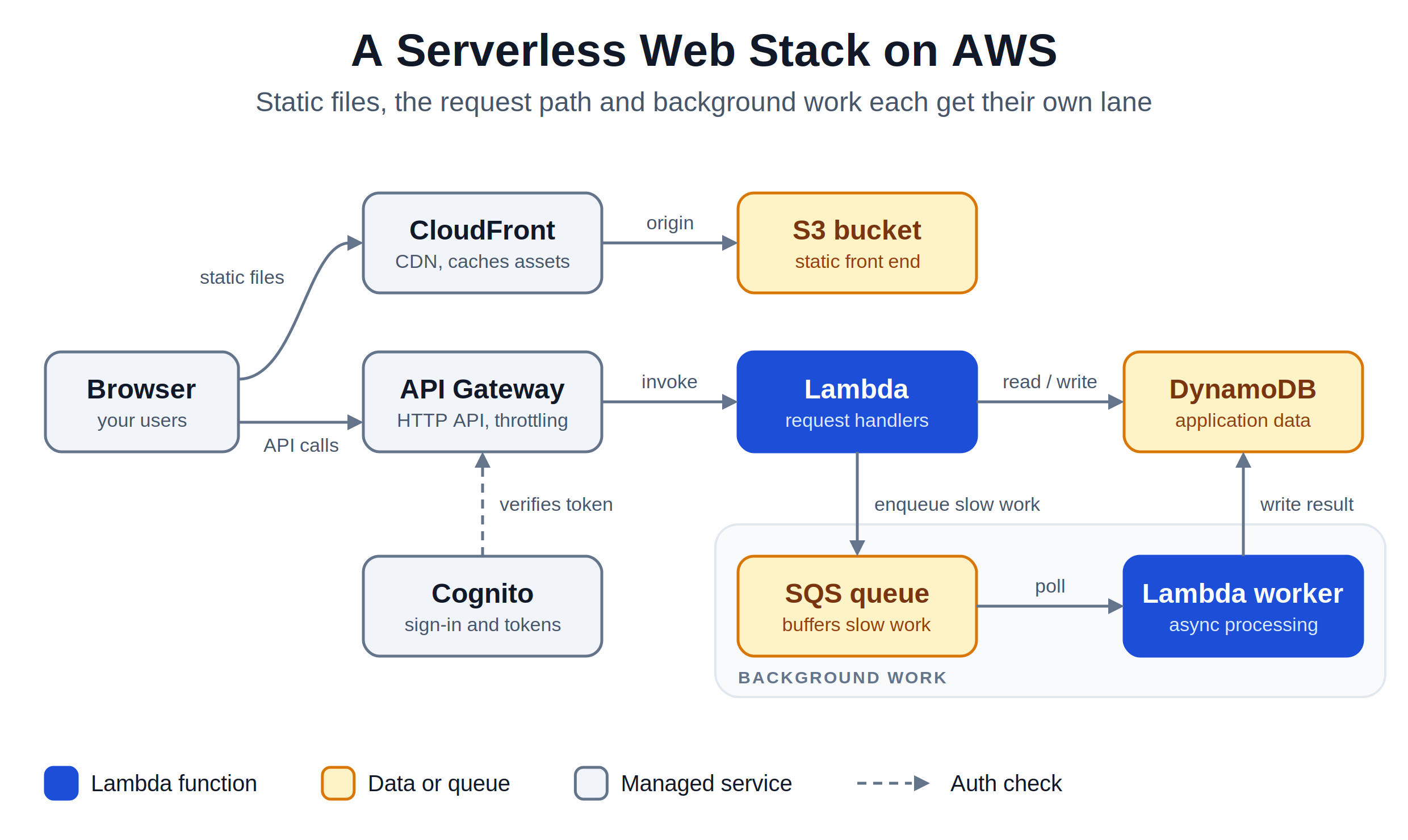
Figure 1. Static files, the request path and background work each get their own lane.
The trade is clear. You give up control of the runtime and accept hard limits. In return, a low-traffic app can cost a few dollars a month, and a spike does not need a capacity plan.
When serverless is the right call (and when it is not)
Serverless fits best when traffic is spiky or unpredictable, work is event-driven, or a small team cannot afford to run infrastructure. Internal tools, webhooks, image processing, scheduled jobs and API backends for early-stage products are all strong candidates.
It fits worse in three cases:
Steady, high-volume traffic. Lambda bills for wall-clock time, including time spent waiting on a database. A busy API that mostly waits pays for that waiting on every request. Practice 9 shows where the crossover sits.
Long-running work. Lambda caps execution at 15 minutes. Anything longer belongs in Fargate, Batch or a Step Functions workflow.
Latency-critical paths that cannot tolerate variance. Cold starts are manageable, not eliminated.
Best practice 1: Keep functions small, single-purpose and stateless
One function should do one job. In practice that means one function per business capability (create-order, get-order, handle-payment-event), not one per HTTP verb and not one for the whole application.
Separate the handler from the logic. The handler parses the event, calls a plain function and formats the response. The plain function knows nothing about API Gateway, so you can unit-test it without AWS and reuse it behind an SQS or EventBridge trigger later.
Decide where to split with three questions:
Split into separate functions when | Keep together when |
|---|---|
The code needs different permissions (write payments vs read the catalogue) | Handlers share identical permissions and dependencies |
The workloads need different memory, timeout or concurrency (image resize vs API read) | Endpoints always change and deploy together |
The triggers differ (HTTP vs queue vs schedule) | Small CRUD routes act on a single resource |
Share code by bundling it, not by default with layers. Bundle shared modules into each function with esbuild. Layers add versioning overhead and their contents still count toward the 250 MB unzipped limit.
Never keep state in the function. Any environment can be frozen or discarded at any moment. /tmp (512 MB by default, configurable up to 10,240 MB) is scratch space that may survive between warm invocations, but it is not storage. Put state in DynamoDB, S3 or ElastiCache.
A single "Lambdalith" is a fair starting point, with a cost. Running a whole web framework (Express, Hono, FastAPI with an adapter) behind one proxy route is quick to build and easy to move. You pay for it with a larger package, slower cold starts and one broad set of permissions. Split out the functions that need tighter permissions or different scaling first, and leave the rest together until there is a reason.
Best practice 2: Size memory to buy CPU, and use arm64
Lambda allocates CPU in proportion to memory, from 128 MB up to 10,240 MB. At 1,769 MB a function gets the equivalent of one full vCPU. Two consequences follow:
CPU-bound work speeds up as memory rises. Parsing, compression, image work and cryptography all benefit.
I/O-bound work barely does. A function waiting 150 ms for DynamoDB waits 150 ms at any memory size.
Because you pay for memory multiplied by duration, a faster function can be cheaper. Here is the shape of it for a hypothetical CPU-bound function (illustrative numbers, not a measurement):
Setting | Duration | GB-seconds | Duration cost per million invocations |
|---|---|---|---|
512 MB | 800 ms | 0.40 | $6.67 |
1,024 MB | 300 ms | 0.30 | $5.00 |
Doubling memory more than halved the duration, so the function got faster and 25% cheaper. Past the point where duration stops falling, extra memory is pure cost. That point is different for every function, so measure it.
Measure with AWS Lambda Power Tuning. It is an open-source Step Functions state machine that invokes your function at several memory sizes and plots cost against speed. Run it with a production-like payload, choose the cost, speed or balanced strategy, and re-run it after large dependency changes.
Then move to arm64 (Graviton). It is priced about 20% lower per GB-second than x86. For pure JavaScript and most Python code the change is a one-line setting. The catch is native dependencies: confirm they have arm64 builds and build them in CI on the same architecture.
Best practice 3: Treat cold starts as a design constraint
A cold start happens when Lambda creates a new execution environment: it downloads your code, starts the runtime and runs your initialisation code. Requests that hit a warm environment skip all of that.
In typical production traffic only a small share of invocations are cold (AWS has put it below 1%), which is why cold starts show up in p95 and p99 latency far more than in averages. Design for the tail, not the mean.
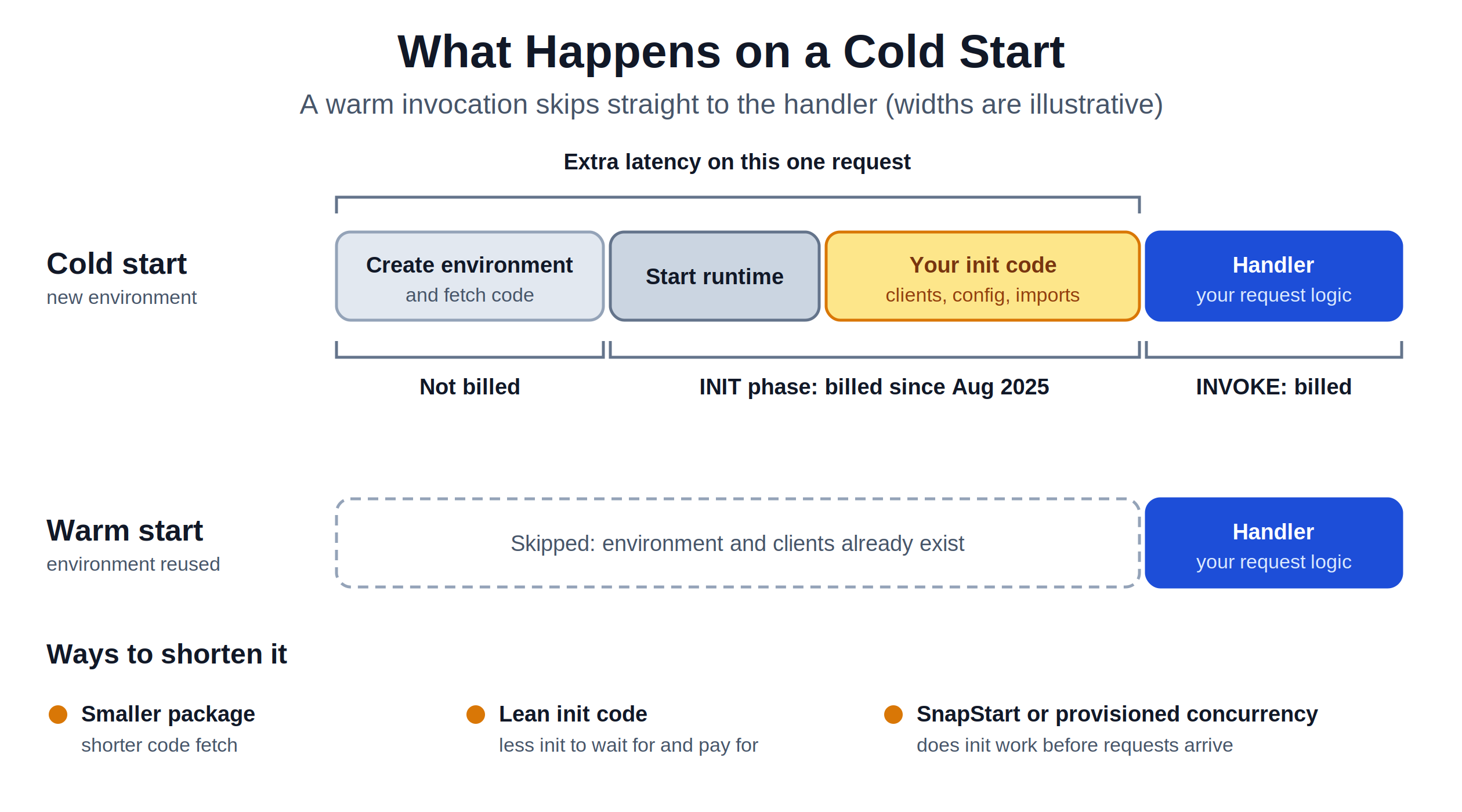
Figure 2. Everything before the handler is the cold-start tax. Since August 2025 the INIT phase is billed too.
Measure before you optimise. Every cold start adds an InitDuration to the invocation's REPORT log line. This CloudWatch Logs Insights query shows how often it happens and how long it takes:
filter @type = "REPORT"
| stats count() as invocations,
        count(@initDuration) as coldStarts,
        avg(@initDuration) as avgInitMs,
        max(@initDuration) as maxInitMs
If coldStarts is a fraction of a percent of invocations and the init time is short, leave it alone and spend your effort elsewhere.
What reduces cold-start pain, in rough order of payoff:
Ship less code. Tree-shake and bundle with esbuild, drop unused SDK clients and import only the AWS SDK v3 modules you use. Package size is the most reliable lever.
Initialise outside the handler. Create SDK clients, database connections and config lookups once, at module scope, so warm invocations reuse them.
Pick the runtime deliberately. Node.js and Python start quickly. Java and .NET start slower, though Lambda SnapStart can cut that substantially on the runtimes that support it (Java, Python and .NET). SnapStart restores from a snapshot, so re-check anything that must be unique per environment, such as random seeds and open network connections.
Use provisioned concurrency only where it earns its cost. It keeps a set number of environments initialised, which suits a checkout or login endpoint with a strict latency target. It is billed whether or not it is used, so pair it with scheduled scaling to match your traffic hours instead of applying it across the board.
Give init code more CPU. Initialisation runs with the same CPU allocation as the handler, so a larger memory size shortens it too.
Two myths worth dropping. Placing a function in a VPC no longer adds the long cold-start delay it once did, since AWS changed how Lambda networking works in 2019. And a "keep warm" ping only keeps one environment alive; the next concurrent request still lands on a cold one.
Since August 2025, Lambda also bills the initialisation phase for ZIP-packaged functions on managed runtimes, so heavy start-up code shows up on your invoice as well as in your latency.
Here is the module-scope pattern in Node.js:
js
import { DynamoDBClient } from "@aws-sdk/client-dynamodb";
import { DynamoDBDocumentClient, GetCommand } from "@aws-sdk/lib-dynamodb";

// Created once per execution environment, reused on warm invocations
const client = DynamoDBDocumentClient.from(new DynamoDBClient({}));

export const handler = async (event) => {
  const { Item } = await client.send(
    new GetCommand({ TableName: process.env.TABLE, Key: { pk: event.pathParameters.id } })
  );
  return { statusCode: Item ? 200 : 404, body: JSON.stringify(Item ?? {}) };
};
Front-end teams who care about perceived speed should pair this with the client-side techniques in our guide to modern web performance optimization, because a fast backend does not rescue a page that ships too much JavaScript.
Best practice 4: Design around the hard limits
Limits are where serverless designs break, so know them before you draw the architecture. As of writing, the defaults that matter most for web work are:
Limit | Default |
|---|---|
Maximum function timeout | 15 minutes |
Memory | 128 MB to 10,240 MB |
Synchronous request and response payload | 6 MB each (streamed responses up to 200 MB) |
Deployment package | 50 MB zipped, 250 MB unzipped (layers included) |
Container image size | 10 GB |
Concurrent executions per Region | 1,000 by default (new accounts start lower) |
AWS changes quotas over time, so check the current Lambda quotas page before you commit to a design.
Three consequences show up constantly:
The 6 MB payload limit means file uploads and downloads should never pass through Lambda. Issue a pre-signed S3 URL and let the browser talk to S3 directly.
The regional concurrency limit is shared by every function in the account and Region. A runaway batch job can starve your customer-facing API. Set reserved concurrency on non-critical functions to cap them, and on critical ones to guarantee capacity.
New accounts often start well below 1,000. AWS raises the applied quota automatically as usage grows, but a launch-day traffic spike on a fresh account can hit throttling first. Request an increase through Service Quotas before a launch, not after.
Also keep API Gateway's own timeout in mind. A REST API integration times out at 29 seconds by default, well below Lambda's ceiling, so a "long" request that Lambda would finish can still fail at the gateway. Regional REST APIs can raise that limit at the cost of some throttle quota; edge-optimized APIs cannot.
Best practice 5: Move slow work off the request path
If a user does not need the result to see a response, do not make them wait for it. Accept the request, put a message on a queue, return quickly and process asynchronously.
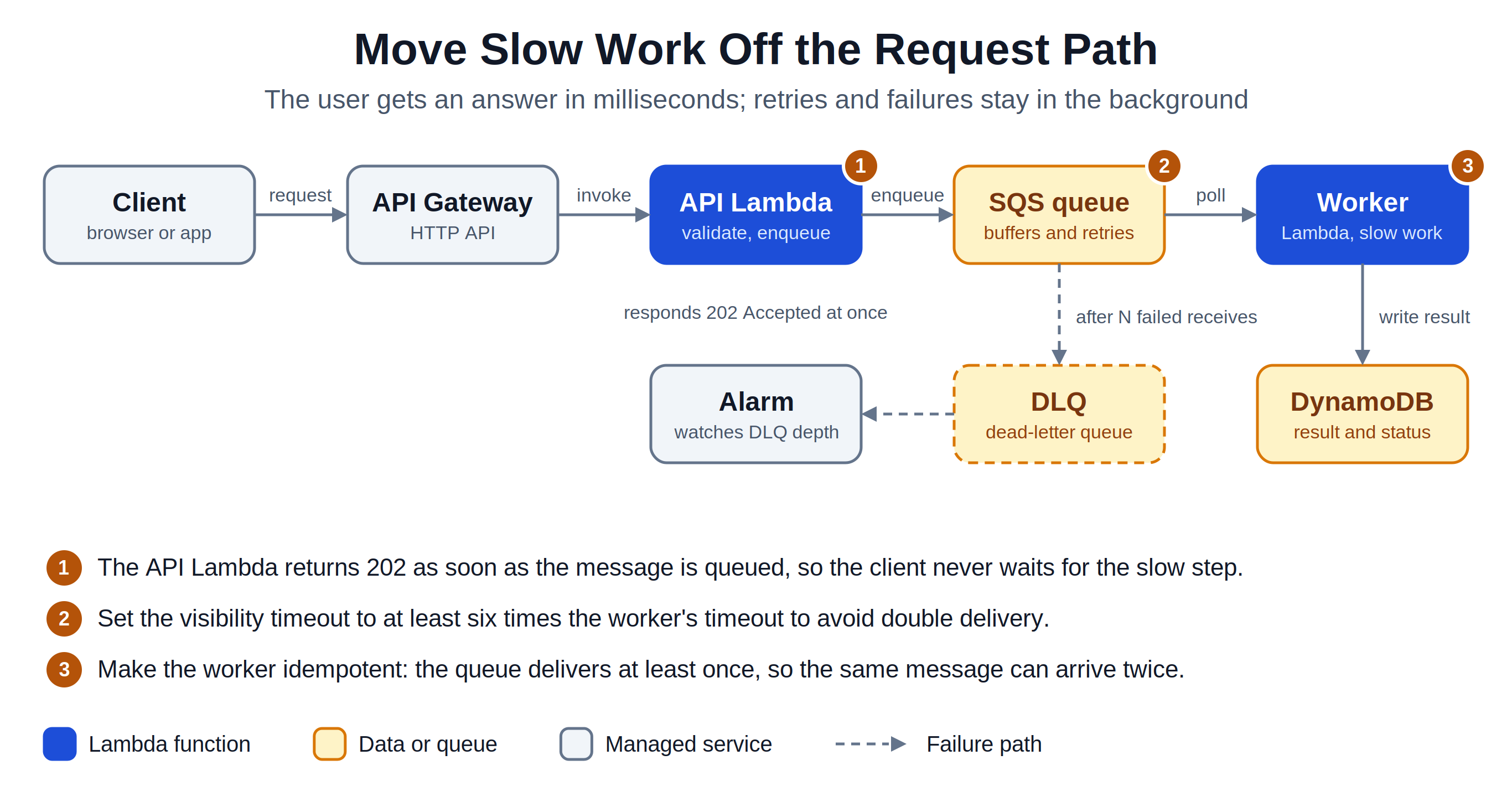
Figure 3. The client is answered as soon as the message is queued; retries and failures stay in the background.
Pick the messaging service by the job:
Need | Use |
|---|---|
Buffer work for one consumer and absorb spikes | SQS |
Broadcast one event to many consumers | SNS or EventBridge |
Route by event content across services and SaaS apps | EventBridge |
Ordered multi-step flow with retries and compensation | Step Functions (Express for short, high-volume flows; Standard for long-running, auditable ones) |
Configure the SQS consumer properly. Four settings decide whether a queue helps you or hurts you:
Dead-letter queue. Attach a redrive policy with a
maxReceiveCountso a poison message moves aside after a few failed receives instead of retrying forever. A small number such as 3 to 5 is a common starting point.Visibility timeout. Set it to at least six times your function timeout so a message is not delivered again while still being processed.
Partial batch responses. By default, if your function throws, the whole batch returns to the queue and every message is retried. Enable
ReportBatchItemFailureson the event source mapping and return only the IDs that failed:
js
export const handler = async (event) => {
  const failures = [];
  for (const record of event.Records) {
    try {
      await processOrder(JSON.parse(record.body));
    } catch (err) {
      console.error("failed", record.messageId, err);
      failures.push({ itemIdentifier: record.messageId });
    }
  }
  return { batchItemFailures: failures }; // empty array means full success
};
Concurrency cap. Without a limit, Lambda scales an SQS consumer from 5 concurrent invocations by up to 300 more per minute, reaching 1,250. A backlog can then flatten the database or third-party API behind it. Set
MaximumConcurrencyon the event source mapping (minimum 2, maximum 1,000) to protect whatever sits downstream. Keep the function's reserved concurrency at or above the sum of those maximums, or Lambda may throttle messages.
Assume every message arrives twice. SQS standard queues, SNS and EventBridge all deliver at least once, so make every consumer idempotent. The simplest form is a conditional write keyed on a request ID:
js
import { PutCommand } from "@aws-sdk/lib-dynamodb";

// Returns true the first time a message ID is seen, false for a duplicate.
// Enable TTL on expiresAt so old keys clean themselves up.
async function claim(client, requestId) {
  try {
    await client.send(new PutCommand({
      TableName: process.env.TABLE,
      Item: { pk: `IDEMPOTENCY#${requestId}`, expiresAt: Math.floor(Date.now() / 1000) + 86400 },
      ConditionExpression: "attribute_not_exists(pk)",
    }));
    return true;
  } catch (err) {
    if (err.name === "ConditionalCheckFailedException") return false;
    throw err;
  }
}
This is enough for cheap, safe-to-repeat work. If a crash between claiming and finishing would lose the job, or the side effect charges a card, use the idempotency utility in AWS Lambda Powertools, which tracks in-progress and completed states instead of a single claim.
Best practice 6: Get the data layer right
The data layer is where most serverless projects hurt, because Lambda scales out faster than a traditional database can accept connections.
Prefer DynamoDB for serverless-native workloads. It is accessed over HTTPS, so there is no connection pool to exhaust, and on-demand capacity mode scales with traffic. The price is upfront modelling: design keys from your queries, not from your entities. For an orders table with pk = CUSTOMER#<id> and sk = ORDER#<createdAt>#<orderId>:
Access pattern | How to serve it |
|---|---|
List a customer's orders, newest first | Query |
Orders for a customer in a date range | Query |
Fetch one order by its ID alone | Query a global secondary index keyed on the order ID |
Four rules keep it healthy:
Never Scan in a request path. If a screen needs a query you did not model, add an index instead.
Avoid hot keys. One partition key that takes a disproportionate share of traffic (a single
ORDERSkey for everything, for example) becomes the bottleneck no matter how much capacity you buy.Watch the 400 KB item limit. Store large payloads in S3 and keep a pointer in the item.
Use on-demand for spiky or new workloads, and consider provisioned capacity with auto scaling once traffic is steady and predictable, because it costs less at a stable load.
Use TTL to expire data that should not live forever: sessions, idempotency keys, temporary tokens.
If you need a relational database, control the connection count. Each Lambda environment handles one request at a time, so give each one a connection pool of size 1 and create it at module scope. Then put Amazon RDS Proxy in front of the database so hundreds of environments share a small pool of real connections. Two details matter:
Without a proxy, the arithmetic is unforgiving: your reserved concurrency multiplied by connections per environment must stay below the database's
max_connections.Statements that change session state can pin a connection to one client and reduce the proxy's multiplexing, so keep sessions clean.
Aurora Serverless v2 lets database capacity follow load, which suits the same spiky patterns Lambda handles well.
Cache what rarely changes, with a TTL. Config values, feature flags and reference data can live in memory at module scope, or in Parameter Store with a short expiry, instead of being fetched on every call.
For teams building analytics on top of this data, the data and analytics category covers the warehouses and product-analytics tools that sit downstream of a serverless backend.
Best practice 7: Lock down security with least privilege
Serverless shifts the security perimeter from the network to identity. Every function is a small program with its own permissions, and those permissions are the blast radius if it is compromised.
Give each function its own role, scoped to specific actions and resources. Compare the policy most teams start with:
json
{
  "Effect": "Allow",
  "Action": "dynamodb:*",
  "Resource": "*"
}
with the one a read-and-create order function actually needs:
json
{
  "Version": "2012-10-17",
  "Statement": [{
    "Effect": "Allow",
    "Action": ["dynamodb:GetItem", "dynamodb:PutItem"],
    "Resource": "arn:aws:dynamodb:us-east-1:123456789012:table/orders"
  }]
}
The second policy cannot delete the table, read another one or scan customer data if the function is compromised. SAM's built-in policy templates, such as DynamoDBReadPolicy, generate scoped policies like this for you.
Match each threat to a control:
Threat | Control |
|---|---|
Stolen function credentials | Per-function role limited to named actions and ARNs |
Leaked secrets | Secrets Manager or Parameter Store, fetched once and cached (the AWS Parameters and Secrets Lambda Extension caches values for you) |
Injection through event data | Schema validation in the function and parameterised queries |
Abuse and bots | Throttling at the gateway, plus AWS WAF |
Unauthenticated calls | Cognito or JWT authorizer, Lambda authorizer with cached results, or IAM auth between services |
Vulnerable dependencies | Lockfiles, automated updates and scanning (Amazon Inspector can scan Lambda functions) |
Two API type details catch people out. Request validation at the gateway is a REST API feature; on an HTTP API the validation has to happen in your function. And AWS WAF attaches only to REST APIs, so an HTTP API needs CloudFront with WAF in front of it. Per-client usage plans with API keys are also REST-only.
Best practice 8: Make it observable before you need it
Debugging a request that crossed API Gateway, three functions and a queue is miserable without tracing. Build observability in from the first deployment.
Log structured JSON with a correlation ID. A useful line looks like this:
json
{
  "level": "ERROR",
  "service": "orders",
  "correlation_id": "7f3a9c1e-42b8-4d0a-9c55-1e2d8a6b0f34",
  "message": "payment provider timeout",
  "order_id": "ord_1042",
  "duration_ms": 2871
}
Take the ID from the incoming request (or generate one at the edge), pass it in a header to downstream HTTP calls, and put it in SQS message attributes and EventBridge event details so the worker logs the same value. AWS Lambda Powertools (TypeScript, Python, Java and .NET) handles the structured logging, metrics and tracing with very little code. Log what you would query, and keep personal data and full payloads out of it.
Turn on tracing. AWS X-Ray or OpenTelemetry shows where latency accumulates across the hop count.
Alarm on symptoms, not just errors:
Metric | Alarm when | What it catches |
|---|---|---|
Lambda | The error rate rises | A bug or failing dependency |
Lambda | Above zero | Concurrency exhausted |
Lambda | Approaching the timeout | Timeouts before they happen |
| Near your account quota | A launch or loop about to throttle |
SQS | It keeps growing | Consumers falling behind |
DLQ | Above zero | Messages failing permanently |
Stream consumer | It keeps growing | A stream consumer that cannot keep up |
API Gateway | Above your baseline | What users actually feel |
Compare API Gateway's IntegrationLatency with Latency to tell whether the time went into your function or the gateway.
Set log retention. CloudWatch Logs default to never expiring, which quietly becomes a cost line item.
If your functions call LLMs, add an evaluation and tracing layer as well. The AI infrastructure category covers tools built for that, and LangSmith is one we score highly for tracing and evaluating LLM applications.
Best practice 9: Control cost deliberately
Serverless pricing is simple in shape and easy to misjudge in practice. Lambda charges per request and per GB-second of execution. At current published x86 rates in US East, that is $0.20 per million requests and $0.0000166667 per GB-second, with a monthly free tier of 1 million requests and 400,000 GB-seconds.
A worked example: an API that serves 5 million requests a month, each running 200 ms at 512 MB.
Compute: 5,000,000 × 0.2 s × 0.5 GB = 500,000 GB-seconds. After the 400,000 GB-second free tier, 100,000 GB-seconds cost about $1.67.
Requests: 4 million billable × $0.20 per million = $0.80.
Lambda total: about $2.47 a month, or roughly $9.33 without the free tier.
API Gateway in front: 5 million requests at $1.00 per million on an HTTP API is $5.00. On a REST API at $3.50 per million it is $17.50.
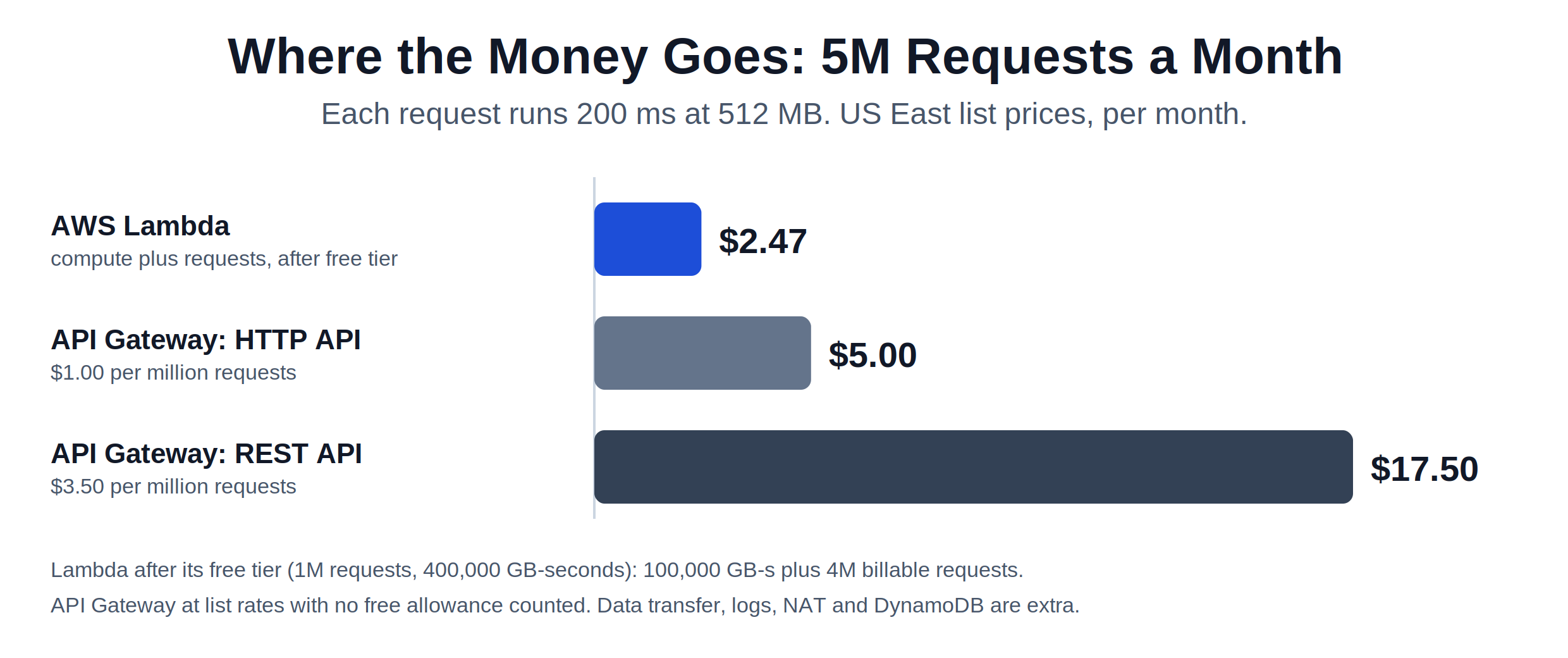
Figure 4. For a lightweight function, the gateway in front of it costs more than the function itself.
For short, lightweight functions like this one, the request charge at the gateway outweighs the compute charge. Heavier functions shift the balance, and NAT gateways, data transfer, CloudWatch Logs and DynamoDB add lines of their own, so total the whole request path before you commit.
Where containers start to win
Lambda's cost grows with every request. A container's cost is flat. That means there is a volume where the flat line is cheaper, and you can estimate it in a few lines.
Take two small Fargate tasks (0.5 vCPU and 1 GB each, x86) behind an Application Load Balancer, so the service survives a task failure:
Each task: (0.5 × $0.0404784) + (1 × $0.004446) per hour, times 730 hours, is about $18.02 a month. Two tasks cost $36.04.
The load balancer's base charge is $0.0225 an hour, or $16.43 a month, before usage-based LCU charges.
The fixed baseline is about $52.47 a month.
The same 512 MB, 200 ms Lambda behind an HTTP API costs about $2.87 per million requests ($1.87 for Lambda plus $1.00 for the gateway).
Divide the baseline by the per-request cost and the lines cross at roughly 18 million requests a month, or about 7 requests a second on average.
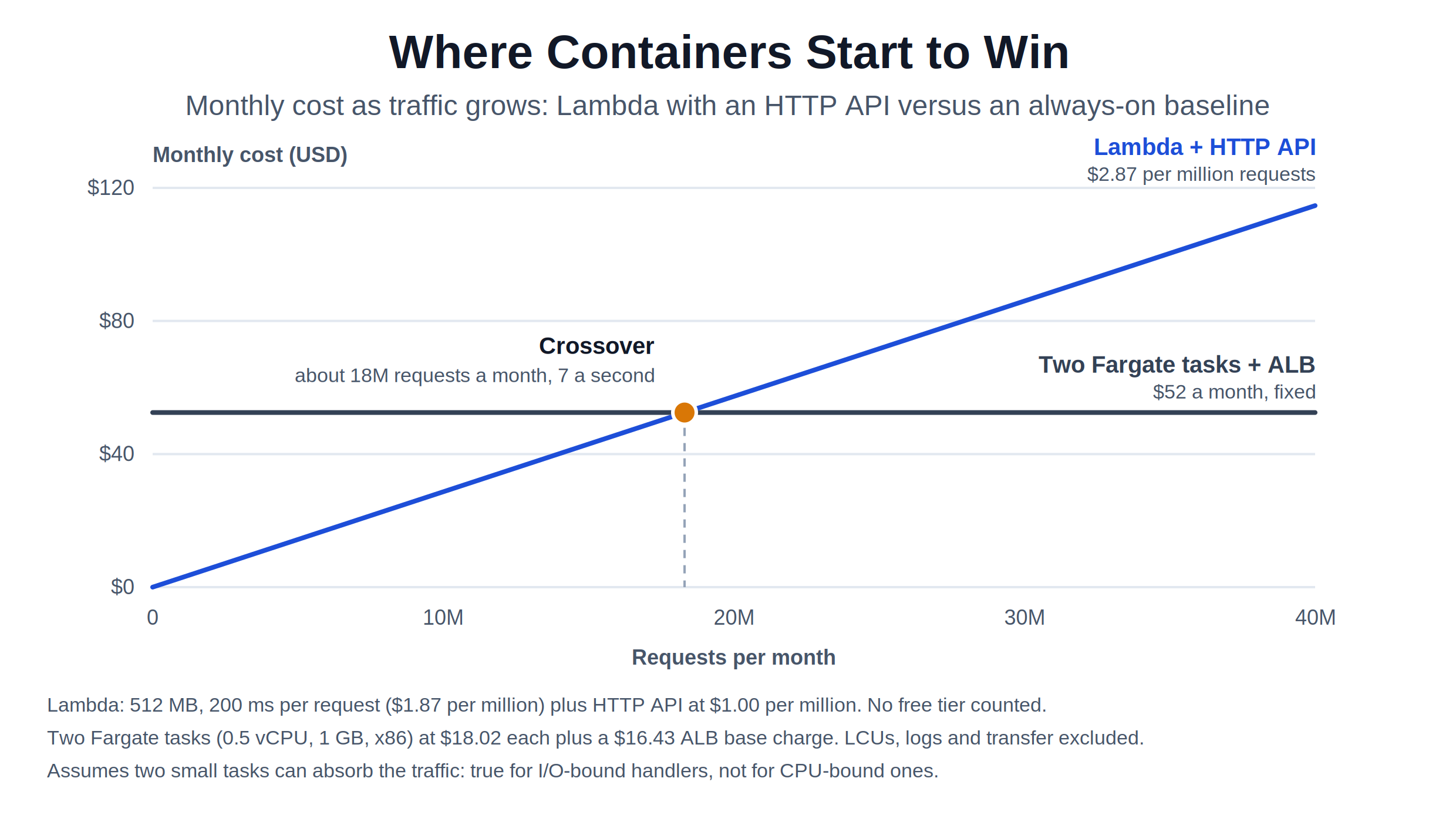
Figure 5. Below the crossover, Lambda wins on cost. Above it, the fixed baseline does.
Treat that number as a starting point, not a verdict:
It assumes the two tasks can absorb the load. That is reasonable for handlers that mostly wait on I/O, and false for CPU-bound ones, where you would need more tasks and a later crossover.
Using a function URL instead of a gateway removes the $1.00 per million and moves the crossover to about 28 million requests a month.
The container side excludes operations time, such as patching images, tuning autoscaling and paging a person. Lambda's side excludes nothing, because AWS carries that work.
Compute Savings Plans can discount both Fargate and Lambda duration once your spend is steady, which narrows the gap.
Traffic shape matters as much as volume. A service that sits idle most of the day and spikes briefly can stay cheaper on Lambda at a monthly volume that would favour containers if the load were flat.
Practical ways to keep the total down:
Use HTTP APIs instead of REST APIs unless you need REST-only features such as usage plans with API keys, built-in response caching or WAF. For plain Lambda proxying, JWT auth and CORS, the cheaper option is usually enough.
Avoid NAT gateways for functions that only talk to AWS services; use VPC endpoints instead. Only place a function in a VPC when it truly needs private resources.
Set budgets and anomaly alerts in AWS Budgets before launch. A recursive loop between an S3 trigger and a Lambda function is a classic way to generate a surprise invoice overnight.
Right-size, then re-check. Traffic changes, and the memory setting that was optimal in March may not be in September.
Best practice 10: Ship with infrastructure as code and a real pipeline
Clicking through the console does not scale past a first prototype. Define everything in code so environments are reproducible.
Pick the tool your team will maintain:
Tool | Choose it when |
|---|---|
AWS SAM | The stack is serverless-only and you want the shortest path: concise YAML, local invoke, sample event generation and built-in gradual deployments |
AWS CDK | The team prefers TypeScript or Python, wants reusable constructs and manages larger multi-service stacks |
Terraform | You already run Terraform, or the estate spans several clouds |
Deploy gradually and roll back automatically. Publish each release as a new Lambda version behind an alias and shift traffic in steps. In SAM that is the DeploymentPreference setting with a strategy such as Canary10Percent5Minutes or Linear10PercentEvery1Minute, tied to CloudWatch alarms. If an alarm fires during the shift, CodeDeploy rolls the alias back without a person involved. Pre-traffic and post-traffic hooks let you run smoke tests before and after the shift.
Test in layers:
Unit tests cover the plain logic with no AWS involved, which practice 1's handler split makes easy.
Handler tests with real event shapes.
sam local generate-eventproduces realistic API Gateway, SQS and S3 payloads, so tests fail on the field you forgot instead of in production.Integration tests against a real stack. Deploy an ephemeral environment per branch in a sandbox account. Emulators do not reproduce IAM, quotas or event-source behaviour faithfully, so keep them as a convenience rather than a source of truth.
Smoke tests after every deploy that hit the live endpoints and check for a 200.
Separate accounts for dev, staging and production. It contains mistakes and gives each environment its own concurrency quota.
AI coding tools now speed up much of this scaffolding. In the WebTechOS index, Cursor and Claude Code both score 86 and are well suited to generating SAM templates, IAM policies and test harnesses, though generated permissions still deserve a human read before they ship. The wider AI developer tools category covers the rest of the field.
Where serverless on AWS is not the only answer
Lambda is not the only way to run code without managing servers, and it is a poor fit for GPU work and long model runs. For inference, fine-tuning or batch jobs that need GPUs, a purpose-built serverless platform such as Modal is often a better match than stretching Lambda past its limits. Our AI Agent Hub stack pairs Modal with LangGraph and LangSmith for teams running agents in production.
For glue between SaaS tools that does not need custom code at all, a workflow tool like n8n can replace a handful of small functions and their upkeep.
And if the web app you are building needs a customer-facing AI agent, building retrieval, human handoff and channel integrations on Lambda and a model API is a project of its own. A hosted platform such as YourGPT, which scores 86 in our index, can be embedded in the front end with a script, leaving your Lambda functions to handle the business APIs the agent calls.
Seven mistakes to catch before launch
Mistake | What you will see | Fix |
|---|---|---|
One shared admin role for every function | One compromised function can touch everything | One role per function, actions and ARNs spelled out (practice 7) |
Clients and connections created inside the handler | Slow warm invocations and connection churn | Initialise at module scope (practice 3) |
Lambda connecting straight to PostgreSQL or MySQL | "Too many connections" during spikes | RDS Proxy, or DynamoDB (practice 6) |
Queue consumer with no concurrency cap | A backlog floods the database or a third-party API |
|
No dead-letter queue and a non-idempotent worker | Endless retries, duplicate emails or charges | Redrive policy and idempotency keys (practices 5 and 6) |
Files passed through Lambda | Payload errors at 6 MB | Pre-signed S3 URLs (practice 4) |
Defaults left in place: REST API, never-expiring logs, no budget | A bill that creeps up with no single cause | HTTP API, log retention, Budgets alerts (practices 8 and 9) |
Questions
Frequently asked questions
Is AWS serverless cheaper than running servers?
For spiky or low-to-moderate traffic, usually yes, and often dramatically. For steady traffic above roughly 18 million requests a month in the example above, a fixed container baseline can be cheaper. Include API Gateway in the total and run both estimates with your real volume, duration and memory.
How do I reduce Lambda cold starts?
Ship a smaller package, initialise clients outside the handler, choose a fast-starting runtime such as Node.js or Python, and use SnapStart or provisioned concurrency only for latency-critical paths. Measure p95 and p99 latency rather than averages, since cold starts affect the tail.
Should I use API Gateway or Lambda function URLs?
Function URLs are simpler and have no separate gateway charge, which suits webhooks and simple endpoints, but they offer only IAM or public access. API Gateway is the better choice when you need custom authorizers, throttling per route, caching or WAF integration.
Should I use an HTTP API or a REST API in API Gateway?
Start with an HTTP API. At list prices it costs $1.00 per million requests against $3.50 for a REST API, and it covers Lambda proxying, JWT authorisation and CORS. Choose a REST API only when you need usage plans with API keys, built-in caching, WAF or request validation at the gateway.
What is the difference between reserved and provisioned concurrency?
Reserved concurrency sets a cap and a guarantee for one function out of your account's pool, and it costs nothing extra. Provisioned concurrency keeps environments initialised to avoid cold starts and is billed whether or not they are used.
Why is my Lambda concurrency limit only 10?
New AWS accounts can start with a reduced applied quota even though the documented default is 1,000 per Region. AWS raises it automatically as usage grows, and you can request an increase through Service Quotas ahead of a launch.
Can I run a relational database with Lambda?
Yes, but put RDS Proxy in front of it and keep connection handling outside the handler. Without a proxy, a traffic spike can exhaust database connections before Lambda reaches its own concurrency limit. DynamoDB avoids the problem entirely if your access patterns fit.
What is the maximum execution time for AWS Lambda?
15 minutes. For longer jobs, use AWS Fargate, AWS Batch, or a Step Functions workflow that splits the work into steps.
How do I test serverless applications locally?
Use SAM CLI or a local emulator for quick feedback on handler logic, but treat it as a convenience. Emulators do not reproduce IAM, quotas or event-source behaviour faithfully, so also run integration tests against a real AWS sandbox account.
Is serverless secure by default?
AWS secures the infrastructure and runtime, but you own everything above it: IAM permissions, input validation, secrets, dependencies and data protection. The usual weak points are over-broad permissions and unvalidated input rather than the platform itself.
What is the difference between Lambda and Fargate?
Lambda runs short, event-driven functions and bills per invocation. Fargate runs containers that can live as long as you need and bills for the vCPU and memory they hold. Choose Lambda for bursty request handling and Fargate for long-running or steady workloads, and use the crossover estimate in practice 9 to decide where your traffic sits.
Final Verdict
Serverless on AWS rewards teams that respect its limits. Lambda scales without a capacity plan, but it will not rescue a design that blocks requests on slow work, opens a database connection on every invocation or ships without usable logs. The ten practices above come down to one habit: decide what happens when a function is slow, duplicated, throttled or wrong before traffic decides for you.
If you are improving an existing project, start with the cheap wins this week. Add a correlation ID and structured logs, put a dead-letter queue on every queue, and give each function its own least-privilege IAM role. Next, spend a month on performance and reliability: run Power Tuning on your busiest functions, move to arm64 where your dependencies allow, and put RDS Proxy in front of any relational database. Then, over the following quarter, bring everything under infrastructure as code with canary deployments, and re-run the break-even maths from practice 9 with your real request volume, because that is the point where Lambda either keeps earning its place or a container starts to make more sense.
Do that, and the three failures we opened with stop being surprises. If you are also weighing the tooling around this stack, the tools index and the AI infrastructure category on WebTechOS are good places to compare options.
WebTechOS accepts no payment for coverage, placement or scores. Where a piece references pricing, it reflects published list rates at the date shown.
Keep reading
All insights →Designing Zero-Downtime Database Migration Frameworks
Design a zero-downtime database migration framework with expand and contract, safe backfills, lock budgets, sync, cutover gates and rollback.
Gorgias Alternatives for Small Ecommerce Teams in 2026
Compare the 7 best Gorgias alternatives for small ecommerce teams in 2026. Review pricing, AI automation, features, and support capabilities.
Is ChatGPT or Claude Worth Paying For? 2026 Pricing Breakdown
ChatGPT Plus and Claude Pro both cost $20. Compare Free, Go, Pro, Max and Ultra plans, usage limits and hidden costs to see which is worth paying for.
Best AI chatbot.com alternatives compared in 2026
Compare 7 AI chatbot alternatives for 2026 on resolution claims, pricing, channels and handoff. See where YourGPT, Intercom, Zendesk and Tidio fit.