Designing Zero-Downtime Database Migration Frameworks
Design a zero-downtime database migration framework with expand and contract, safe backfills, lock budgets, sync, cutover gates and rollback.
22 Nov 2026·18 min read·General
A migration that passes in staging can still take production down in under a minute. Picture an ALTER TABLE on a busy orders table. It needs a lock the table cannot give it yet, because one slow report has been holding a transaction open for twenty minutes. The ALTER waits. Every query that arrives after it waits behind it. The connection pool fills, health checks fail, and the incident channel lights up over a change that looked like one line of SQL.
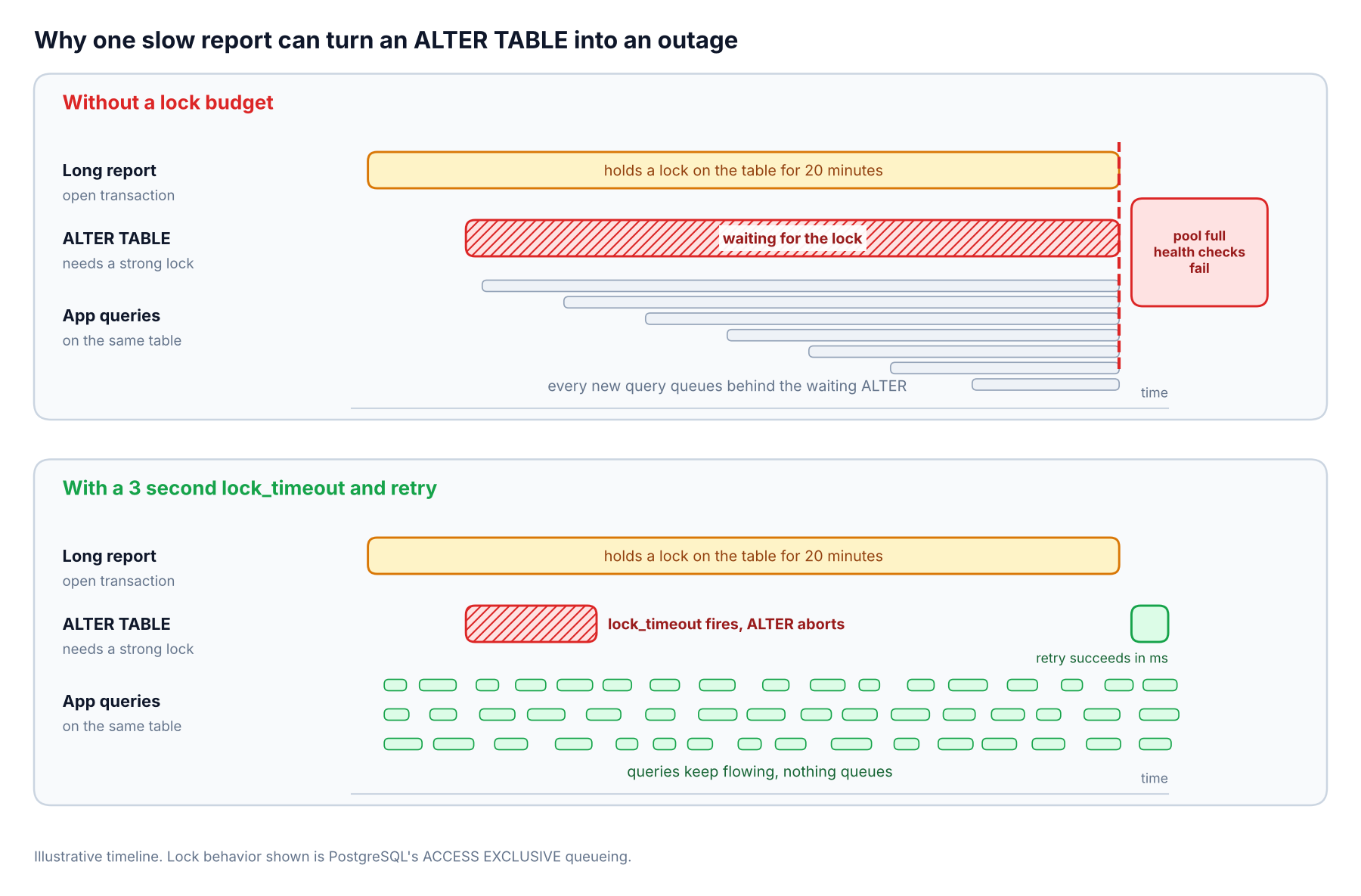
A short lock timeout turns a pile-up into a harmless retry.
Zero-downtime database migration is not a trick for a single risky change. It is a framework, a set of rules, tooling and gates that make every change safe by default. This guide walks through how we would design one, from the phase model to lock budgets, backfills, sync, cutover and rollback.
Short answer. A zero-downtime migration framework is a set of enforced rules, not a clever script. Make every change safe for the old and new application version. Split risky changes into expand, backfill, ramp and contract steps. Cap how long any statement may wait for a lock. Copy data in small throttled batches. Verify before moving reads. Keep the old structure writable until you no longer need to roll back.
Why "safe in staging" migrations still take production down
Three failure modes show up again and again in migration incidents, and a good framework is built around all of them.
Lock contention. A schema change that needs a strong lock queues behind existing transactions and blocks everything that follows.
Version skew. During a rolling deploy, old and new application code run side by side. A column the old code reads and the new code dropped breaks one of them.
Silent divergence. When old and new structures both receive writes, a missed update leaves them disagreeing and nothing throws an error.
Staging rarely reproduces any of these. It has no long-running reports, no overlap between releases, and a fraction of the write volume. That gap is why the framework has to enforce safety mechanically rather than rely on someone remembering.
What a database migration framework actually is
A folder of numbered SQL files is a migration tool. A framework adds the decisions around it. We would expect these seven parts.
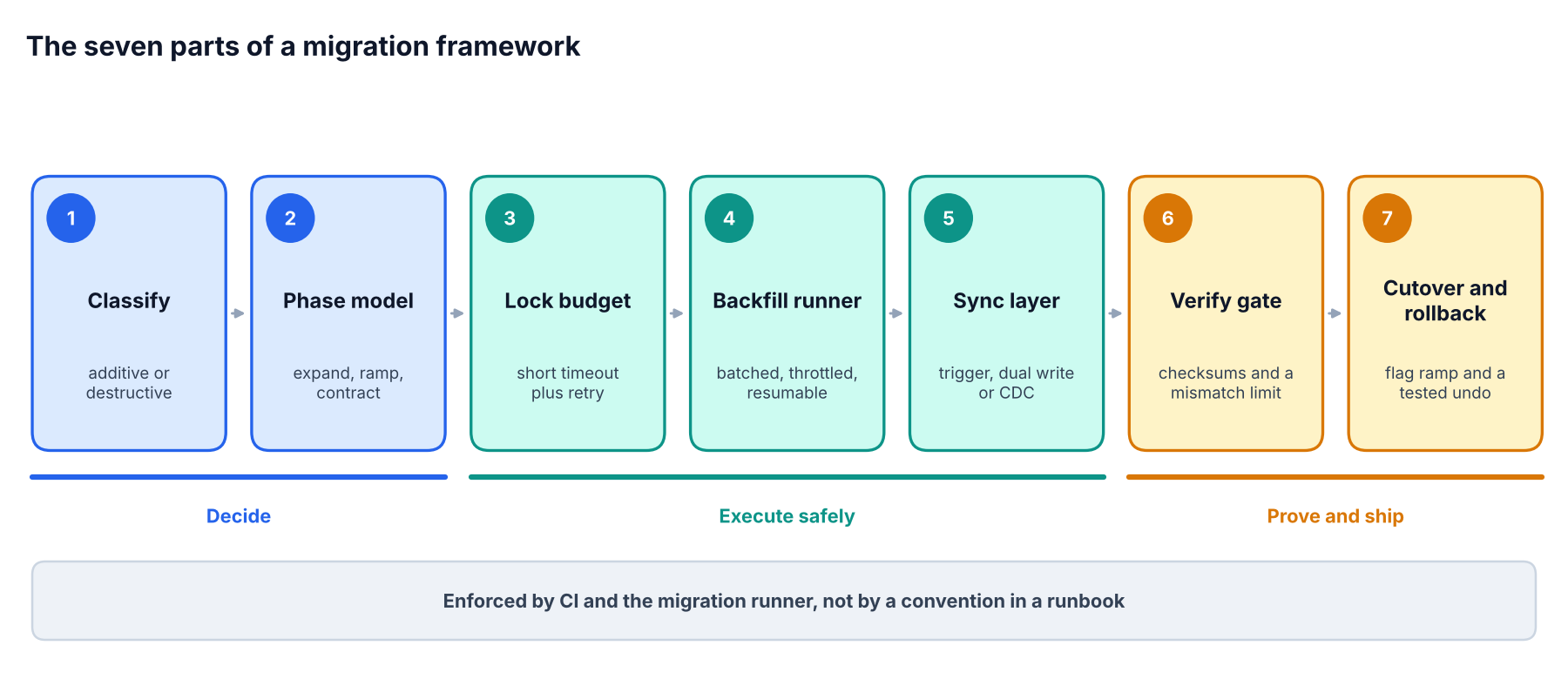
The seven parts of the framework, grouped by what they do.
Component | What it decides |
|---|---|
Change classification | Which changes are additive, which are destructive, and which phase each belongs in |
Phase model | The order of expand, migrate and contract across releases |
Lock and timeout policy | How long any statement may wait for a lock before it aborts |
Backfill runner | How existing rows are copied in small, resumable, throttled batches |
Sync layer | How old and new structures stay consistent during the overlap |
Verification | What must be proven before reads move to the new structure |
Cutover and rollback | How traffic shifts, and how it shifts back |
Flyway, Liquibase, Alembic, Prisma Migrate and Rails migrations all handle the first job well, which is versioning and applying changes in order. None of them enforce the other six on their own. That is the part you design.
Rule one, every change must work for two application versions
Treat this as the ground rule of the framework. Every schema change must be safe for the application version that is running now and the one that ships next.
It sounds obvious until you map it onto a rolling deploy. For several minutes, sometimes hours with canaries, both versions talk to the same database. A migration that is only correct for the new version is a migration that breaks the old one.
Two consequences follow.
Schema changes and code changes ship as separate releases, coordinated in a fixed order.
Destructive changes, such as dropping or renaming, never ship in the same release as the code that stops depending on them.
The expand and contract pattern in seven steps
The expand and contract pattern is the backbone of every zero-downtime schema migration. You add the new structure, move everything over while both exist, then remove the old one. Here is a concrete example, replacing a free-text users.phone column with a normalized users.phone_e164 column.
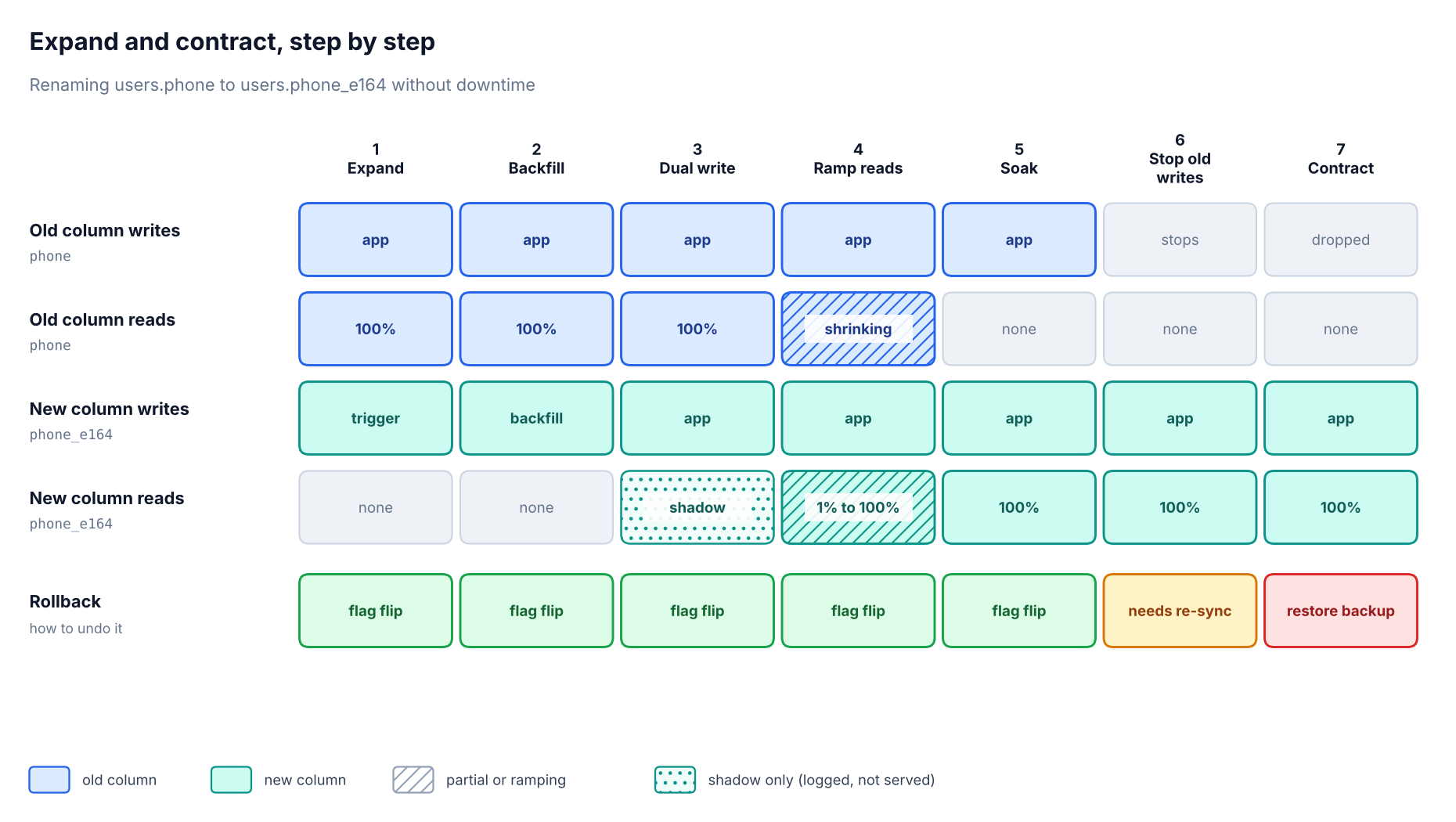
What reads and writes each column at every step, and how hard it is to undo.
Step | What ships | Why it is safe |
|---|---|---|
1. Expand | Add nullable | Old code ignores the new column, and new data still flows into it |
2. Backfill | A throttled job fills | No deploy, no long lock, can pause and resume |
3. Dual write | New app version writes both columns in one transaction, still serves reads from | Both columns stay consistent and users still see the trusted value |
4. Ramp reads | A flag moves reads to | Any problem is a flag flip, and the old column is still current |
5. Soak | Run at 100% for a full business cycle while still writing both columns | Rare paths such as month-end jobs and exports get time to show up, and rollback is still a flag flip |
6. Stop writing the old column | Deploy code that no longer writes | From here the old column goes stale, so rolling back would need a re-sync |
7. Contract | Drop | The only step that destroys data, and it comes last |
Step 1 in PostgreSQL looks like this.
sql
ALTER TABLE users ADD COLUMN phone_e164 text;

CREATE FUNCTION sync_phone_e164() RETURNS trigger AS $$
BEGIN
  NEW.phone_e164 := normalize_phone(NEW.phone);
  RETURN NEW;
END;
$$ LANGUAGE plpgsql;

CREATE TRIGGER users_sync_phone
BEFORE INSERT OR UPDATE OF phone ON users
FOR EACH ROW EXECUTE FUNCTION sync_phone_e164();
Adding a nullable column is metadata-only. Creating the trigger is not free, because CREATE TRIGGER takes a SHARE ROW EXCLUSIVE lock that blocks writes while it waits and runs. Run it under the lock budget described below, like any other statement that touches the table.
One more detail trips teams up in steps 1 through 5. While the trigger and the application's dual write both exist, they must call the same normalization logic. If they differ, the trigger quietly overwrites what the app just wrote.
Teams get hurt when they collapse several of these steps into one or two releases for speed. The seven-step version feels slow on day one and fast the first time it saves a rollback.
Safe versions of the changes that usually break things
Backward-compatible schema changes follow a small number of recipes. These examples use PostgreSQL, and the MySQL section further down covers where its rules differ.
Change | The risky way | The safe way |
|---|---|---|
Add a column with a default | A volatile default such as | No default or a constant default is metadata-only on PostgreSQL 11 and later |
Add an index |
|
|
Make an existing column NOT NULL |
| Add |
Add a foreign key | Adding it directly takes a lock that blocks writes on both tables while it scans | Add it |
Rename a column |
| Add the new column, sync, move reads, then drop the old one |
Change |
| Add a new column, sync it with a trigger, backfill, swap reads, drop the old column. Plan the swap of keys, sequences and foreign keys separately |
Drop a column | Drop it while old code might still select it | Remove all reads and writes in code first, wait a release, then drop |
The pattern behind every row is the same. Make the change small enough that the lock is momentary, and move the expensive work into a step that does not hold one.
Lock budgets, the guardrail that prevents most outages
If we could enforce only one rule in a framework, it would be a lock budget. Every metadata change runs with a short lock_timeout. If it cannot get its lock quickly, it gives up and retries, instead of queueing and blocking the application.
python
def run_ddl(conn, statement, attempts=5):
    for i in range(attempts):
        try:
            with conn.transaction():
                conn.execute("SET LOCAL lock_timeout = '3s'")
                conn.execute("SET LOCAL statement_timeout = '30s'")
                conn.execute(statement)
            return
        except LockNotAvailable:
            time.sleep(2 ** i + random.random())
    raise MigrationAborted(statement)
SET LOCAL keeps the timeouts scoped to one transaction, so they cannot leak into a pooled connection. The transaction block also rolls back cleanly when the lock times out, which a plain retry loop would not do.
Pair it with a pre-flight check that refuses to start while a long transaction is touching the target table.
sql
SELECT a.pid, now() - a.xact_start AS age, left(a.query, 80) AS query
FROM pg_stat_activity a
JOIN pg_locks l ON l.pid = a.pid
WHERE l.relation = 'public.orders'::regclass
  AND a.pid <> pg_backend_pid()
  AND a.xact_start < now() - interval '30 seconds';
Index builds need their own policy. CREATE INDEX CONCURRENTLY waits for other transactions to finish at several points, and a short lock_timeout can cancel it during those waits. Run it with lock_timeout set to 0, watch its runtime, and check for an invalid index afterward. Keep the short budget for metadata-only changes such as adding a nullable column, which should finish in milliseconds. A few seconds of waiting there is already a warning.
Backfills that do not hurt production
A backfill is where a safe plan quietly becomes an unsafe one. A single UPDATE across 150 million rows holds locks, floods the write-ahead log, bloats the table and sends replicas far behind.
The framework's backfill runner should follow five rules.
Batch by primary key range. Walk the table in key order, not with
OFFSET.Make every batch idempotent. Re-running a batch must produce the same result.
Checkpoint progress. The job stores the last completed key so a crash resumes instead of restarting.
Throttle on replica lag. Pause automatically when lag crosses a threshold.
Run it as a separate worker. It should be killable at any moment without affecting the app.
sql
UPDATE users
SET phone_e164 = normalize_phone(phone)
WHERE id > :last_id
  AND id <= :last_id + 5000
  AND phone_e164 IS NULL;
The arithmetic is worth doing before you start. At 150 million rows and 5,000 rows per batch, that is 30,000 batches. If each batch takes 150 ms and the runner pauses another 150 ms between them, the job finishes in about two and a half hours. That is a number you can schedule, communicate and monitor, which a single giant statement never is. The estimate assumes dense IDs. If the key space has large gaps, batch by the next N existing keys instead of a fixed ID range, and add time for any lag pauses.
Give the worker its own database credentials and its own connection limit. A stalled backfill should never be able to starve the application's connection pool.
Keeping old and new structures in sync
While both structures exist, something has to keep them consistent. There are four common mechanisms.
Mechanism | Best for | Main risk |
|---|---|---|
Transactional dual write in the application | Two columns or tables in the same database | Code paths that forget to write both |
Database triggers | Old code that you cannot change quickly | Hidden logic and extra write latency |
Change data capture (CDC), for example Debezium | Moving data between databases or engines | Lag, ordering and operational overhead |
Event-driven sync pipelines | Fan-out to several consumers | Eventual consistency and replay handling |
The point that gets lost in many guides is this. Dual writes are safe when both writes land in one transaction in one database, and unsafe when they cross two systems. If the first write commits and the second fails, you have divergence with no error and no alarm. For cross-database migrations, keep the application writing to a single primary and replicate to the other system with CDC or logical replication. Then switch writes once, deliberately, as described in the next section.
A useful habit during the overlap is the shadow read. The app serves the old result and runs the new query alongside it, logging any difference. GitHub's open source Scientist library, first written for Ruby, popularized the idea. It always returns the trusted result, randomizes the order of the two paths, and is usually run on a small sample of requests before being widened. It is easy to copy into a data access layer.
Moving between databases and major versions
Many searches for a zero-downtime database migration are really about moving an entire database, such as a cloud move, an engine change or a major version upgrade. The column-level pattern above does not cover that case, but the same principles apply.
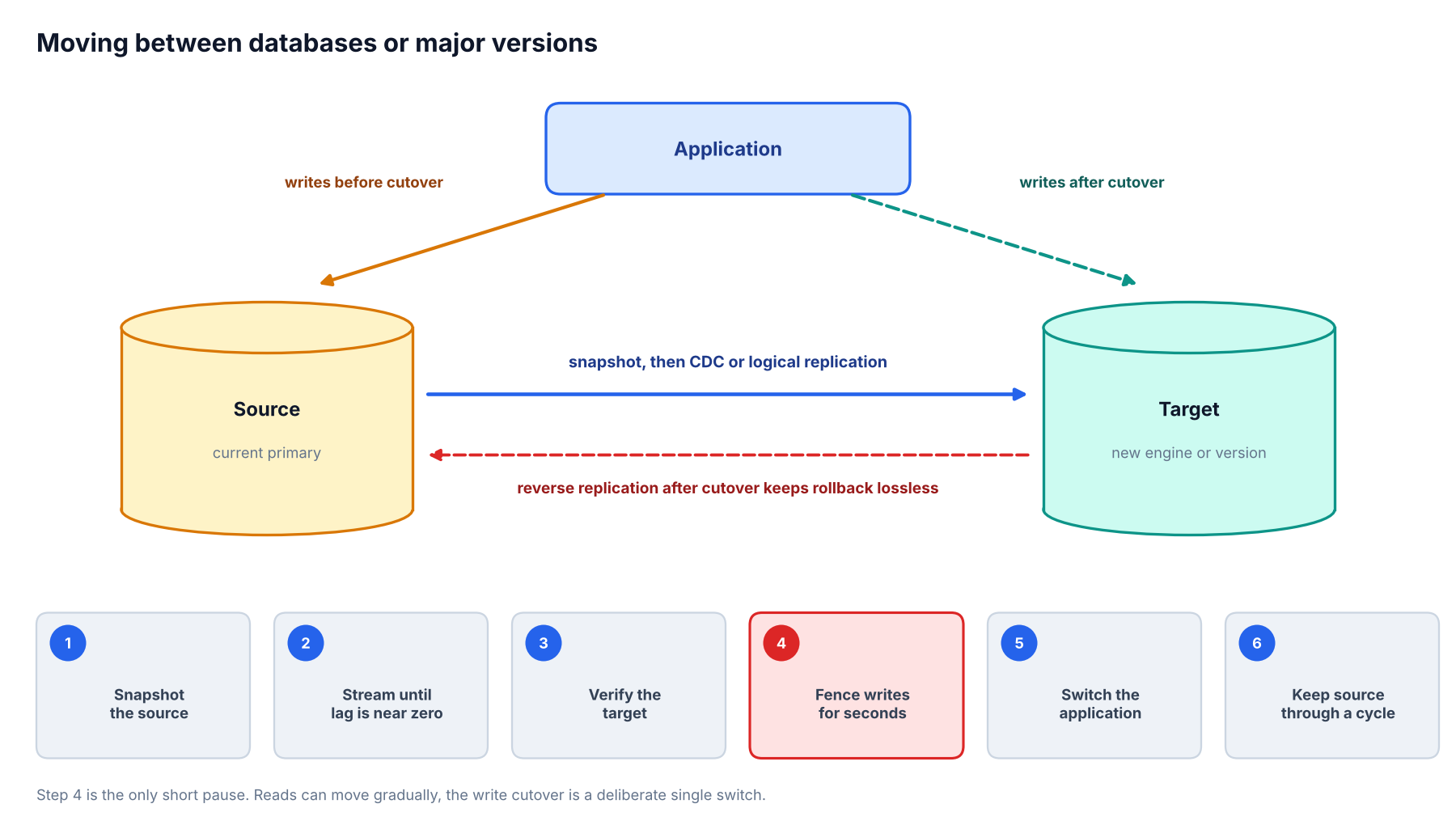
Reads can move gradually. The write cutover is one deliberate switch.
Snapshot, then stream. Copy the initial data, then keep the target current with logical replication or CDC until the lag is near zero.
Replicate what replication does not. Logical replication generally does not carry schema changes, and sequence values may need separate handling depending on your version, so script both.
Verify on the target. Run the same checksum and sample diffs described below, plus a load test against the target with production-shaped queries.
Cut over writes once. Pause or fence writes for a few seconds, wait for replication lag to reach zero, then point the application at the target.
Replicate backwards. Stream changes from the new primary back to the old one so a rollback does not lose data written after cutover.
Keep the source around. Retire it only after the target has run under real traffic through a full business cycle.
Be honest about the claim. Reads can move gradually, but the write cutover is usually a short pause measured in seconds. If your product cannot tolerate even that, you need application-level queuing during the fence.
If you run MySQL
The framework is the same, but the engine's rules differ in ways that matter.
Metadata locks queue like PostgreSQL locks. A DDL statement waiting behind an open transaction blocks later queries on that table, so the same long-transaction check and a short timeout apply. MySQL's
lock_wait_timeoutsetting controls how long a session waits for a metadata lock.Ask for the algorithm you expect. In MySQL 8.4, adding a column can use
ALGORITHM=INSTANT, which is metadata-only. Adding a secondary index usesINPLACEand allows concurrent writes. Changing a column data type needsALGORITHM=COPYand a full table rebuild with no concurrent writes. Stating the algorithm explicitly makes the statement fail instead of silently choosing a blocking method.Use an online schema change tool for the rebuilds. gh-ost builds a ghost table, copies rows in the background and applies ongoing changes from the binary log instead of triggers. It can throttle and pause, and it lets you hold the final table swap until you are ready. pt-online-schema-change does similar work with triggers.
Note that CREATE INDEX in MySQL also finishes only after transactions that are using the table complete, so the long-transaction check matters here too.
Verification before cutover
A matching row count proves that rows arrived. It does not prove they arrived correctly. The framework should require evidence before reads move.
Mismatch count. For a derived column, count rows where the new value disagrees with what the old one implies.
Chunk checksums. Compare hashes of ranges of rows between old and new structures.
Sampled row diffs. Pull a random sample and compare every migrated field.
Constraint validation. Confirm foreign keys, uniqueness and nullability hold on the new structure.
Shadow read mismatch rate. Set a hard threshold. Our default would be zero unexplained mismatches over a full business cycle.
sql
-- rows where the new column disagrees with the old one
SELECT count(*) AS mismatches
FROM users
WHERE phone_e164 IS DISTINCT FROM normalize_phone(phone);

-- one hash comparison per 5,000-row chunk
SELECT (id - 1) / 5000 AS chunk,
       md5(string_agg(phone_e164, ',' ORDER BY id))
         = md5(string_agg(normalize_phone(phone), ',' ORDER BY id)) AS match
FROM users
GROUP BY 1
ORDER BY 1;
Write the threshold into the pipeline as a gate. If the gate is a convention in a runbook, it will be skipped the one time it matters.
What to watch while a migration runs
A migration needs its own small dashboard. These are the signals we would put on it for PostgreSQL.
Signal | Where to read it | Why it matters |
|---|---|---|
Lock waiters |
| A rising count means a statement is queueing and the app may be next |
Replica lag |
| Backfills and bulk updates push replicas behind, so throttle on it |
Dead tuples |
| Row rewrites leave bloat that autovacuum has to clear |
WAL volume | Growth of | Large backfills can generate more log than disks or replicas expect |
Error rate and p99 latency | Your APM or metrics stack | The user-facing check on every ramp stage |
Shadow mismatch rate | Application metric from the shadow read | The correctness check on every ramp stage |
Cutover as a gradual read shift
Never flip all reads in one deploy. Put the read path behind a flag and ramp it with a gate at each stage. At every stage compare error rate, p99 latency and mismatch rate against the old path.
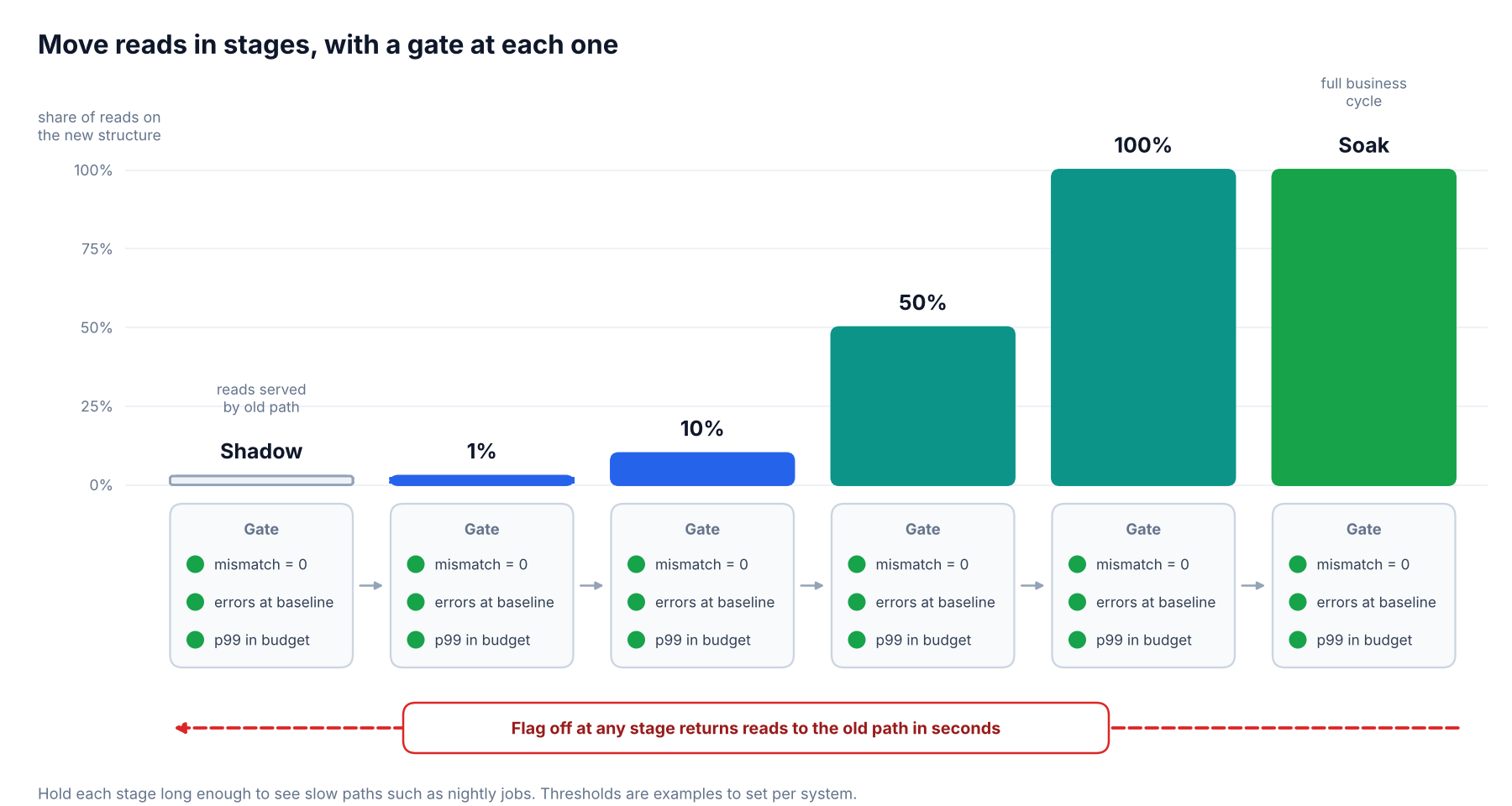
Each stage has to pass its gate before the next one starts. The flag is always the way back.
Three details make the flag trustworthy. Evaluate it server side. Fall back to the old path if the flag service is unreachable. Bucket consistently by user or tenant so one customer does not bounce between paths mid-session.
A product platform such as PostHog, which bundles feature flags with analytics, can drive the ramp and segment who sees what. It is not an observability tool, and our review notes that its individual modules trail category specialists, so keep error rate and latency on your existing metrics stack and use the flag platform to control the rollout. Any flag system works as long as turning it off takes seconds and does not need a deploy.
Rollback design
Rollback is a property you build in, not a script you write during an incident. In the seven-step plan above, rollback is a flag flip through step 5 because the old column is still written and still correct. Step 6 is the quiet point of no easy return, since the old column stops receiving writes and begins to go stale. Step 7 is the point of no return.
A few rules keep that honest.
Keep writing the old structure through the soak period, and stop only when you are certain you will not need it.
Take a fresh backup before the contract step, and keep it through the retention window.
Remember that rolling back application code does not roll back schema. Plan the schema reversal separately.
Make the contract step its own release, with its own approval.
Where automation and AI assistants fit
Writing migrations and backfills is repetitive, careful work, which makes it a reasonable job for an assistant. An agent such as Claude Code or an AI editor like Cursor can draft the expand step, the trigger and the batch loop quickly, and it is good at translating a plan like the table above into code for a specific ORM.
We would still treat that output like any other pull request from someone new to the codebase. It goes through the same linter and the same lock-budget gate as everything else. Tools such as squawk for PostgreSQL and strong_migrations for Rails flag unsafe statements automatically. pgroll goes further for PostgreSQL by running every migration as expand and contract, using versioned views and triggers so old and new application versions can coexist. Our AI developer tools category covers the assistants in more depth.
Migrating beyond relational tables
The same shape applies to things that are not tables. Changing an embedding model means re-embedding your corpus and building a second index, then shadow-querying it, then shifting traffic. That is expand and contract with a different storage engine. If you are choosing the target for that second index, our comparison of Pinecone and Qdrant for enterprise use covers pricing, benchmarks and compliance, and its FAQ notes that Qdrant ships an official tool for streaming data out of Pinecone while both stay live.
A framework checklist you can adopt this sprint
You do not need to build everything at once. This order gives the best return.
Add a migration linter to CI. Block unsafe statements before review.
Enforce lock and statement timeouts on every migration connection.
Adopt the seven-step phase model for any rename, type change or drop.
Build one reusable backfill runner with key-range batches, checkpoints and lag throttling.
Put the read path behind a flag for every data-shape change.
Define a verification gate with a mismatch threshold.
Make contract a separate release with a fresh backup.
Questions
Frequently asked questions
What is the expand and contract pattern?
It is a phased approach to changing a schema without downtime. You expand by adding the new structure while keeping the old one, migrate by syncing data and moving traffic, and contract by removing the old structure once nothing uses it. It lets old and new application versions run against the same database safely.
Can you do a zero-downtime database migration without dual writes?
Yes. For changes inside one database, a trigger can keep a new column in sync with an old one, so application code does not need to write both. For moves between databases, CDC or logical replication reads the source's change stream and applies it to the target, which avoids having the application write to two systems.
Does ALTER TABLE lock the table in PostgreSQL?
Many forms of ALTER TABLE need a strong lock, and even a fast one can cause an outage if it waits behind a long transaction and blocks the queries behind it. Adding a nullable column is metadata only and quick, but changing a column type usually rewrites the table. Always set a short lock_timeout so a waiting statement aborts instead of queueing.
How do you migrate between database engines without downtime?
Copy a snapshot, stream changes with CDC or logical replication until lag is near zero, verify the target, then cut over writes in one deliberate step. Expect a write pause of seconds, and set up reverse replication so you can roll back without losing new data.
How do you roll back a zero-downtime migration?
Design rollback into the phases. While both structures are still written and consistent, rollback means turning a flag off. Once the application stops writing the old structure, rollback needs a re-sync, and once you drop it, rollback means restoring from backup. That is why contract is a separate, deliberate step.
How big should backfill batches be?
Start small, often a few thousand rows, then tune against replica lag and write latency. The right size is the largest batch that keeps lag and p99 latency inside your limits. Always batch by primary key range and make each batch safe to repeat.
Does adding an index lock the table?
A plain CREATE INDEX in PostgreSQL blocks writes while it builds. CREATE INDEX CONCURRENTLY avoids that, but it cannot run inside a transaction block, it takes longer, and a failed run leaves an invalid index you must drop. In MySQL 8.4, adding a secondary index runs in place and allows concurrent writes.
Is zero downtime worth it for a small application?
If the database is small and you can accept a short maintenance window, a simple migration may be the right call. The framework earns its keep once downtime has a real cost, such as paying customers, background jobs that cannot pause, or several services sharing one database. Even then, the lock budget and linter are cheap enough to adopt on day one.
Conclusion
Zero-downtime migrations are less about clever tooling and more about discipline you can automate. If you adopt only three things, make them the migration linter, the lock timeout policy and the rule that contract is always its own release. Those three stop the majority of avoidable outages for almost no engineering cost.
The seven-step expand and contract flow, the throttled backfill runner and the verification gate are worth building once a table is large enough that a mistake is expensive. Reach for an automated tool such as pgroll, or a CDC pipeline for engine moves, when you run migrations often enough that hand-rolled scripts become the risk.
Skip the framework only when the database is small and a short maintenance window is acceptable. Everywhere else, the slow, boring sequence wins.
WebTechOS accepts no payment for coverage, placement or scores. Where a piece references pricing, it reflects published list rates at the date shown.
Keep reading
All insights →Gorgias Alternatives for Small Ecommerce Teams in 2026
Compare the 7 best Gorgias alternatives for small ecommerce teams in 2026. Review pricing, AI automation, features, and support capabilities.
Is ChatGPT or Claude Worth Paying For? 2026 Pricing Breakdown
ChatGPT Plus and Claude Pro both cost $20. Compare Free, Go, Pro, Max and Ultra plans, usage limits and hidden costs to see which is worth paying for.
Best AI chatbot.com alternatives compared in 2026
Compare 7 AI chatbot alternatives for 2026 on resolution claims, pricing, channels and handoff. See where YourGPT, Intercom, Zendesk and Tidio fit.
9 Best AI Auto Caption and Subtitle Generators in 2026
Nine AI caption and subtitle generators compared on languages, free-plan limits, export formats and annual pricing, from Kapwing to Whisper.