Is ChatGPT or Claude Worth Paying For? 2026 Pricing Breakdown
ChatGPT Plus and Claude Pro both cost $20. Compare Free, Go, Pro, Max and Ultra plans, usage limits and hidden costs to see which is worth paying for.
18 Nov 2026·12 min read·General

ChatGPT Plus and Claude Pro both cost $20 a month, so the price tag rarely settles the question. What does is everything around those two plans: a free tier that may be enough, an $8 ChatGPT plan that can show ads, and a stack of $100-plus tiers on each side that were reshuffled in the last five weeks. OpenAI added a $500 Pro tier at the end of September, and Anthropic renamed its Max plans on October 30.
If you use an assistant for work most days, one $20 plan usually earns its keep. If you use one a few times a week, a free plan is likely enough. The $100 and $200 plans make sense only after you have hit a limit repeatedly. This guide lays out what each plan costs, what you get at each step, and how to test before you pay.
This blog lays out what each plan costs, what you get at each step, and how to test before you pay. Most pricing guides stop at the monthly number, so this one also adds the yearly cost of every tier, a break-even calculation and a decision path to follow. It suits anyone deciding whether to start paying, from solo freelancers to small teams.
Which ChatGPT or Claude Plan Should You Choose?
Not every ChatGPT or Claude plan is worth paying for. The right choice depends on how often you use AI, the tasks you handle, and the features you need. Here's a quick comparison to help you decide.
If you… | Start with | Monthly cost (US list) |
|---|---|---|
Ask an assistant a few questions a week | Free on either | $0 |
Use one daily for mixed work and want built-in image creation | ChatGPT Plus | $20 |
Write long documents or code from the terminal | Claude Pro, which includes Claude Code | $20, or $17 billed annually |
Chat a lot, rarely need advanced tools, and can live with ads | ChatGPT Go | $8 |
Hit your $20 plan’s limits most weeks | Claude Max or ChatGPT Pro 100 | $100 |
Run agent or coding sessions for hours at a stretch | Claude Ultra or ChatGPT Pro 200 or 500 | $200 to $500 |
Share an assistant across a team | Claude Team or ChatGPT Business | $20 per seat billed annually, $25 monthly |
Treat the table as a starting point. The sections below explain the reasoning and the numbers behind each row.
ChatGPT vs Claude Pricing in 2026: Monthly and Annual Costs
ChatGPT and Claude offer free plans, $20 subscriptions, and higher-priced options for heavy users and teams. Here's a breakdown of their monthly and annual costs as of November 2, 2026, to help you compare plans and understand the price differences.
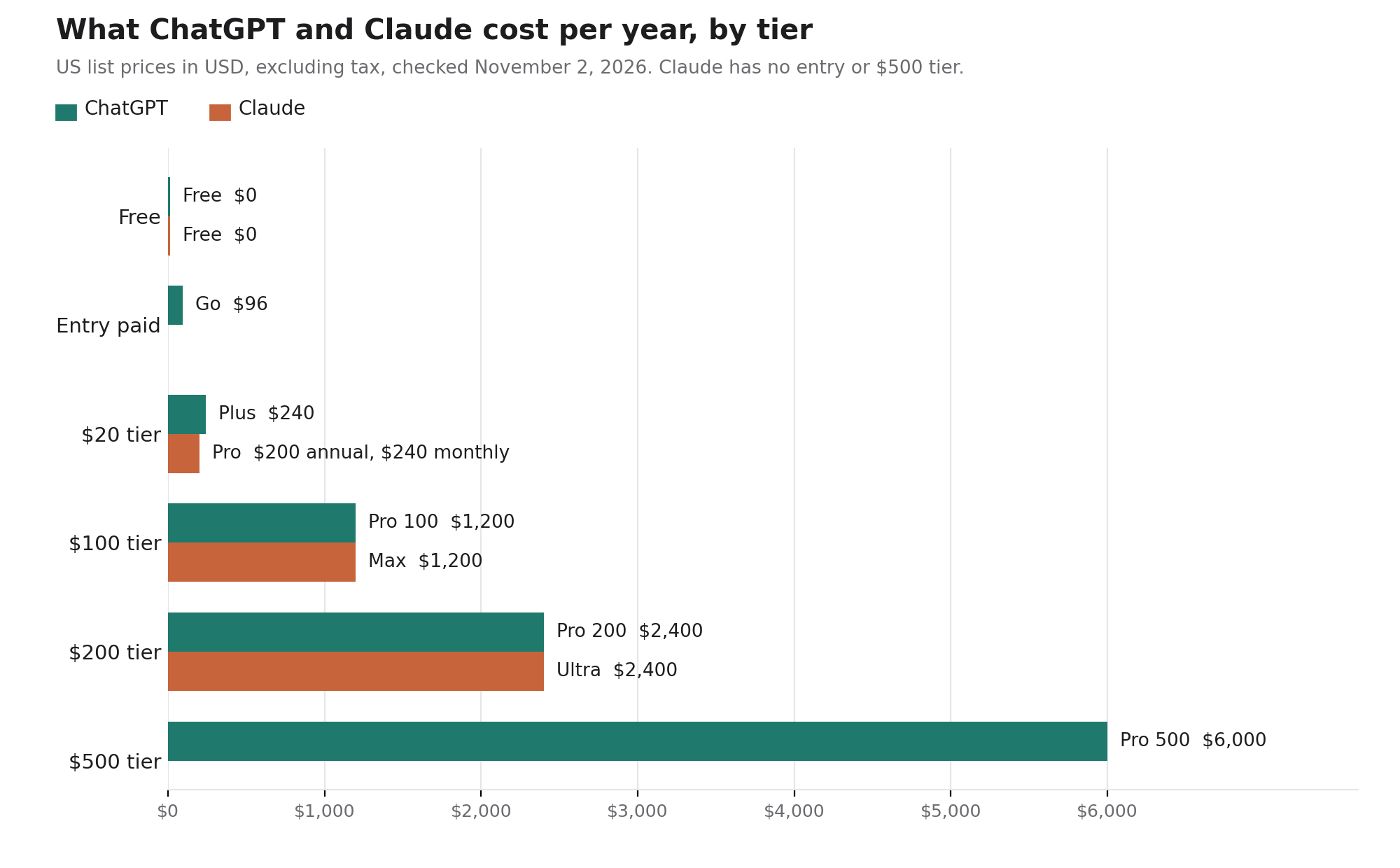
These are US list prices in USD, excluding tax, as of November 2, 2026. Claude figures come from Anthropic’s pricing page. ChatGPT’s Pro tiers and its monthly-only billing for Go, Plus and Pro come from OpenAI’s help center, while the Go, Plus and Business prices match what recent pricing trackers report from OpenAI’s pricing page. OpenAI bills in US dollars in most countries, and app-store and local prices can differ, so confirm at checkout.
Tier | ChatGPT | Claude |
|---|---|---|
Free | $0 | $0 |
Entry paid | Go: $8/month ($96/year) | None |
Standard | Plus: $20/month ($240/year), monthly billing only | Pro: $20/month ($240/year), or $17/month billed annually ($200/year) |
Heavy use | Pro 100: $100/month ($1,200/year) | Max: $100/month ($1,200/year), 5x Pro usage |
Heavier use | Pro 200: $200/month ($2,400/year) | Ultra: $200/month ($2,400/year), 10x Pro’s weekly usage, no 5-hour limit for verified accounts |
Top tier | Pro 500: $500/month ($6,000/year) | None |
Team seat | Business: $20/seat billed annually, $25 monthly | Team standard seat: $20 billed annually, $25 monthly |
The two ladders mirror each other almost rung for rung. ChatGPT adds an $8 entry plan and a $500 top tier, and Claude adds an annual discount on Pro that saves $40 a year, about 17%.
One naming warning. Anthropic renamed Max 5x to Max and Max 20x to Ultra on October 30, at unchanged prices, and Ultra now lists 10x Pro’s weekly usage. Any comparison that still says “Max 20x” was written before the change.
ChatGPT Plus vs Claude Pro: Is $20 a Month Worth It?
Claude Pro adds Opus models, Claude Code, Research, Projects, Claude in Chrome, Microsoft 365 integrations and scheduled tasks on top of Free. Usage limits reset every five hours and weekly. Fable, Anthropic’s top model, is not included on Pro and runs only through usage credits billed at API rates. How Fable differs from Opus and Sonnet is worth reading before you pay that premium.
ChatGPT Plus is the ad-free entry to OpenAI’s full tool set. OpenAI says Plus adds higher limits and broader access to advanced models and tools, including deep research and agent mode where available, and independent trackers report that regular chat has run GPT-6 Sol on Plus since October 7 while Free and Go run GPT-6 Luna. ChatGPT also has built-in image creation, which Claude’s plan page does not list on any tier.
In practice the $20 plans split by workload more than by price. Claude Pro bundles a coding agent and long-document tools. Plus bundles a broader consumer toolkit. WebTechOS ran a side-by-side of ChatGPT and Claude on five everyday tasks and found ChatGPT closer to the brief on an editing task and Claude’s long-form draft more natural. Several of those comparisons were non-blind, so use them as prompts for your own test, not as a ranking.
ChatGPT Free vs Go vs Claude Free: Which Is Worth Using?
Free is a real product on both sides. Claude’s Free plan includes Sonnet and Haiku, web search, file creation, code execution, memory and Artifacts, with limited usage every five hours and every week. It also covers Docs, Slides, voice mode and up to five Projects, and excludes Opus, Claude Code and Research. ChatGPT Free runs GPT-6 Luna, which trackers describe as uncapped for text chats, while files, images and voice carry their own limits.
ChatGPT Go costs $8 a month and gives more messages, image generation, file uploads, memory and data analysis than Free. According to OpenAI’s Go help page, some advanced products and higher-tier features still require Plus, and trackers report that Go runs the same default model as Free. On ads, OpenAI’s help page says it may start testing them on Go, while trackers report ads already appear on Free and Go in some regions, so check your own market. The step from Go to Plus is $12 a month, or $144 a year, and it buys the advanced tools. Go fits someone who chats heavily and never needs Deep Research or Codex. Voice mode on Go has the same limits as Free, so voice alone is no reason to pay for it.
ChatGPT Pro vs Claude Max and Ultra: Are Higher-Priced Plans Worth It?
ChatGPT and Claude offer premium plans ranging from $100 to $500 per month, mainly for users who need higher usage limits and longer AI sessions. But paying more doesn't always mean getting better value. Here's when upgrading makes financial sense and when a $20 plan is enough.
Only if you keep hitting a cap. Claude’s higher tiers sell more of the same allowance, and the price per unit does not fall. Claude Max costs $100 for 5x Pro usage, which is $20 per Pro-sized allowance. Ultra costs $200 for 10x Pro’s weekly usage, which is also $20 per Pro-sized allowance. What Ultra adds is the removal of the five-hour limit for verified accounts, so a long session no longer stalls mid-task.
Those multiples describe allowance, not message counts. Anthropic says how fast you reach a limit depends on the model, the length of your chats and the size of your files, and trackers report that OpenAI has not published current per-window message numbers for Plus.
ChatGPT’s ladder is harder to read, because OpenAI’s latest help text ranks the Pro tiers by usage without attaching multiples. Earlier versions of that page put Pro 100 at 5x Plus and Pro 200 at 20x, which priced usage at $20 and $10 per Plus-sized allowance. That is why the change matters: new Pro 200 subscriptions now come with a lower allowance than before at the same $200, and the grandfathered allowance for earlier subscribers ran only through October 29. Pro 500 offers the most usage and is the only tier with Ultrafast. Check the plan label and price in your billing settings before you confirm, because three different plans share the name Pro.
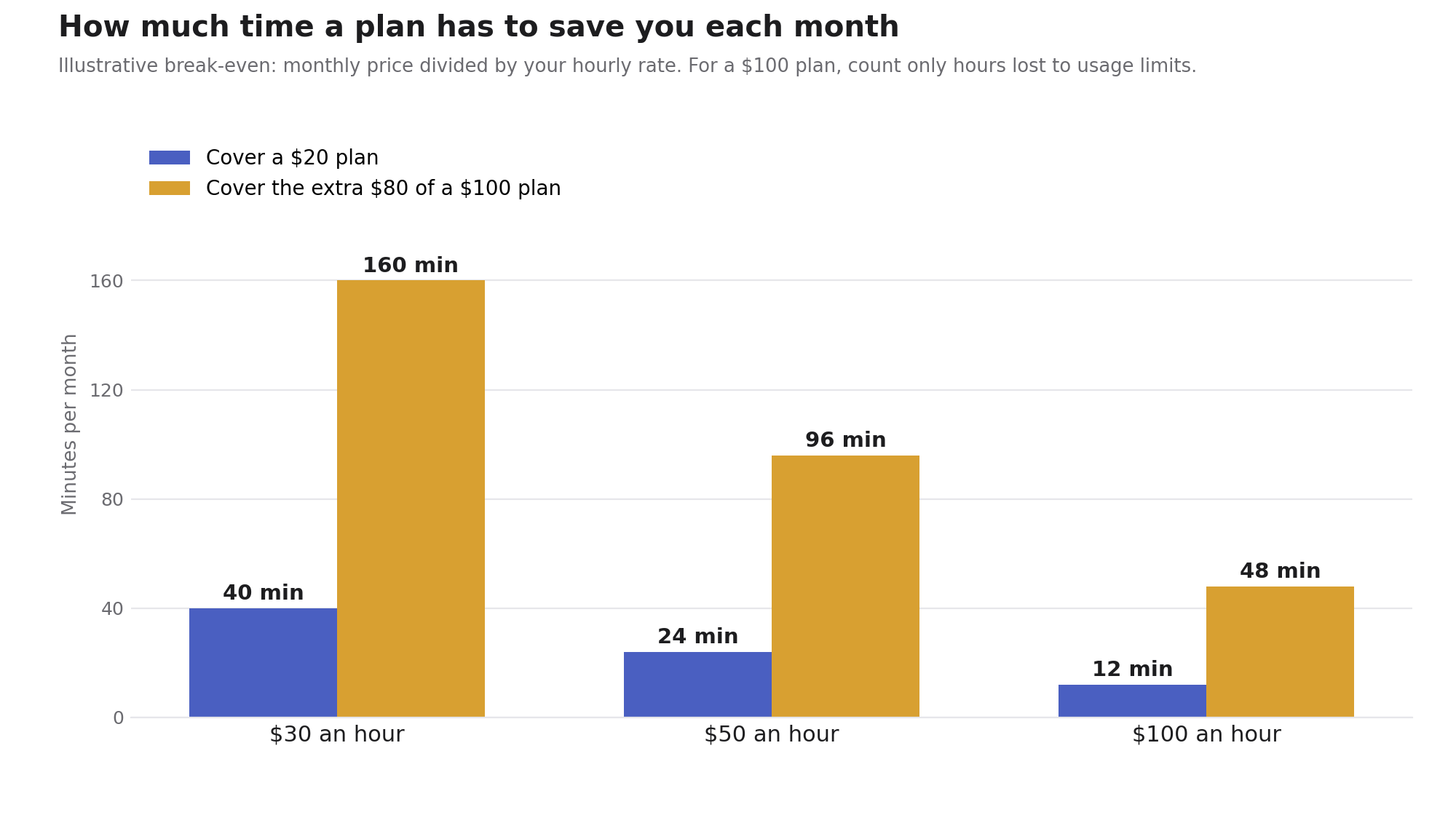
A rough break-even helps. The step from Plus to a $100 plan costs $80 more each month. At an illustrative billing rate of $50 an hour, that is 96 minutes. The hours that count are the ones you lose to limits, such as waiting for a reset or falling back to a weaker model, not the hours AI saves you in general.
Developers should check one detail before upgrading. Claude Code is included in every paid Claude plan, but it shares one pool with chat, so a long terminal session spends the same allowance as your conversations. Anthropic’s alternative for heavy coding is pay-as-you-go API credits through a Console account. WebTechOS scores Claude Code and Cursor at 86 each in its tool index, and its Cursor vs Claude Code comparison sets an AI-native editor against a terminal agent
ChatGPT vs Claude: Which Plan Is Best for Your Work?
A lead-in under the heading: “Pick by the recurring job that costs you the most time, because that job is what the plan has to pay for.” It tells readers how to use the sections that follow.
Occasional users: Stay on a free plan. A handful of questions, a rewritten email or a quick summary does not justify $20, and both free tiers cover that.
Writers and marketers : Either $20 plan can work, and the independent evidence on writing quality is thin, so test with your own style guide and three real briefs. WebTechOS has argued that general assistants have already absorbed most of what dedicated AI writing tools once offered. That makes one well-configured assistant a better spend than a second writing subscription.
Developers : Claude Pro bundles Claude Code and ChatGPT Plus includes Codex, so the entry price buys a coding agent either way.
Researchers and analysts : Claude’s Research mode starts on Pro, and ChatGPT includes Deep Research with Plus. Both can produce a plausible figure that is not in the source, so open the cited passage before you quote it in anything you publish or send to a client.
Small teams : Claude Team and ChatGPT Business both start at two seats. The reason to buy them is the contract more than the extra usage. Anthropic lists no model training on your content by default for Team, while its individual plans from Free through Ultra are opt-out, and OpenAI says personal-plan chats can be used for training unless you turn that off. Before rolling anything out, ask which model provider sits behind a tool and what happens if it retires the model. If what you actually need is customer support automation, a chat subscription is the wrong product, and purpose-built autonomous support agents come with resolution reporting that a seat license does not.
Costs that are not on the pricing page
Overage at API rates. When you hit a limit on a paid Claude plan, you can keep working by switching on usage credits, which bill at standard API rates. A heavy month can therefore cost more than the plan’s sticker price, so check Settings > Usage to see where you stand before you turn them on.
Chat plans and the API are separate bills. OpenAI says API usage is billed independently of ChatGPT plans, and Claude’s plans follow the same split. As a yardstick, Claude Sonnet 5.5 lists at $2 per million input tokens and $10 per million output tokens. Max and Ultra come with $100 and $200 of monthly Claude Platform credits, which Anthropic describes as credits “to build on the Claude Platform.” Two independent write-ups of the Ultra launch (one, two) say the credits cover API work only and do not stretch your chat or Claude Code allowance, so they matter only if you build on the API. Billing itself is shifting too, with several billing models now competing to replace the seat.
Plans change quickly. Anthropic says payments are generally non-refundable, so start on monthly billing and take Claude’s annual Pro discount only once your needs have settled. In the EEA and UK you can request a refund within 14 days of purchase, and elsewhere Anthropic checks eligibility case by case.
How to Decide If ChatGPT or Claude Is Worth Paying For
Before subscribing, test both AI assistants on tasks you regularly handle. A simple one-week comparison can help you assess their accuracy, features, and usage limits to see whether a paid plan is worth the cost.
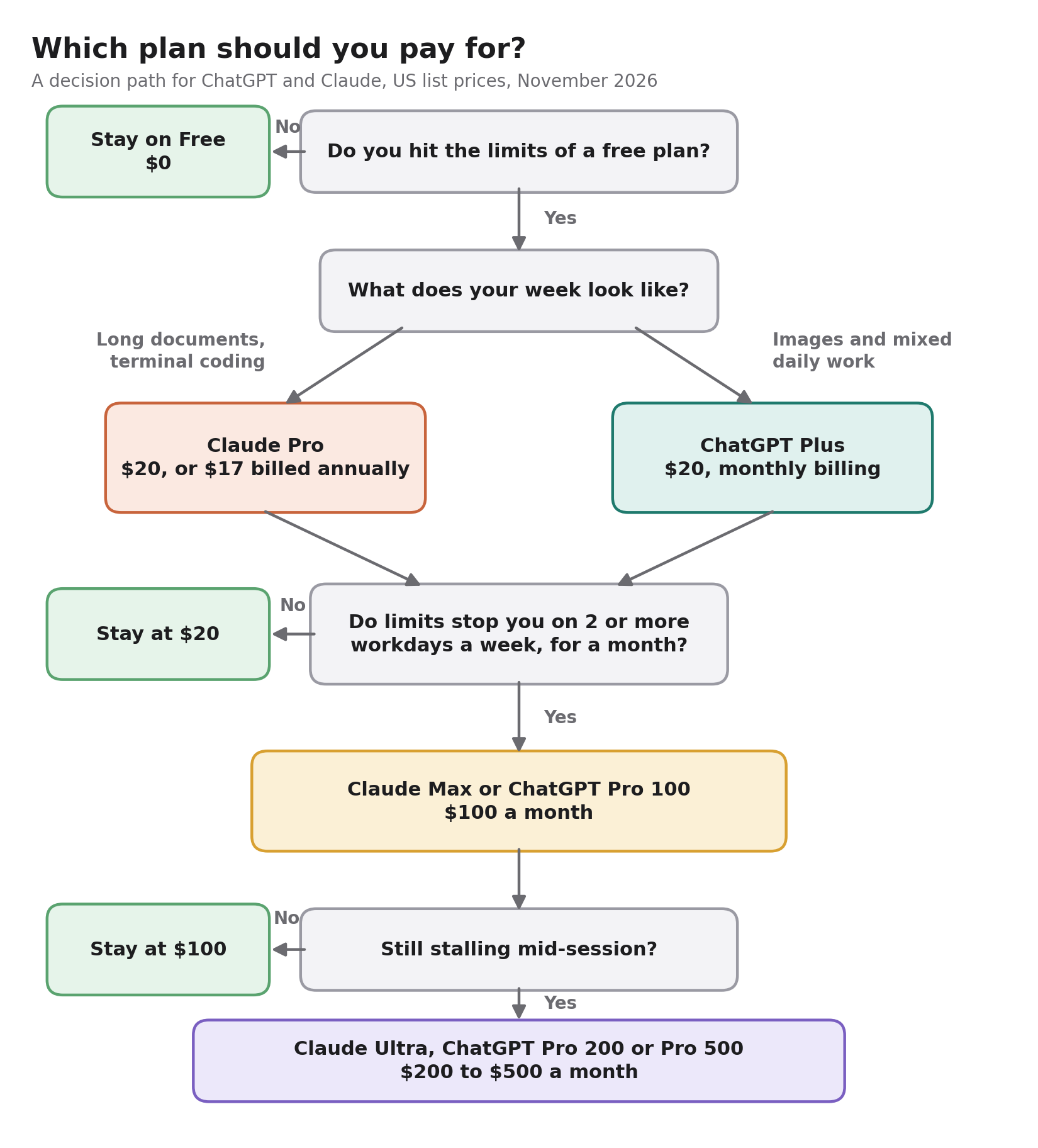
A week of real work answers this better than any comparison table.
Pick three tasks from your actual week, and make one of them something you find hard.
Run them on both free plans first and note where each one hits a wall.
Buy one month of the $20 plan that hit the walls, on monthly billing.
Count two things: the minutes you spend editing each output, and the workdays on which you reach a usage limit.
Add a trap. Give each assistant a document and ask something the document does not answer, then see whether it says so or invents an answer.
As a rule of thumb, consider the next tier up only if you hit a limit on at least two workdays a week for a month. If both assistants earn their place, paying for both costs $40 a month, which is $480 a year on monthly billing or $440 if you take Claude’s annual Pro discount. If Gemini or Grok are also on your shortlist, WebTechOS’s four-way comparison of Claude, ChatGPT, Gemini and Grok covers their plans and cost per benchmark task.
Questions
Frequently asked questions
Is ChatGPT Plus worth $20 a month?
Yes, if you use it for work most days and want the full tool set. No, if you rarely hit Free’s limits. As an illustration, at $50 an hour the plan pays for itself if it saves 24 minutes a month.
Is Claude Pro worth it?
Yes, if your week involves long documents, file analysis or Claude Code, all of which Free either excludes or limits. If Free already covers your usage, there is nothing to gain.
Claude Pro vs ChatGPT Plus: which should I buy?
They cost the same, so choose by workload. Claude Pro suits long documents and terminal coding, and ChatGPT Plus suits image creation and a broader toolkit. Run the one-week test on your own tasks before committing.
Is ChatGPT Go worth $8?
Rarely. It suits heavy chatters who never need Deep Research or Codex, and nearly everyone else gets more from Plus.
What is the difference between Claude Max and Ultra?
Max gives 5x Pro usage every five hours and every week. Ultra gives 10x Pro’s weekly usage and drops the five-hour limit for verified accounts.
Is it worth paying for both ChatGPT and Claude?
Only if your tasks split cleanly, such as image creation in ChatGPT and terminal coding in Claude. Most people are better served by one plan used well.
Do ChatGPT and Claude train on my chats?
On personal plans, training on your conversations is opt-out at both, so check your data settings. Claude Team and Enterprise exclude training by default, and ChatGPT Business is reported to do the same.
Is there an annual discount?
Claude Pro costs $200 a year instead of $240, and Max and Ultra are monthly only. OpenAI says it does not support annual billing for Go, Plus or Pro, though Business has an annual seat price.
Conclusion
A plan that costs five times as much has to save you five times the time. That is the whole test for anything above $20.
Your next step is small. Start on a free plan this week, run the three-task test above, then pay monthly for the one plan that hit your walls. Set a reminder for 60 days out and recheck the checkout page before you renew or upgrade.
When that reminder fires, ask one question: would you notice if the plan disappeared tomorrow? If not, downgrade. Keep your prompts, style guide and key files in your own folder rather than inside either app, so a price change or a better model elsewhere costs you an afternoon instead of a migration. Nothing here is permanent either: both vendors let you cancel anytime, and Anthropic says your chats and projects stay with your account after you drop to Free. To look beyond these two assistants, start with the WebTechOS comparison hub.
WebTechOS accepts no payment for coverage, placement or scores. Where a piece references pricing, it reflects published list rates at the date shown.
Keep reading
All insights →Best AI chatbot.com alternatives compared in 2026
Compare 7 AI chatbot alternatives for 2026 on resolution claims, pricing, channels and handoff. See where YourGPT, Intercom, Zendesk and Tidio fit.
9 Best AI Auto Caption and Subtitle Generators in 2026
Nine AI caption and subtitle generators compared on languages, free-plan limits, export formats and annual pricing, from Kapwing to Whisper.
7 Best HeyGen Alternatives in 2026
Compare 7 HeyGen alternatives for 2026 by price, limits and fit. Synthesia, AI Studios, Colossyan, D-ID, Creatify, VEED and CoAnimator.
8 Best Remotion Alternatives for Programmatic Video in 2026
Remotion’s license or React-only workflow slowing your team? Compare 8 Remotion alternatives for programmatic video, from free engines to no-code APIs.