Building High-Throughput Webhooks Processing Systems
Build a webhook receiver that survives traffic spikes: acknowledge fast, buffer events, deduplicate, rate-limit downstream calls, and replay safely.
9 Nov 2026·19 min read·General
A webhook endpoint that copes with 40 requests a second in staging can fall over at 4,000 in production, and the failure is rarely in the handler itself. It is in whatever the handler calls: a CRM rate limit, a database connection pool, an enrichment API having a slow afternoon. The provider sees a timeout and retries, so every slow request acquires a twin, and the twin makes the slowdown worse.
The short answer is to make the receiver do three things only: verify the signature, persist the raw event, and return a 2xx. Everything slow happens afterwards, in workers whose concurrency you control, behind a buffer that absorbs the spike. The rest of this guide covers how to size that design, choose the buffer, keep duplicates harmless, protect the systems downstream, and prove it all works before a campaign or a provider incident tests it for you.
It is written for engineers and technical leads who consume webhooks from payment, CRM, e-commerce or product-analytics providers. If you are choosing tooling rather than writing code, the section on workflow tools and managed platforms maps the build-or-buy options.
Size Webhook Systems for Peak Load, Not Average Traffic
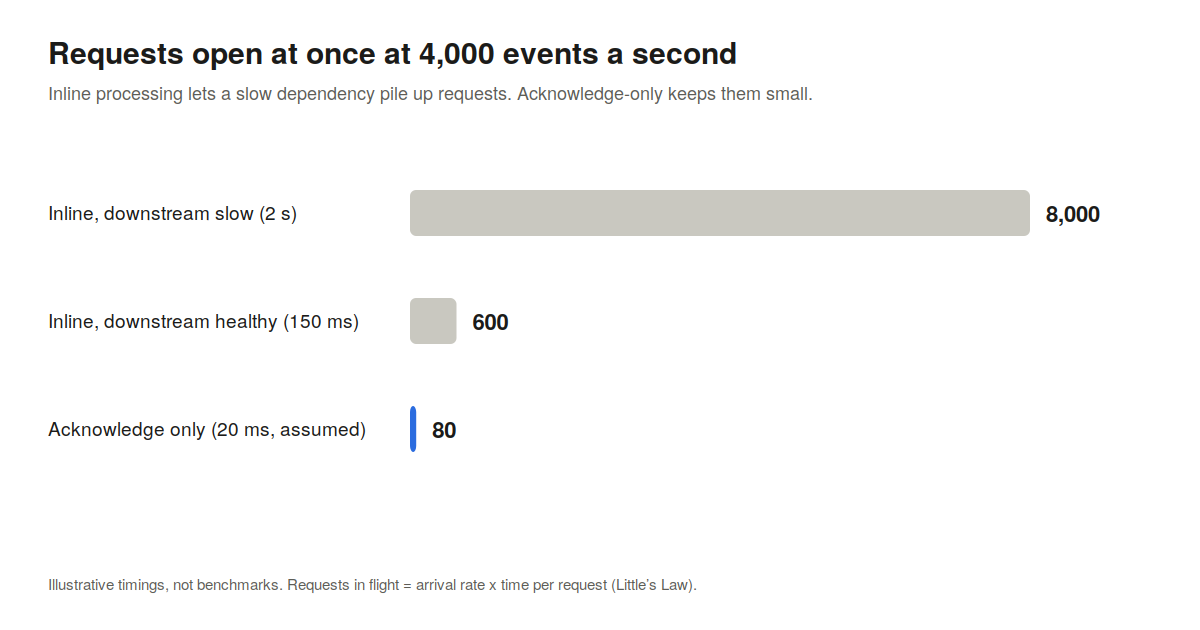
The number that explains most webhook outages is requests in flight, which is the arrival rate multiplied by the time each request takes (Little's Law). If events arrive at 4,000 a second and each takes 150 ms to handle inline, about 600 requests are open at once. If the system it calls slows to two seconds, 8,000 are open at once, and the arrival rate has not changed.
Take an illustrative system that normally sees 400 events a second and then gets a 60-second burst at 4,000, perhaps from a campaign launch or a backfill. That burst is 240,000 events.
Design | Time per request | Requests in flight at 4,000 events/s |
|---|---|---|
Inline processing, downstream healthy | 150 ms | 600 |
Inline processing, downstream slow | 2 s | 8,000 |
Acknowledge only (verify, one insert, 2xx) | 20 ms (assumed) | 80 |
The timings are assumptions chosen to show the shape of the problem, not benchmarks. Substitute your own p99 figures.
Providers set the clock, and it is short. GitHub's webhook best-practices page asks for a 2xx within 10 seconds. Shopify's window is five seconds, and Stripe asks you to return a 2xx quickly without publishing a figure. Miss the deadline and the delivery counts as failed. What follows differs by provider. Stripe retries in live mode for up to three days with exponential backoff, while GitHub tells you to redeliver missed webhooks yourself once your server is back. Check each provider's current documentation before you set your own timeouts, because these values change.
Before designing anything, write down five numbers:
Peak events per second, and how long peaks last
p99 work per event, including every downstream call it makes
The hard limit of each downstream dependency (API rate limit, connection pool size)
The longest acceptable delay between an event arriving and its action completing
The provider's timeout and retry window
The fourth deserves the most thought, because it is the budget the queue spends. Everything in the next sections is a way of trading latency you can afford for stability you cannot do without.
Separate Webhook Ingestion From Event Processing
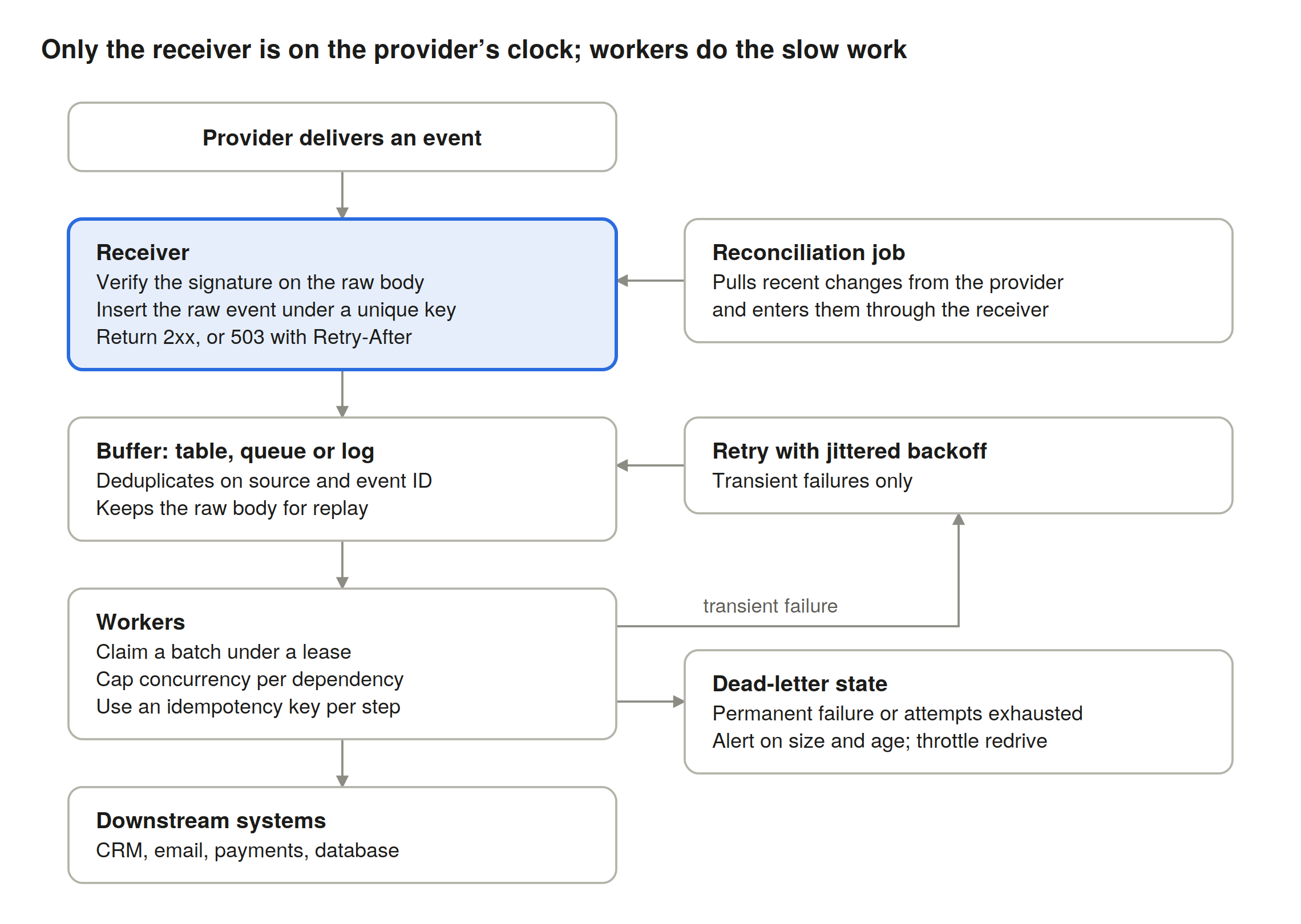
Everything the provider waits for should fit inside one signature check and one insert. The diagram shows where that boundary sits: the receiver is the only step on the provider’s clock, and every slow or failure-prone step lives behind the buffer.
A reconciliation job re-enters through the same receiver path, which is one more reason ingestion has to be idempotent.
Two details decide whether the receiver survives a spike. First, verify the signature against the raw bytes, not a re-serialised copy of the parsed JSON, because whitespace and key order change the hash. Second, make the insert the only thing that can fail, and make it fail fast. A short pool-acquire timeout and a statement timeout turn a struggling database into a quick 503 with a Retry-After header (some providers honour it) instead of a pile of hanging requests that the provider times out and retries.
import express from "express";
import crypto from "node:crypto";
import pg from "pg";

const db = new pg.Pool({
  max: 20,
  connectionTimeoutMillis: 500, // fail fast instead of queueing behind a sick database
  statement_timeout: 1000,
});
const app = express();

function validSignature(rawBody, header, secret) {
  if (!Buffer.isBuffer(rawBody)) return false; // wrong content type leaves req.body as {}
  const expected = crypto.createHmac("sha256", secret).update(rawBody).digest("hex");
  const a = Buffer.from(expected);
  const b = Buffer.from(header ?? "");
  return a.length === b.length && crypto.timingSafeEqual(a, b);
}

app.post(
  "/webhooks/orders",
  express.raw({ type: "application/json", limit: "1mb" }),
  async (req, res) => {
    // Header names vary by provider; these two are placeholders.
    if (!validSignature(req.body, req.get("x-signature"), process.env.WEBHOOK_SECRET)) {
      return res.sendStatus(401);
    }
    const eventId = req.get("x-event-id");
    if (!eventId) return res.sendStatus(400);

    try {
      await db.query(
        `INSERT INTO webhook_events (source, event_id, body)
         VALUES ('orders', $1, $2)
         ON CONFLICT DO NOTHING`,
        [eventId, req.body.toString("utf8")]
      );
      res.sendStatus(200); // a duplicate is not an error
    } catch {
      res.set("Retry-After", "30").sendStatus(503); // ask the provider to come back later
    }
  }
);
The table behind it keeps the exact request body as text, so you can re-verify and replay it later. The partial index means finished rows never slow the queries that look for work.
CREATE TABLE webhook_events (
  source          text        NOT NULL,
  event_id        text        NOT NULL,
  body            text        NOT NULL,
  received_at     timestamptz NOT NULL DEFAULT now(),
  status          text        NOT NULL DEFAULT 'pending',
  attempts        int         NOT NULL DEFAULT 0,
  next_attempt_at timestamptz NOT NULL DEFAULT now(),
  PRIMARY KEY (source, event_id)
);

CREATE INDEX webhook_events_ready
  ON webhook_events (next_attempt_at)
  WHERE status = 'pending';
Choose the buffer by what you need to order and replay
The buffer between acknowledgement and processing can be a database table, a queue or a log. Dan Farrelly's account of scaling webhooks at Buffer reaches the same overall shape: decouple the handler, put a queue behind it, and make retries idempotent. (Inngest sells a managed platform for this, so read its conclusion with that in mind.) Which buffer you pick depends mostly on ordering, replay and who else needs the events.
Buffer | Fits when | Ordering | Replay | What you operate |
|---|---|---|---|---|
Postgres table with SKIP LOCKED | One database, moderate sustained volume, you want dedupe, storage and queue in one place | Whatever you ORDER BY | Native: rows stay until you delete them | An index, retention and vacuum |
SQS standard queue | Spiky load, workers that scale independently of the database | None | Only within the queue's retention period | Queue, dead-letter queue, visibility timeout |
SQS FIFO queue | Events for the same resource must be processed in order | Within a message group | Same as standard | Message-group design |
Kafka or a similar log | Several consumers need the same events, long retention, rebuilds from history | Within a partition | Native, by offset | Brokers or a managed service, consumer groups |
Managed webhook platform (Inngest, Hookdeck, Svix and similar) | Many providers, a small team, no appetite for running any of the above | Platform-specific | Usually built in | A vendor relationship and its pricing |
The unglamorous default is the Postgres table, because it keeps the raw event, the dedupe record and the work queue in one transactional place. The claim query below uses FOR UPDATE SKIP LOCKED so two workers never wait on or double-take the same rows, and a lease (the next_attempt_at bump) plays the role of an SQS visibility timeout: if a worker dies mid-batch, its rows become claimable again after 60 seconds.
WITH batch AS (
  SELECT source, event_id
  FROM webhook_events
  WHERE status = 'pending' AND next_attempt_at <= now()
  ORDER BY next_attempt_at
  LIMIT 50
  FOR UPDATE SKIP LOCKED
)
UPDATE webhook_events e
SET attempts = e.attempts + 1,
    next_attempt_at = now() + interval '60 seconds'
FROM batch b
WHERE e.source = b.source AND e.event_id = b.event_id
RETURNING e.source, e.event_id, e.body, e.attempts;
Order the claim by next_attempt_at so the partial index on that column serves the query. In a local test on 240,000 pending rows, ordering by received_at instead forced a sequential scan and a disk sort of roughly 95 ms per claim, while next_attempt_at used the index and returned in under a millisecond. Your numbers will differ, but run EXPLAIN on the claim query against a burst-sized table before you trust it.
Move to SQS or a log when the queue's churn starts competing with your primary workload for the same database, when several independent consumers need the same events, or when you need workers on infrastructure that should not hold database credentials. Until one of those is true, a second system is operating cost without a matching benefit.
Why Webhook Deduplication Alone Is Not Enough
Duplicates arrive from three places: the provider retrying after a timeout, your own worker crashing after a side effect but before recording it, and replays you trigger on purpose. A single dedupe check at the door handles only the first.
The first layer is ingestion. The composite primary key on (source, event_id) plus ON CONFLICT DO NOTHING, shown in the receiver, lets the database decide whether an event is new. It is atomic, so two simultaneous deliveries cannot both pass a check-then-insert race. If a provider sends no stable event ID, derive one from fields that do not change across retries, such as resource ID, event type and the resource's version. Never derive it from arrival time.
The second layer is the side effect. Every action that changes something outside your database, such as creating a CRM task, sending an email or charging a card, needs its own idempotency key built from the event ID and the step name (evt_123:create_task). Pass it to the downstream API where one is supported, since many payment and messaging APIs accept an idempotency key. Without it, the crash case looks like this: the worker creates the task, dies before marking the event done, the lease expires, a second worker re-claims the event, and the CRM now holds two tasks.
Where a downstream system offers no idempotency support, you can only choose per step between at-most-once and at-least-once. Pick the failure that is cheaper. A missed internal notification is usually tolerable, while a duplicated customer email or charge is not.
Deduplication keeps a repeat from entering. Idempotency makes a repeat harmless if it gets in anyway. You want both, because volume turns a small rate into a large count: a 0.5% duplicate rate across the 240,000-event burst above is 1,200 duplicated side effects.
Protect downstream systems with per-dependency limits
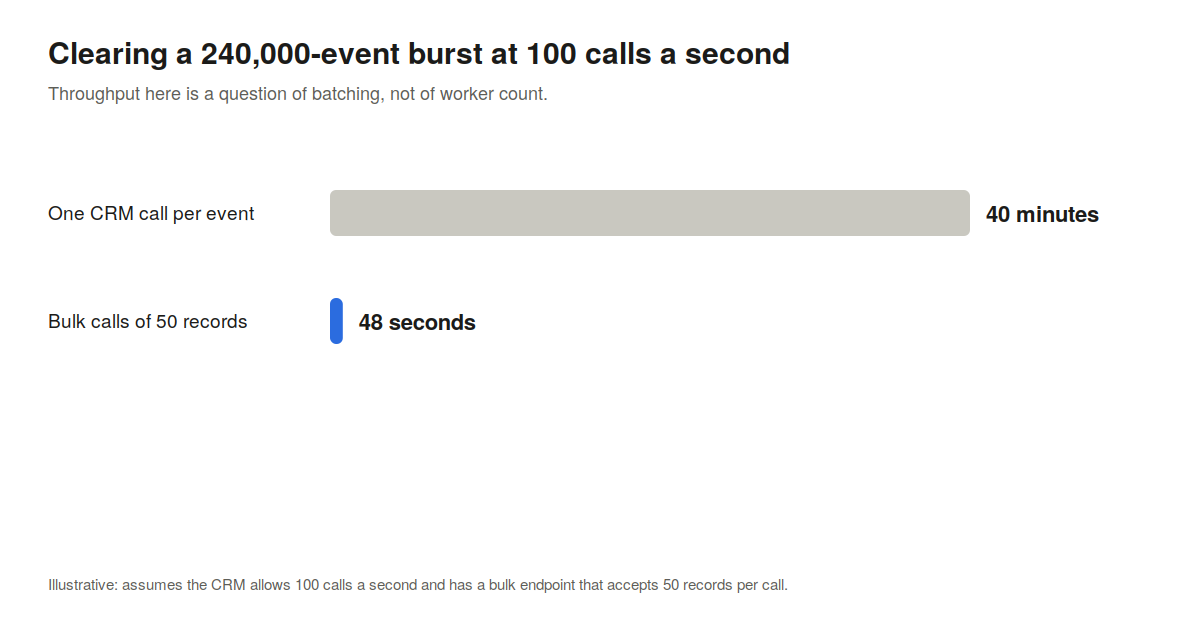
More workers drain the queue faster, which is the wrong goal when the thing they call has a ceiling. The buffer only relieves pressure if each dependency gets its own limit and the workers respect it.
Continue the illustrative burst of 240,000 events against a CRM that allows 100 calls a second. One call per event takes 2,400 seconds, or 40 minutes, no matter how many workers you add. If the CRM has a bulk endpoint that accepts 50 records per call, the same burst needs 4,800 calls and clears in 48 seconds. At this point throughput is a question of batching, not of worker count, and the latency budget from earlier tells you whether 40 minutes is acceptable.
A concurrency limiter per dependency is the simplest guard. This one hands a slot directly to the next waiting task, so the cap holds under load:
export class Limiter {
  constructor(max) {
    this.max = max;
    this.active = 0;
    this.waiting = [];
  }
  async run(fn) {
    if (this.active >= this.max) await new Promise((r) => this.waiting.push(r)); // slot is handed over
    else this.active++;
    try {
      return await fn();
    } finally {
      const next = this.waiting.shift();
      if (next) next();
      else this.active--;
    }
  }
}

const crm = new Limiter(10); // set from the CRM's documented concurrency allowance
await crm.run(() => createCrmTask(event));
A concurrency cap is not a rate limit. When a dependency answers 429 with a Retry-After header, pause that dependency for every worker, not just the one event that failed, or the pool keeps hammering a service that has asked you to stop.
Order by key, not globally
Providers do not promise ordering (Stripe says events can arrive out of order), and a shared worker pool adds its own reordering. You have two options. The cheaper one is to make handlers order-independent: store the resource's version or updated_at, and apply an incoming event only if it is newer than what you hold. The stricter one is to route by a hash of the resource ID so that all events for one order or customer land on one partition, processed by one worker at a time (an SQS FIFO message group or a Kafka partition key does this natively).
Partitioning brings a hot-key problem. One very active account can saturate its partition while the others sit idle. Choose the finest key that still preserves the ordering you need, per order rather than per merchant for example, and watch the per-partition queue depth rather than only the total.
Design Webhook Retries That Don't Overload Your System
Once your receiver returns a 2xx, the provider's retry loop is closed. From that moment the event's survival is your responsibility, which makes your own retry policy part of the system's correctness rather than a tuning detail.
Start by sorting failures into two groups. Timeouts, connection errors, 429s and 5xx responses are transient, so retry them. A malformed payload, a failed validation or a permanent 4xx will fail the same way every time, so send those straight to the dead-letter state instead of spending retries on them.
For transient failures, add jitter to the backoff. When a dependency recovers from an outage, every worker that was waiting on the same schedule retries at the same instant, and the recovering service falls over again. Randomising the delay spreads that load out. This version doubles the ceiling on each attempt, caps it at five minutes, and picks a delay between half the ceiling and the full ceiling:
export function backoffSeconds(attempt) {
  const ceiling = Math.min(300, 2 ** attempt); // 2, 4, 8 ... capped at 5 minutes
  return ceiling / 2 + (Math.random() * ceiling) / 2; // "equal jitter"
}
In the Postgres version, a retry is an update to the event's next_attempt_at, and exhaustion is a status change:
-- transient failure: try again later
UPDATE webhook_events
SET next_attempt_at = now() + make_interval(secs => $3)
WHERE source = $1 AND event_id = $2;

-- permanent failure, or attempts exhausted (for example attempts >= 8)
UPDATE webhook_events SET status = 'dead'
WHERE source = $1 AND event_id = $2;
Cap the attempts, because a single poison event retried forever quietly consumes worker capacity. AWS recommends dead-letter queues for messages that repeatedly fail, and the same idea applies to a status column. Treat the dead-letter set as a worklist rather than a graveyard: alert on its size and on the age of its oldest item, and give yourself a redrive command that is itself throttled, so replaying a thousand fixed events does not cause the next incident.
Store Webhooks for Replay and Recovery
The receiver stores the exact request body before anything else touches it, and that one habit pays for three later jobs. You can re-verify a signature when a dispute arises, you can fix a parsing bug and run the corrected code over the original input, and you can replay events without asking the provider to send them again. Keep raw bodies for weeks, not days, and archive rather than delete if storage becomes a concern.
Because processing is idempotent at both layers, replay is a status change:
UPDATE webhook_events
SET status = 'pending', attempts = 0, next_attempt_at = now()
WHERE status = 'dead' AND received_at >= $1;
Replayed events go through the same per-dependency limiters as live traffic. Pushing half a million events into a CRM at full speed after an outage is how a recovery becomes a second incident, so run replays at a lower priority or a lower concurrency than live work.
Replay cannot recover an event that never reached you. If your endpoint is down for longer than a provider's retry window (up to three days for Stripe in live mode, and not at all automatically for GitHub), those events are gone from the provider's side of the conversation. A reconciliation job covers the gap. On a schedule, ask the provider's API for changes since your last checkpoint and push any event ID you are missing through the same ingestion path the webhook uses. Since ingestion is idempotent, the job can overlap with live traffic safely. Run it daily if the data is revenue-critical, and monitor the webhook URL itself, not only the application behind it.
Test and Monitor Webhook Reliability
A load test that only sends steady traffic proves the happy path. Capture a few real payloads from a staging account, replay them against your receiver with a load tool, and break things on purpose.
Scenario | How to run it | Pass condition |
|---|---|---|
Burst | Replay at 10x your recorded peak for 60 seconds | Ack latency stays flat while queue depth rises, then drains |
Slow downstream | Make the stubbed dependency answer in 2 seconds, then with 429s | Receiver latency unchanged; limiter holds the concurrency cap |
Duplicate storm | Send every event twice, and 5% of them three times | Stored rows and side effects equal the number of unique events |
Worker crash | Kill workers mid-batch with SIGKILL | Every event completes after the lease expires, with no repeated side effect |
Database brownout | Block or throttle the database | Receiver returns 503 with Retry-After within about a second, and nothing hangs |
Out-of-order delivery | Shuffle events for the same resource | Final stored state matches the in-order run |
In production, these seven numbers catch most real incidents:
Metric | What it tells you | Alert when |
|---|---|---|
Ack latency p99 | Whether the receiver is safe against provider deadlines | It approaches a fraction of the shortest provider deadline |
Queue depth and age of oldest ready event | Whether workers are keeping up | Oldest age nears your latency budget |
Event-to-action latency | What the business actually experiences | It exceeds the budget, even if every request succeeded |
Retry rate per dependency | Which downstream system is struggling | It climbs alongside 429s or 5xx |
Dead-letter count and oldest age | Poison or permanent failures | Count grows, or the oldest item is older than a working day |
Duplicate-ingest rate | How often the provider retries you | It jumps, which usually means your receiver got slow |
Signature failures | A rotated secret or someone probing the URL | Any spike |
Queue depth and oldest-event age come straight out of the Postgres buffer:
SELECT count(*) AS ready, now() - min(received_at) AS oldest_ready_age
FROM webhook_events
WHERE status = 'pending' AND next_attempt_at <= now();
The oldest-event age matters more than the depth. A queue of 10,000 events that drains in seconds is healthy, while a queue of 500 whose oldest member is an hour old is an incident.
Choosing Tools for Webhook Automation and Processing
Not every webhook consumer needs custom code. When the job is moving records between SaaS apps, a workflow automation tool is a receiver, buffer and worker in one product, and the question becomes whether it honours the principles above. Ask three things of any of them. Does the webhook trigger acknowledge before or after the workflow runs? How does it add workers when volume spikes? How does it bill a deep workflow?
Billing is where the choice gets expensive. WebTechOS's n8n vs Zapier comparison frames it this way: Zapier bills per task, so a ten-step workflow consumes ten tasks per run, while n8n bills per execution, so the same workflow costs one. At 10,000 runs a month that is 100,000 tasks against 10,000 executions. n8n's queue mode adds worker processes for high-throughput production use, although the review is clear that self-hosting means you own upgrades, queue mode and backups. Make prices by operation, and is the third model worth running against your own step counts. The automation stack on the same site pairs n8n for volume with Zapier only for connectors nobody else has, and puts that bundle at $120 to $600 a month as of its latest listing.
When each event kicks off heavy compute, such as model inference, keep the receiver and buffer exactly as designed and move only the expensive step. The Modal review recommends serverless GPU compute that scales to zero for bursty work written in Python, which describes a webhook-triggered batch job well. It also warns that always-busy workloads often cost less on a reserved machine, so check your utilisation before committing.
If the consumer is an LLM agent, treat the model as one more rate-limited dependency. Store the event first, call the model from a worker, cap its concurrency like any other limit, and keep a trace of every run so a bad outcome can be inspected rather than guessed at. Tracing and evaluation tooling for LLM applications covers that last part.
Situation | Reasonable choice | Why |
|---|---|---|
One or two providers, engineers on hand, sensitive data | Build with the Postgres pattern above | Full control over failure modes, and a small amount of code |
Many providers with different signing and retry rules, small team | Managed webhook platform | Verification, retries and replay come normalised, while idempotency stays yours |
Mostly moving records between SaaS apps, technical ops team | Workflow tool with a queue mode, such as n8n | Execution-based billing and worker scaling |
Mostly moving records, non-technical team, low volume, long-tail connectors | Per-task tools such as Zapier | Connector breadth, with cost that grows with step count |
Each event triggers heavy, bursty compute | The pattern above, with the heavy step on scale-to-zero compute | You pay for the bursts only |
Whatever you buy, the design questions from earlier stay with you. A platform can carry the plumbing, but your downstream limits, idempotency keys and latency budget are decisions only your team can make.
Questions
Frequently asked questions
How many webhooks per second can one endpoint handle?
There is no fixed number, because the limit is whatever the acknowledge path touches: usually the database insert and its connection pool. Estimate it with requests in flight (arrival rate multiplied by time per request), cap the pool, and load test with your own payloads. An acknowledge-only receiver has far less to go wrong than one that processes inline.
Should a webhook endpoint return 200 or 202?
Any 2xx tells most providers the delivery succeeded, so either works. Use 200 unless the provider's documentation asks for a specific code, and read each provider's delivery requirements, because a few are stricter than the general rule.
How long do providers retry failed webhooks, and what if my endpoint is down longer?
It varies by provider. Stripe retries in live mode for up to three days with exponential backoff, while GitHub does not redeliver automatically. For an outage longer than the window, run a reconciliation job against the provider's API and push missing events through your normal ingestion path.
Do I need Kafka to process high-volume webhooks?
Usually not. A Postgres table or a managed queue handles most webhook workloads, and either can sit behind an acknowledge-only receiver. Reach for a log such as Kafka when several independent consumers need the same events or when you want to rebuild state by replaying history by offset.
How do I keep webhook events in order?
Make handlers order-independent by comparing the resource's version or timestamp before applying an event, or partition by the resource's ID so one worker handles each resource's events sequentially. Choose the finest key that preserves the ordering you need, so a single busy account does not become a hot partition.
Are webhooks better than polling?
Webhooks are better for near-real-time updates from a third party, since the provider pushes changes instead of you asking repeatedly. Polling remains useful as a backstop. Even a webhook-first design benefits from a scheduled pull that catches events the webhook path missed.
Where to start
If you are retrofitting an existing endpoint, this order gives the largest gain for the least work:
Reduce the receiver to verify, insert with a unique key, and return a 2xx, with a fast 503 and
Retry-Afterwhen the database is unhealthy.Write down the five numbers, especially the latency budget.
Put a limiter in front of every downstream dependency, and batch where its API allows.
Add attempt caps, jittered backoff and a dead-letter state with an alert on it.
Run the six failure scenarios in staging, then schedule the reconciliation job.
Conclusion
Webhook throughput is decided by how little the receiver does and how deliberately everything behind it is limited. Acknowledge fast, make every event safe to process twice, give each downstream system its own cap, and keep the raw event so you can replay it. Get those four right and a traffic spike costs you latency and loses nothing.
Start with the check that teaches the most. Replay your busiest hour's payloads twice, kill a worker mid-batch, and compare the stored rows and side effects with the number of unique events. If they match, you have a design worth scaling. If they do not, you have found your next fix before a provider found it for you.
WebTechOS accepts no payment for coverage, placement or scores. Where a piece references pricing, it reflects published list rates at the date shown.
Keep reading
All insights →Designing Zero-Downtime Database Migration Frameworks
Design a zero-downtime database migration framework with expand and contract, safe backfills, lock budgets, sync, cutover gates and rollback.
Gorgias Alternatives for Small Ecommerce Teams in 2026
Compare the 7 best Gorgias alternatives for small ecommerce teams in 2026. Review pricing, AI automation, features, and support capabilities.
Is ChatGPT or Claude Worth Paying For? 2026 Pricing Breakdown
ChatGPT Plus and Claude Pro both cost $20. Compare Free, Go, Pro, Max and Ultra plans, usage limits and hidden costs to see which is worth paying for.
Best AI chatbot.com alternatives compared in 2026
Compare 7 AI chatbot alternatives for 2026 on resolution claims, pricing, channels and handoff. See where YourGPT, Intercom, Zendesk and Tidio fit.