Building Local RAG Solutions with DeepSeek
Build a fully local RAG pipeline with DeepSeek R1, Ollama and Qdrant. Covers chunking, embeddings, retrieval and how to measure quality.
22 Oct 2026·10 min read·General

Your team has a pile of internal documents: runbooks, product specs, support macros, and a few hundred PDFs nobody reads anymore. You want a chatbot that answers questions from that material. The obvious route is a hosted API, but then you have to decide whether contracts, customer data, and internal notes can leave your network.
Many teams stall at that point.
Teams in particular often want a chatbot on top of their help center, and no-code platforms such as YourGPT, Intercom offer that with a hosted index. The trade-off is that your documents then live on someone else’s infrastructure. Local retrieval-augmented generation (RAG) removes that trade-off: the documents, embeddings, vector store, and language model all run on hardware you control.
This guide builds that pipeline step by step. You’ll run a DeepSeek-R1 model locally through Ollama, store embeddings in a Qdrant instance on your machine, and connect the two in about fifty lines of Python. We’ll also cover where local setups fall short, how to fix the errors you’re likely to hit, and how to tell whether your version works.
What you need before you start
You need Python 3.10 or newer, Docker for Qdrant, and Ollama. Ollama is a local model runner that downloads and serves open-weight models through a simple command line and HTTP API. Install it from ollama.com, then pull two models: a chat model and an embedding model.
bash
ollama pull deepseek-r1:8b
ollama pull nomic-embed-text
The deepseek-r1:8b tag is one of the distilled versions of DeepSeek-R1. These are smaller models trained to imitate R1’s reasoning, and the 8B version fits on a recent laptop. The download is roughly 5 GB. Around 16 GB of RAM is a comfortable target. Without a GPU, generation will be slow. Larger tags such as 14b or 32b give better answers if your hardware can handle them.
Ollama runs models locally, but it is not the DeepSeek API. Hosted DeepSeek models are a separate option with their own names and pricing, and those change often. Check DeepSeek’s documentation before you pin a model name in production.
The architecture in one pass
Local RAG has two phases. During ingestion, you split documents into chunks, convert each chunk into a vector with an embedding model, and store those vectors alongside the original text. At query time, you embed the question, retrieve the most similar chunks, paste them into a prompt, and ask the model to answer using only that context.
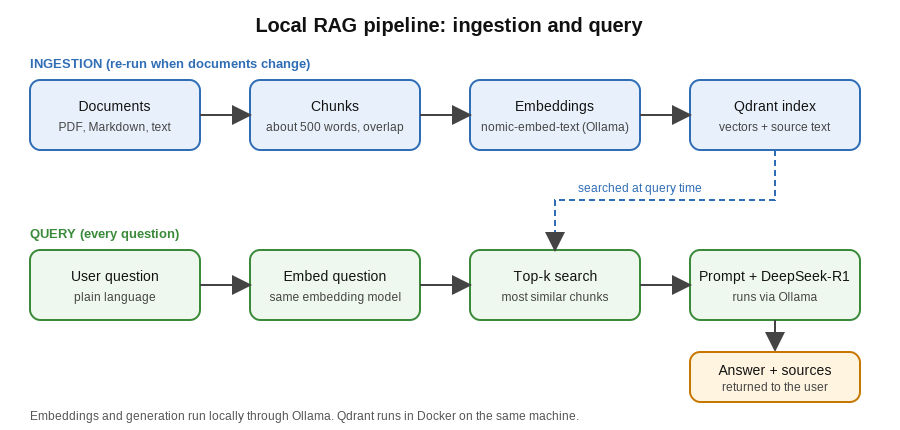
The two phases of a local RAG pipeline. Ingestion runs whenever documents change; querying runs on every question.
The model never memorizes your documents. It reads the relevant passages on each request, so updating the knowledge base means re-running ingestion, not retraining. It also means retrieval quality decides most of your answer quality. A strong model given the wrong passages will confidently produce a wrong answer.
Step 1: Start Qdrant locally
Qdrant is an open-source vector database with strong filtering support, which matters once your documents carry metadata such as department, date, or product line. Run it in Docker and install the Python packages:
bash
docker run -d -p 127.0.0.1:6333:6333 -v qdrant_data:/qdrant/storage --name qdrant qdrant/qdrant
pip install ollama qdrant-client
Two details matter here. The volume keeps your index across container restarts. The 127.0.0.1 prefix binds the port to your own machine only. Without it, Docker publishes the port on every network interface, and anyone on your network can read your index. Local doesn’t mean private unless you configure it that way. If other machines need access later, enable Qdrant’s API key authentication first.
If you’re weighing Qdrant against a managed service for a larger deployment, our vector database comparison covers the trade-offs.
Step 2: Chunk and embed your documents
Chunking is where many first attempts go wrong. Chunks that are too large dilute the signal, so the retriever matches on vague topics. Chunks that are too small lose the context a sentence needs. For a first pass, 500-word chunks with a 50-word overlap are a reasonable starting point. The overlap helps when an answer straddles a boundary.
The ingestion step has one subtle requirement: re-indexing must replace old chunks, not add to them. If you simply upsert new chunks with IDs that restart at zero, you’ll overwrite some old points and leave stale ones behind. The fix is to delete a file’s existing chunks before indexing it again, and to use UUIDs for point IDs so nothing collides.
python
import pathlib
import uuid

import ollama
from qdrant_client import QdrantClient
from qdrant_client.models import (
    Distance, FieldCondition, Filter, FilterSelector, MatchValue, PointStruct, VectorParams,
)

EMBED_MODEL = "nomic-embed-text"
COLLECTION = "docs"
client = QdrantClient(url="http://localhost:6333")

def chunk(text, size=500, overlap=50):
    words = text.split()
    step = size - overlap
    return [" ".join(words[i:i + size]) for i in range(0, len(words), step)]

def embed(texts):
    return ollama.embed(model=EMBED_MODEL, input=texts)["embeddings"]

def ensure_collection():
    if not client.collection_exists(COLLECTION):
        dim = len(embed(["probe"])[0])  # read the size from the model
        client.create_collection(
            collection_name=COLLECTION,
            vectors_config=VectorParams(size=dim, distance=Distance.COSINE),
        )

def remove_source(name):
    client.delete(
        collection_name=COLLECTION,
        points_selector=FilterSelector(
            filter=Filter(must=[FieldCondition(key="source", match=MatchValue(value=name))])
        ),
    )

def ingest_file(path):
    file = pathlib.Path(path)
    text = file.read_text(encoding="utf-8")
    ensure_collection()
    remove_source(file.name)
    chunks = chunk(text)
    if not chunks:
        return 0
    points = [
        PointStruct(id=str(uuid.uuid4()), vector=v, payload={"source": file.name, "text": c})
        for c, v in zip(chunks, embed(chunks))
    ]
    client.upsert(collection_name=COLLECTION, points=points)
    return len(points)
Reading the vector size from the model means swapping embedding models won’t silently break the collection. Every point stores its source file name, which you need for citations and for filtering later. The chunker splits on words for simplicity. In production, split on sentences or headings and count tokens, because the model’s context limit is measured in tokens.
If your documents live in a shared drive or a CMS, a workflow tool such as n8n can call ingest_file whenever a file changes. That keeps the index close to the source without anyone remembering to re-run a script.
Step 3: Retrieve and generate
On the query side, embed the question, pull the top matches from Qdrant, build a prompt that limits the model to that context, and call DeepSeek through Ollama.
python
CHAT_MODEL = "deepseek-r1:8b"

def answer(question, k=4):
    hits = client.query_points(
        collection_name=COLLECTION,
        query=embed([question])[0],
        limit=k,
    ).points

    context = "\n\n".join(f"[{h.payload['source']}] {h.payload['text']}" for h in hits)
    prompt = (
        "Answer the question using only the context below. "
        "If the context does not contain the answer, say so.\n\n"
        f"Context:\n{context}\n\nQuestion: {question}"
    )

    response = ollama.chat(
        model=CHAT_MODEL,
        messages=[{"role": "user", "content": prompt}],
        options={"num_ctx": 8192},
    )
    text = response["message"]["content"]
    if "</think>" in text:  # R1-style models may place reasoning in think tags
        text = text.split("</think>")[-1]
    return text.strip(), sorted({h.payload["source"] for h in hits})
Two settings deserve attention. Ollama’s default context window is much smaller than the model supports, and a reasoning model needs room for both the retrieved passages and its own thinking, so num_ctx is set explicitly. A larger value uses more memory, so match it to your hardware and to how much context you retrieve.
Here’s how to run it end to end:
python
ingest_file("refund-policy.md")
ingest_file("onboarding.md")

text, sources = answer("How long does a customer have to request a refund?")
print(text)
print("Sources:", sources)
The complete version, with a command-line interface, is in the attached local_rag.py file. Run python local_rag.py ingest refund-policy.md and then python local_rag.py ask "your question".
The output depends on your documents. A correct run gives an answer that states the policy in the document’s own terms and lists the file it came from. If the answer is wrong or the source list is empty, print the retrieved chunks before you blame the model. In most failures, the right passage was never retrieved.
Common errors and fixes
Symptom | Likely cause | Fix |
|---|---|---|
| Qdrant container isn’t running | Run |
| Model wasn’t pulled | Run |
Dimension mismatch on upsert | Collection was created with a different embedding model | Delete the collection and re-ingest with the current model |
Answers ignore obvious content | Chunks split a key passage, or | Increase the overlap or |
Very slow first response | The model is loading into memory | Expect a delay on the first call; later calls are faster |
Where local RAG gets hard
Three problems show up quickly.
Reasoning speed. R1-style models think before they answer, so they generate many more tokens than a standard chat model. On modest hardware, a response can take noticeably longer than users expect. Keep
kmodest so the prompt stays short, and consider a smaller or non-reasoning model for interfaces where latency matters more than depth.Retrieval misses on exact terms. Vector search handles paraphrase well but struggles with exact identifiers such as error codes, SKUs, or version strings. The usual fix is hybrid search, which combines dense vectors with sparse keyword-style vectors. Qdrant supports both in one collection and can fuse the two result lists with reciprocal rank fusion. Add it only after your evaluation set shows that pure vector search misses identifier-heavy questions. It adds indexing time and complexity, and it only helps if those misses are actually your problem.
Chunks that break meaning. Tables, code blocks, and numbered procedures split badly under fixed-size chunking. Parse tables into structured text before chunking, or keep each table as one chunk even when it exceeds your target size.
Some questions need more than one retrieval pass. If the first results look weak, you may want to rewrite the query and search again. LangGraph lets you model that as an explicit set of steps with state, which is easier to debug than a chain of nested conditionals.
Once the pipeline serves real users, you’ll want tracing so you can see which chunks each answer used. Tools like LangSmith cover that. If you’re choosing between evaluation platforms, our LangSmith vs Braintrust comparison helps.
Measuring whether it works
Reading a few answers and deciding they look fine is how RAG systems fail quietly. Build a small evaluation set instead. Write 30 to 50 questions your users actually ask, and for each one record which document contains the answer. Then measure retrieval on its own: for each question, did the correct source appear in the top k results?
python
def retrieval_hit_rate(eval_set, k=4):
    hits = 0
    for question, expected_source in eval_set:
        results = client.query_points(
            collection_name=COLLECTION,
            query=embed([question])[0],
            limit=k,
        ).points
        if any(r.payload["source"] == expected_source for r in results):
            hits += 1
    return hits / len(eval_set)

eval_set = [
    ("How long do customers have to request a refund?", "refund-policy.md"),
    ("What happens during the first week of onboarding?", "onboarding.md"),
]
print(f"Hit rate at k=4: {retrieval_hit_rate(eval_set):.0%}")
Run this before you touch the prompt or the model. Retrieval comes first because the generator can only work with what it reads. If the hit rate is low, change the chunk size, the overlap, or the embedding model, then measure again. Once retrieval is solid, spend your effort on generation quality, such as prompt wording and how much context you pass.
If you want to compare vector storage and evaluation options before committing, our AI infrastructure category groups the tools that handle both.
Questions
Frequently asked questions
Can I run DeepSeek RAG completely offline?
Yes, once the models are downloaded. Ollama serves the model from your machine, and Qdrant runs in a local container. After the initial pulls, neither component needs internet access. This is the main reason teams with strict data policies choose this setup.
How much RAM does DeepSeek R1 need locally?
For the 8B distilled model, around 16 GB of system RAM gives a smooth experience, especially if other applications are open. Larger distilled variants need considerably more. A GPU with enough VRAM to hold the model speeds up generation a great deal, but CPU-only inference works for testing.
Is DeepSeek R1 a good choice for RAG?
It works well for reasoning over retrieved material, especially for questions that combine several facts. The trade-off is speed, since the reasoning step adds latency. For simple lookup questions, a non-reasoning model may feel faster, so test both against your own question set.
What chunk size should I use for document retrieval?
Start with 300 to 500 words and some overlap, then measure hit rate on a small evaluation set. Dense technical documents often need smaller chunks, while narrative content handles larger ones. No universal number exists, which is why measurement matters more than the starting value.
Should I use a local model or the DeepSeek API?
It depends on what you’re optimizing for. Local models keep documents on your hardware and remove per-token costs, but you take on setup, hardware, and maintenance. The hosted API is simpler to run and usually gives access to larger models. Many teams prototype locally and send only the parts that need it to hosted inference.
If you’re comparing hosted support chatbots rather than building one, our YourGPT vs Intercom comparison covers how the two approach it.
Is a local RAG system secure by default?
No. Running everything on your machine keeps data off third-party servers, but it doesn’t secure the services themselves. Bind Qdrant and Ollama to localhost, enable Qdrant’s API key if other machines need access, and restrict file permissions on the document folder. Treat the index as sensitive, because the payloads contain your document text in plain form.
Conclusion
A local RAG pipeline answers a real business problem: getting useful answers from private documents without sending them to someone else’s servers. The setup here is deliberately small. Ollama runs the models, Qdrant stores the vectors, and a short Python layer connects them. You can read every line and change any piece without rewriting the rest.
The hard part isn’t the code. It’s retrieval quality, which you can only judge against questions drawn from your own documents. Start with one folder you already know the answers to, write 30 questions with known sources, and measure before you tune anything. Then decide on a larger model, hybrid search, or tracing based on failures you’ve actually observed.
When a single script stops being enough, our AI agent hub stack walks through one way to assemble the production pieces around a pipeline like this.
WebTechOS accepts no payment for coverage, placement or scores. Where a piece references pricing, it reflects published list rates at the date shown.
Keep reading
All insights →Designing Zero-Downtime Database Migration Frameworks
Design a zero-downtime database migration framework with expand and contract, safe backfills, lock budgets, sync, cutover gates and rollback.
Gorgias Alternatives for Small Ecommerce Teams in 2026
Compare the 7 best Gorgias alternatives for small ecommerce teams in 2026. Review pricing, AI automation, features, and support capabilities.
Is ChatGPT or Claude Worth Paying For? 2026 Pricing Breakdown
ChatGPT Plus and Claude Pro both cost $20. Compare Free, Go, Pro, Max and Ultra plans, usage limits and hidden costs to see which is worth paying for.
Best AI chatbot.com alternatives compared in 2026
Compare 7 AI chatbot alternatives for 2026 on resolution claims, pricing, channels and handoff. See where YourGPT, Intercom, Zendesk and Tidio fit.