Jira Service Management Reviews 2026: Ratings, Pricing, Pros and Cons
Read Jira Service Management reviews for 2026. Compare user ratings, pricing, pros, cons, AI features, and limitations before choosing a plan.
11 Nov 2026·14 min read·General
Jira Service Management (JSM) earns strong but not spotless ratings: 4.3 out of 5 on G2, 4.5 on Capterra and 4.4 on Gartner Peer Insights, based on the pages we checked on 2 November 2026. Reviewers like how well tickets, queues and SLAs hold together, how closely it connects to Jira and Confluence, and how much its automation takes off agents. They complain most about the learning curve, a setup that is hard without an admin, and costs that climb as teams and plan tiers grow.
The short verdict: JSM suits teams that already work in Atlassian tools and have someone to configure it. It suits teams that want a help desk running in an afternoon less well.
This guide draws on public review data and Atlassian’s own pricing and documentation. We did not run a hands-on test, so features are described as documented, not as observed.
How users rate Jira Service Management
Three review platforms give a consistent picture: most reviewers are satisfied, with a smaller group frustrated by complexity and cost.
Platform | Rating | Volume | Notes |
|---|---|---|---|
4.3 / 5 | 989 reviews | Page last modified 28 October 2026 | |
4.5 / 5 | 779 reviews | Page updated 19 October 2026 | |
4.4 / 5 | About 1,500 ratings | Counts differ between Gartner pages, and we read this figure from search results because the page itself blocked our request |
Gartner’s rating distribution shows the pattern clearly: 50% of ratings are five stars, 43% are four stars and 6% are three stars, with almost nothing lower. Atlassian’s pricing page also states that Atlassian is a Leader in the 2026 Gartner Magic Quadrant for IT Service Management Platforms. That is the vendor’s statement about analyst positioning, separate from user ratings, and we have not read the report.
How it compares on G2
G2’s JSM page lists nearby alternatives with their ratings:
Product | G2 rating | G2 reviews |
|---|---|---|
Jira Service Management | 4.3 | 989 |
Freshservice | 4.6 | 1,367 |
ServiceNow IT Service Management | 4.5 | 2,014 |
ManageEngine ServiceDesk Plus | 4.2 | 254 |
BMC Helix ITSM | 3.7 | 301 |
Review volumes and the kinds of companies reviewing differ across products, so a gap of a few tenths says little about whether a tool fits your team. Also note that G2’s strengths and weaknesses summaries are generated from review text, so the mention counts below show how often a theme appears, not how serious it is.
What Jira Service Management includes today
Atlassian’s AI features in JSM run on Rovo and Atlassian Intelligence. Two pieces matter most for support teams.
The virtual service agent
You set this up in Studio. Go to Agents, choose Create an agent, select Virtual service agent, then configure its channels. Once at least one intent is set to Active or you’ve activated AI answers, the virtual service agent goes live in your portal and in Microsoft Teams, if you’ve connected it.
The handoff is the part to design carefully. When the virtual service agent can’t resolve a request itself, it automatically creates a ticket in JSM using a preselected default request type. That default request type decides where those tickets land and what your human agents see first, so choose it deliberately instead of accepting whatever the setup wizard suggests.
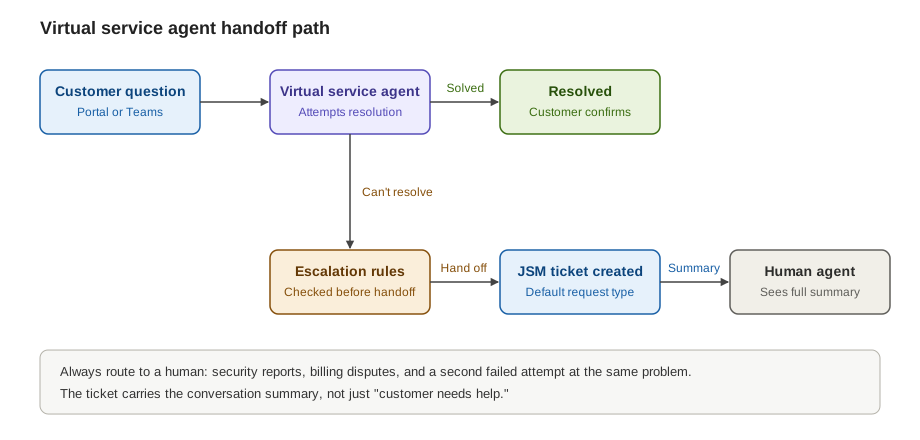
Figure 1 (file: jsm-virtual-agent-handoff-flow.svg): The handoff path from customer question to human agent, with escalation rules applied on the way.
If you’re still deciding how much autonomy customer-facing agents should have, our research on autonomous customer support agents looks at which systems have made it into production and where mistakes have done the most damage.
Rovo agents in the help center
Rovo agents bring automated help to the front of your help center. They give customers instant help from the moment they land on your help center home page. Three constraints to know up front. Only one Rovo agent can be displayed at a time. Customers need a Jira Service Management user or customer role to use one. And Rovo agents are currently only available in JSM portals for Atlassian accounts. Fresh terminology for automation rules and components +2
Configuration decides how useful the agent is. You can add up to five skills to an agent, and a Raise a Request skill routes tickets to the right request type and prefills required fields across as many as 50 JSM spaces. That routing skill is what turns a helpful answer into a ticket that arrives complete, which saves your agents the back-and-forth.
Before any of this works, your organisation admin has to turn on AI for the site.
Check the plan before you promise anything
Packaging is where teams get caught out. Rovo usage is metered per user. Atlassian’s pricing page lists 25 Rovo credits per user per month on Standard, 70 on Premium, and 150 on Enterprise.
The virtual agent is less clear. Atlassian’s pricing page says customers on Service Collection Standard, Premium, and Enterprise plans can run 1,000 virtual agent assisted conversations per month at no additional billing cost. Many third-party guides say the virtual agent is limited to Premium and Enterprise. Atlassian’s documentation says virtual agents are available to all account types with portal access, which describes who can use them, not which plan includes them. Before you commit to a feature, confirm your tier in your own admin settings and on the current pricing page.
Jira Service Management Pros Based on User Reviews
Reviewers consistently highlight JSM's integration capabilities, ticket organization, and flexibility.
1. Strong integration with Jira and Confluence
One of JSM's biggest advantages is its connection to Atlassian's existing products. Support requests can be linked to engineering work in Jira, while Confluence can serve as a knowledge source for internal teams and customers. This is especially useful when a service request requires input from developers.
For example, an IT support agent can link a reported software issue to the development team's work without manually copying information between separate tools.
A September 2026 Capterra review specifically praised this connection between service requests and engineering work.
Best for: IT, engineering, and operations teams already using Jira or Confluence.
2. Configurable ticket management and workflows
JSM supports queues, request types, service-level agreements (SLAs), forms, and custom workflows. Businesses can organize incoming requests according to priority, department, issue type, or escalation requirements. Reviewers appreciate the ability to adapt these processes to how their teams operate. However, this flexibility also creates additional administrative work, especially when workflows become complicated.
3. Automation reduces repetitive work
JSM allows teams to automate activities such as ticket assignment, status updates, and routing. In an August 2026 Capterra review, an enterprise architect estimated that automated queues, SLAs, and workflows reduced time spent on routine tracking and status-related work by approximately 30%. That is one reviewer's estimate, not a measured industry benchmark. The practical benefit depends on how repetitive a team's requests are and how well automation rules are configured.
4. Useful for structured IT service operations
JSM combines request management with incident, problem, change, and asset-management capabilities. This makes it relevant to organizations managing IT services across multiple departments. Teams can coordinate incidents, assign responsibilities, track service issues, and maintain records of changes. Advanced capabilities are plan-dependent, so buyers should check the pricing tiers before assuming everything is included.
Jira Service Management Cons and Common Complaints
Despite its positive ratings, JSM has recurring weaknesses that potential buyers should consider.
1. The learning curve can be steep
Configuration complexity is among the most common complaints. JSM offers substantial control over workflows, permissions, forms, and automation. However, users without Jira administration experience may struggle to configure these features. Some reviewers describe the interface as straightforward for everyday ticket handling but harder to manage when building advanced workflows. A September 2026 Capterra reviewer described the platform as flexible and effective while highlighting the number of configuration options as a challenge.
What this means for buyers: Factor in onboarding, administrator training, and ongoing configuration time. Subscription price alone won't reflect the entire implementation cost.
2. Pricing increases with advanced requirements
JSM offers a free tier, but important ITSM and AI capabilities require higher subscription plans. Standard is listed at $21.50 per agent per month, while Premium is $55.28 under Atlassian's displayed calculator settings. Premium costs approximately 2.57 times as much per agent. This becomes significant when organizations need advanced incident management, change management, or the virtual service agent. Businesses should calculate costs using their expected agent count and required features before purchasing.
3. Advanced reporting and automation may require additional work
Although reviewers appreciate JSM's automation and reporting capabilities, some describe limitations when building more complicated workflows or generating specialized reports. The original research highlights complaints about custom SLA reporting, automation restrictions, and CMDB functionality compared with certain enterprise ITSM platforms. These observations are based on individual reviews rather than controlled product comparisons. Teams with complex reporting or configuration-management requirements should test those capabilities using their own data.
4. Third-party integrations can add costs
JSM integrates naturally with Atlassian products, but some third-party requirements may involve Marketplace applications or additional licenses. Organizations using multiple external tools should check which integrations are native, which require paid applications, and which need custom API work. For businesses with extensive existing software systems, integration maintenance can become a meaningful part of the total cost.
Pricing: what each plan includes
JSM is now sold only inside Atlassian’s Service Collection, a bundle that also includes Customer Service Management, Assets and Rovo. Atlassian’s licensing page says the apps cannot be bought separately and that existing customers are being moved into the collection.
The prices below are what Atlassian’s pricing page showed on 2 November 2026 at its calculator’s default settings. Per-agent rates change with agent count and billing cycle, so confirm the figure for your own team in Atlassian’s calculator.
Plan | Price per agent per month | What it adds |
|---|---|---|
Free | $0 for up to 3 agents | Portal, email and chat channels, forms, workflows and queues, AI-driven reporting, an embedded knowledge base, 1,250 automation steps per subscription per month, community support |
Standard | $21.50 | Rovo agents, search and chat; Assets with 5,000 objects; custom-branded help center; audit logs and multi-region data residency; 3,000 automation steps per user per month; 250 Rovo credits per user per month |
Premium | $55.28 | Virtual service agent; advanced incident and problem management; change management and deployment gating; AIOps; 99.9% uptime SLA; 24/7 premium support; 50,000 Assets objects; 6,500 automation steps; 700 Rovo credits |
Enterprise | Contact sales, annual billing only | Status pages, up to 150 sites, Atlassian Guard Standard for SSO and SCIM, advanced analytics, 500,000 Assets objects, 9,500 automation steps, 1,500 Rovo credits |
Several costs sit outside the plan price. SSO on Standard and Premium needs an Atlassian Guard subscription. Assets objects above the included allowance start at $0.02 per object per month, and virtual service agent conversations above the included 1,000 per month start at $0.30 each.
As an illustration, Premium costs about 2.6 times Standard at these list prices, so a 10-agent desk would pay roughly $215 a month on Standard against $553 on Premium. That is arithmetic on the rates above, and your actual rates depend on agent count and billing cycle. The question to settle early is whether you need change management or advanced incident and problem management, because those features are what move a team from Standard to Premium.
Atlassian offers a 14-day free trial of Standard or Premium, with an extension to a maximum of 30 days on request.
JSM’s AI features and what reviews say about them
None of the five strengths or five weaknesses G2 summarizes concerns AI, so there is little user evidence yet on how JSM’s AI performs in production. What is documented is the packaging:
Rovo agents, search and chat arrive with Standard. Rovo usage is metered in credits per user per month: 250 on Standard, 700 on Premium and 1,500 on Enterprise.
The virtual service agent, which provides AI-powered conversational support, is included from Premium. Atlassian includes 1,000 assisted conversations per month (or 12,000 per year) and charges from $0.30 per assisted conversation beyond that.
An assisted conversation counts whenever it matches an intent, whether the agent resolves it or escalates it, and also when an AI answer resolves it or the customer abandons it. Conversation volume, not resolutions, drives the meter.
Agentic features raise the stakes compared with a chatbot that only answers questions. An agent that can route work, create tickets or hand a case to a person needs clear permissions and a handoff that keeps the conversation context. Test what happens when the agent cannot finish a request before you trust it with customers. Our research on autonomous customer support agents looks at which systems have reached production and where mistakes have done the most damage.
Check your data settings before rolling out AI
Since 17 August 2026, Atlassian has used customer metadata and, depending on settings, in-app data from Jira, Confluence and Jira Service Management to improve its apps and AI, according to its data contribution settings documentation. Reporting on the policy describes in-app data as including Jira issue titles, descriptions and comments and Confluence page content, as Let’s Data Science summarizes it. Defaults follow the highest active plan in your Atlassian organization, trials included:
Plan | Metadata contribution | In-app data contribution |
|---|---|---|
Free and Standard | Always on, cannot be changed | On by default, can be switched off |
Premium | Always on, cannot be changed | Off by default, can be switched on |
Enterprise | On by default, can be switched off | Off by default |
Atlassian also excludes some organizations from data contribution because of compliance requirements, including HIPAA. An org admin should open Security, then Data contribution, in Atlassian Administration and confirm the settings for each product. Record the setting, the date and who checked it so the configuration survives staff changes. Treat training and access as separate questions, because opting out of training does not change which spaces an AI agent can read. Keep sensitive HR, legal and security content out of any knowledge source the agent can reach.
Who should choose Jira Service Management
The reviews and documented plans point to a fairly clear fit.
Choose JSM if your team already uses Jira or Confluence, since integration is among the most cited strengths. It also fits if someone can own configuration, and if you need incident, problem and change management and can budget for Premium.
Look at other tools first if you are a small team with no admin and want a help desk working immediately, because setup is the most common complaint. Compare alternatives if you need a deep CMDB, which the critical Gartner review flags, or if cost predictability at large scale matters most. G2 lists Freshservice, ServiceNow IT Service Management and ManageEngine ServiceDesk Plus as top-rated alternatives, and our customer support category puts help desks and AI resolution layers side by side.
How to test JSM before you commit
Pull 90 days of tickets, group them by request type, and mark which ones need change, problem or advanced incident handling. That decides whether Standard is enough.
Start the free trial and load real request types, including awkward ones such as a message with two problems in it.
Give the person who would administer JSM one task: build a request type, a queue, an SLA and an automation rule, and record the hours. Reviews suggest this is where the learning curve bites.
Price your actual scenario: agent count at your plan, SSO through Guard, Assets above the allowance, and virtual service agent conversations above 1,000 a month.
If you plan to use AI, fix the knowledge base first, because two conflicting policies produce confidently wrong answers. Write explicit escalation rules and make sure humans receive the conversation summary. Then track deflection rate, escalation rate, reopen rate within seven days, and satisfaction scored separately for agent-handled and human-handled conversations. A rising deflection rate alongside a rising reopen rate means the agent is closing conversations, not resolving them.
To size the benefit, suppose a desk handles 600 tickets a month and 180 fall into five repetitive request types. If the agent resolves 60% of those without a human, 108 tickets never reach an agent. At six minutes each, that is about 11 hours of agent time a month. These figures are hypothetical, but the arithmetic gives you a scale to weigh against the cost of Premium.
Questions
Frequently asked questions
Is Jira Service Management worth it in 2026?
Jira Service Management is worth considering for IT teams that need ticket management, workflow automation, SLA tracking, and integration with Jira and Confluence. However, smaller teams with simple support requirements should compare its setup effort and subscription costs with other help desk tools.
What are the biggest disadvantages of Jira Service Management?
The most common complaints include a steep learning curve, complex initial setup, rising subscription costs, and limitations in advanced reporting. Teams without a dedicated administrator may find it difficult to configure and maintain complex workflows.
Is Jira Service Management suitable for small businesses?
Yes. Jira Service Management offers a free plan for up to three agents, making it accessible to small teams. However, businesses needing quick setup and minimal administration may find simpler help desk alternatives easier to manage.
How much does Jira Service Management cost per month?
As of November 2026, Jira Service Management offers a Free plan, Standard at $21.50 per agent per month, and Premium at $55.28 per agent per month under Atlassian's displayed pricing settings. Enterprise pricing requires a custom quote. Actual costs depend on team size, billing terms, and additional features.
Does Jira Service Management include AI-powered customer support?
Yes. Jira Service Management includes Rovo AI capabilities from the Standard plan, while Premium adds a virtual service agent for conversational support. Businesses can use these features to assist with service requests, retrieve information, and automate supported workflows, subject to plan limits and configuration.
Is Jira Service Management better than Freshservice or ServiceNow?
It depends on your requirements. Jira Service Management is particularly suitable for teams already using Atlassian products. Freshservice is worth evaluating for teams prioritizing simpler ITSM administration, while ServiceNow is a strong candidate for complex enterprise service operations. Compare functionality, implementation effort, and total costs before deciding.
Can Jira Service Management replace a traditional help desk?
Yes. Jira Service Management supports ticketing, service requests, SLAs, automation, knowledge management, and incident handling. It can replace a traditional help desk for many IT support teams, but organizations should check whether its workflows, integrations, and pricing meet their requirements before migrating.
Final verdict
For a team already on Jira or Confluence, with an admin and a need for incident, problem and change workflows, JSM’s ratings and documented features make it a sensible front-runner. Budget for Premium if change management matters, check the data contribution settings, and run the trial on your own tickets before you sign.
Teams that need fast setup without an admin, a deep CMDB or predictable costs at large scale should compare Freshservice, ServiceNow and ManageEngine first. Ratings and prices both change, so recheck them on the platforms linked above before you decide.
WebTechOS accepts no payment for coverage, placement or scores. Where a piece references pricing, it reflects published list rates at the date shown.
Keep reading
All insights →Best AI chatbot for property management FAQs in 2026
Compare 7 AI chatbots that answer tenant and prospect FAQs for property managers, with pricing, PMS fit and setup tips. Updated for 2026.
8 Best CrewAI Alternatives for Building Multi-Agent Systems
8 real CrewAI alternatives for multi-agent systems, including LangGraph and YourGPT, with features and pricing verified from each company’s own site.
How to Turn a Blog Post into a Video with AI (Step by Step)
Learn blog to video with AI. Turn a post into a video from a link or a document, with the real costs, limits, and fixes covered.
Claude vs Grok: Which AI Is Better After Real Testing?
We ran Claude and Grok through 7 real tests, research, coding, writing, reasoning, and pricing, to see which AI actually performs better.