Customer Service Sentiment Analysis Tools: The 2026 Buyer's Guide
customer service sentiment analysis tools compared on G2 ratings, real pricing, and what each one does with a negative signal. 2026 picks.
14 Sept 2026·16 min read·General
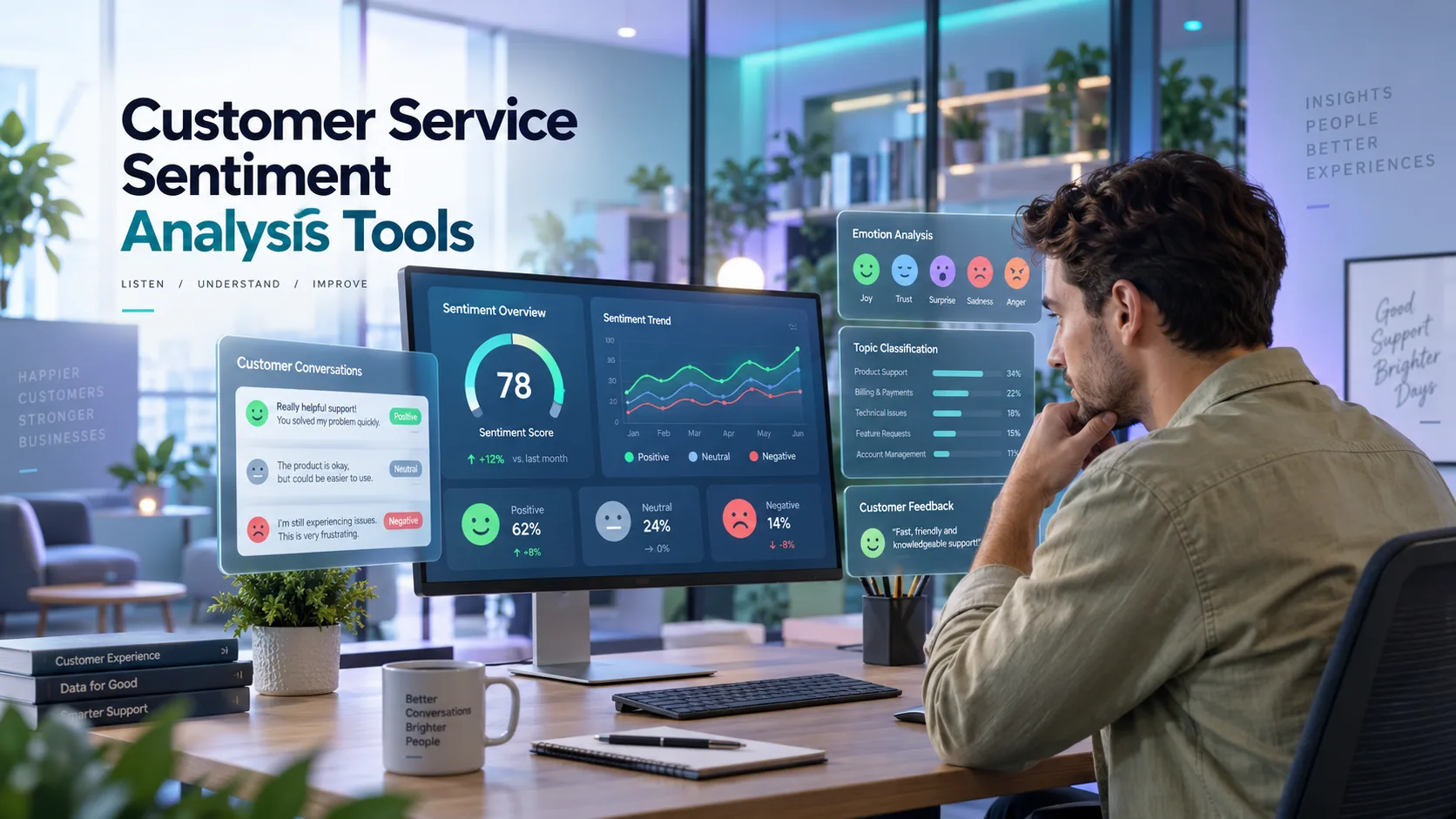
Customer service teams already know their CSAT number is incomplete. What most don't know is how much they are missing. A support queue can carry a 4.4 average CSAT and still be quietly bleeding renewals, because CSAT only hears from the fraction of customers who click through a post-ticket survey, usually somewhere between one in ten and one in seven, and that self-selected group skews toward the delighted and the furious. Everyone cooling off in between never shows up in the number.
Sentiment analysis tools exist to close that gap. Instead of scoring the handful of people who rated their ticket, they read the ticket itself, and every other one behind it, so a slide from warm to indifferent shows up in a trend line weeks before it shows up in a churn report.
The category has its own blind spot, though. Nine of the twelve tools in this guide won't quote a price without a sales call first, and "sentiment analysis" gets stretched to cover everything from a $20-a-seat helpdesk add-on to a six-figure enterprise suite that treats sentiment as one module among many.
We checked twelve tools across five buying tiers against their G2 ratings, review volume, and whatever pricing could actually be confirmed, so you can tell which tier matches your ticket volume and your budget rather than the tier a sales deck is steering you toward.
What "Sentiment Analysis" Actually Covers in Support
Vendors use "sentiment analysis" as a catch-all, so it's worth knowing what a given tool is scoring before a demo convinces you it does all of this. Most tools on the market work in four layers, each one answering a different question than the last.
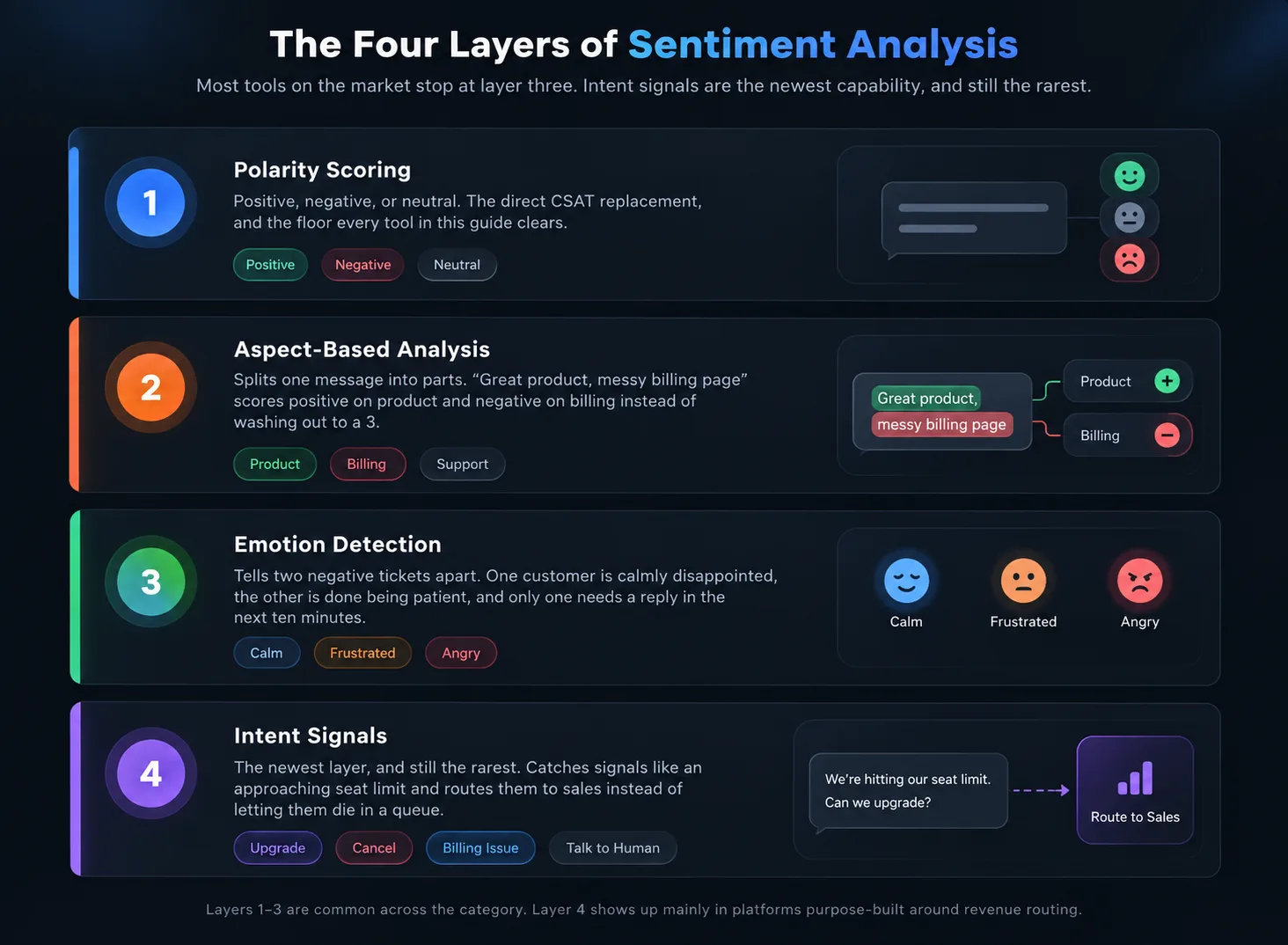
1. Polarity Scoring
This score is the floor, a message rated positive, negative, or neutral, sometimes on a finer scale. It's the direct CSAT replacement, and on its own it's still just a trend line, useful for noticing that a queue is souring but not for explaining why.
2. Aspect-Based Analysis
This layer answers the question of why. Take a ticket that reads "the product's great, but your billing page is a mess." Scored as one block, that's a wash, an unhelpful 3 out of 5 that tells nobody anything. When scored by aspect, the feedback comes back strongly positive for the product and strongly negative for billing. A tool worth paying for routes those two halves to two different teams instead of averaging them into nothing.
3. Emotion Detection
This feature works on a layer under that. Two negative tickets can carry an identical polarity score and mean entirely different things. One customer is calmly disappointed, the other is done being patient, and emotion detection is what tells a team which one needs a reply in the next ten minutes rather than the next business day.
4. Intent Signals
This layer is the newest layer, and the one still missing from most of what's on the market. "We're about to hit our seat limit" isn't a complaint at all, it's an expansion signal, and a tool built to catch it routes the ticket to a salesperson instead of letting it die in a support queue.
Most of what ships as "AI sentiment analysis" in 2026 covers the first three. Intent routing into revenue teams is still mostly reserved for platforms purpose-built around it, and that turns out to be one of the clearest lines separating the categories below.
What to Check Before You Sign Anything
Every vendor demo looks good. Here's where the differences actually show up once you're a paying customer.
Where does the signal live once it's scored? A dashboard that nobody opens after week two is the most common failure mode in this category. Ask whether a negative sentiment spike can trigger an alert, a Slack message, or a CRM field update on its own, or whether someone has to go looking for it.
What's the accuracy on your kind of text? Sarcasm, mixed sentiment in one message, and industry jargon all trip up models trained on generic text. Ask for accuracy numbers on a sample of your tickets, not the vendor's benchmark dataset.
Is pricing public or a black box? Most of this category hides pricing behind a sales call. Budget an extra week for procurement and ask upfront what triggers a billable event, as usage-based and per-resolution models can vary significantly between the demo and the invoice.
Does it replace something or sit next to it? A tool that lives inside your existing helpdesk is one less system to maintain. A standalone platform usually sees more calls, social interactions, reviews, and surveys, but it requires an integration to keep it running.
How much history do you need before it's useful? Aspect-based and intent models generally need a few weeks of your own tagged data to get past generic accuracy. Ask what week one actually looks like, not just the steady state the case study shows.
Our own procurement checklist for AI tools covers the contract-level version of this list, which is worth a read before any call with sales.
The Options, Grouped by Where You'd Actually Deploy Them
Five categories, roughly in order of how much of your stack you'd have to touch to adopt them. Start with whichever one matches where sentiment data would actually live for your team, not the one with the flashiest demo.
1. Already in Your Helpdesk
If you're using Zendesk, Intercom, HubSpot Service Hub, or Front, please check what you're already paying for before purchasing anything new. All four now ship sentiment scoring inside their reporting, and for a team that just wants a trend line and doesn't need cross-channel aggregation or revenue routing, that's often enough.
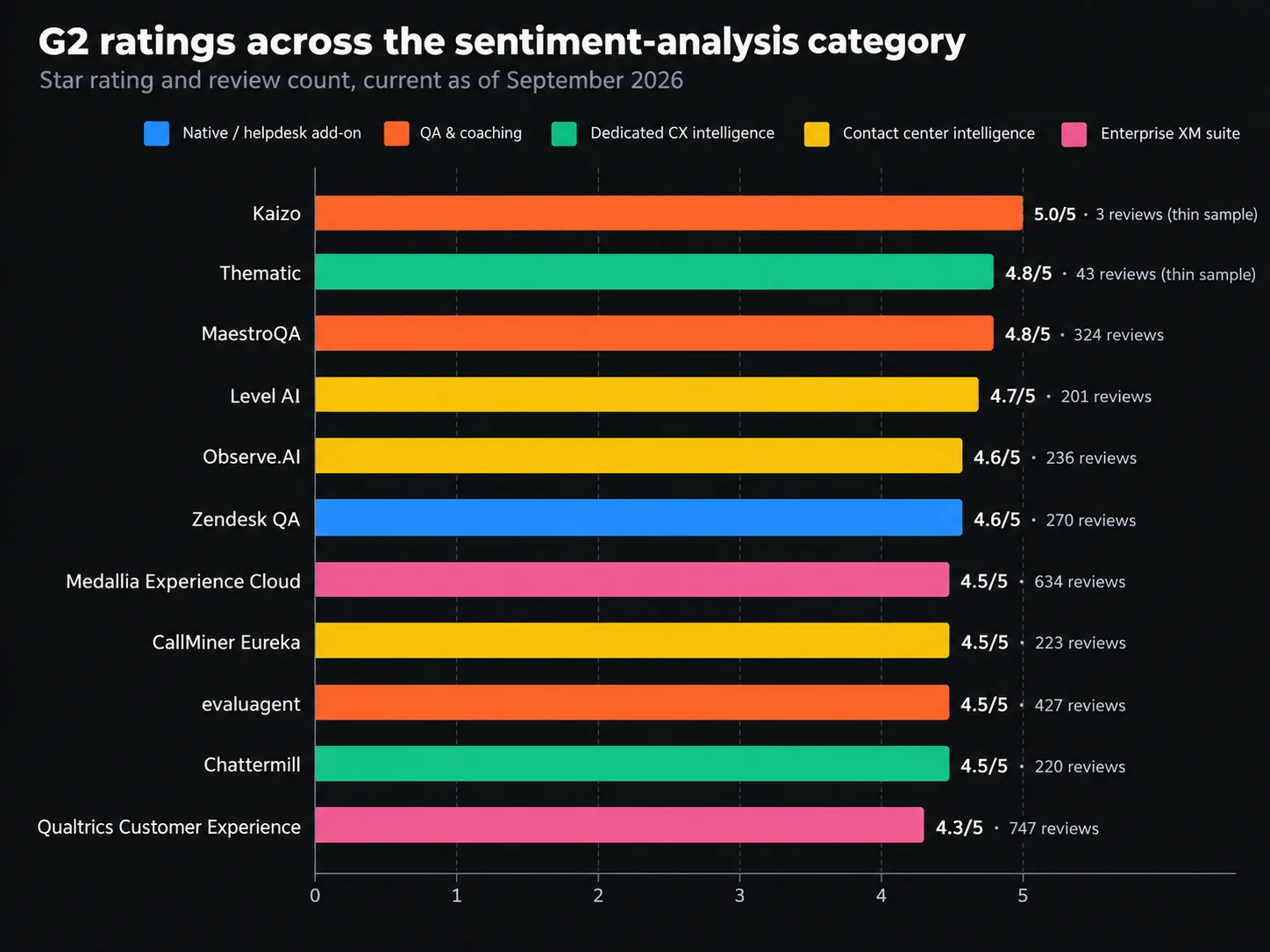
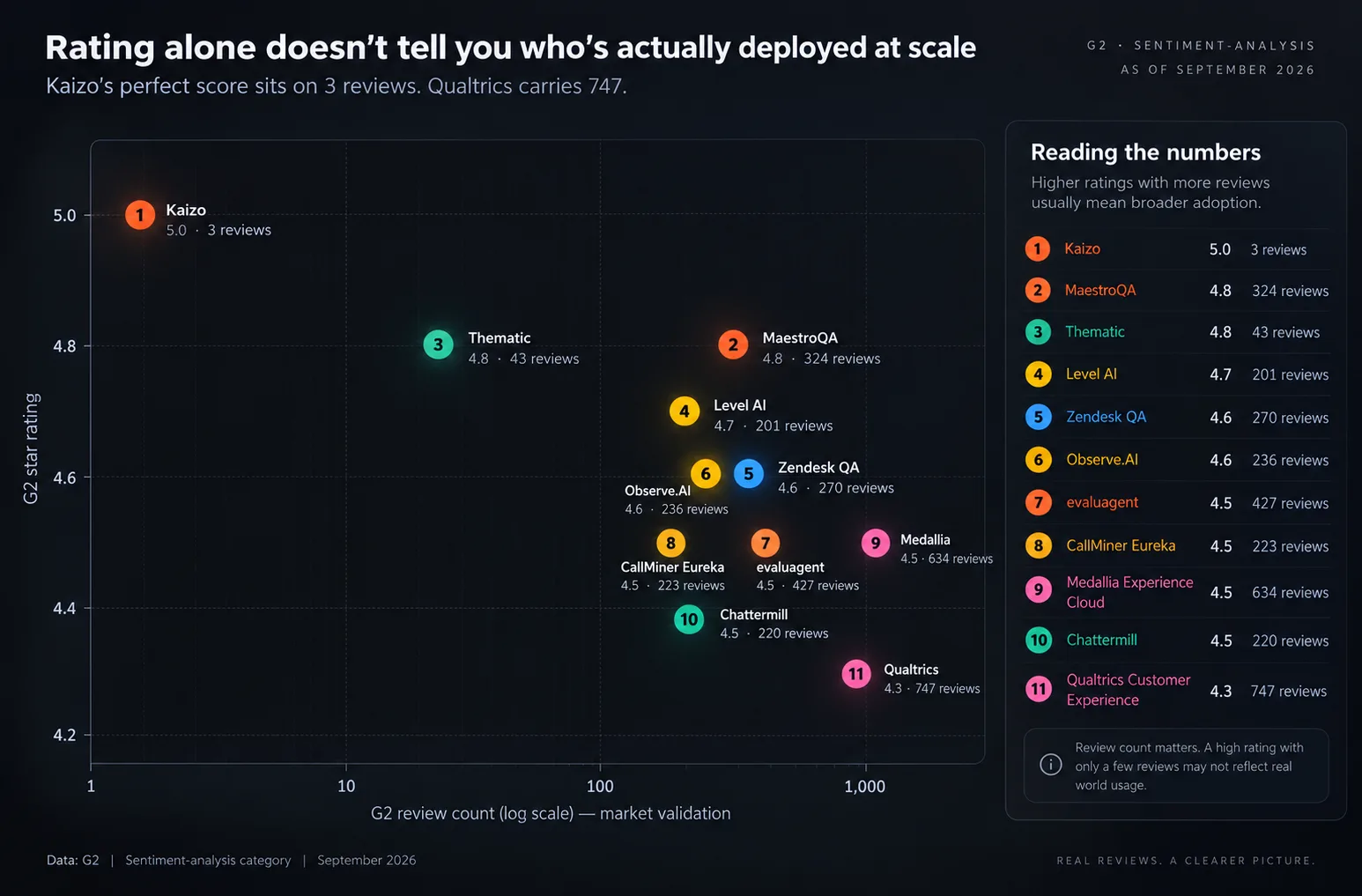
Zendesk QA (formerly Klaus) is the most fully built-out version of this. It auto-scores 100 percent of conversations across human and AI agents, flags outliers by sentiment rather than making a QA manager sample 2 percent of tickets by hand, and surfaces customer intent before an agent replies. It's a $35-per-agent-per-month add-on on top of a Suite plan, not included at any base tier. On G2 it sits at 4.6 out of 5 from around 270 reviews, and the most common complaint isn't accuracy, it's that scoring configurability feels thinner than a dedicated QA specialist tool once you're past the basics. If the seat and add-on math on Zendesk itself is the sticking point rather than the QA layer, we've also tested six AI-native alternatives to it on the same basis.
If you're still deciding between Zendesk and Intercom as your base platform, our head-to-head on outcome-priced AI resolution versus the enterprise system of record covers where each one's native reporting is stronger, and our full customer support category has the rest of the field ranked side by side.
Who this fits: any team under roughly 30 agents that hasn't outgrown a single helpdesk yet and wants sentiment visibility without a second vendor contract.
2. QA and Coaching Platforms With Sentiment Built In
This category treats sentiment as an input to agent coaching, not a standalone metric. It's the right fit once "we should look at our sentiment trends" turns into "we need to know which agents need help this week."
MaestroQA automates quality scoring across 100 percent of voice, chat, and email interactions, with sentiment and keyword detection feeding into coaching workflows rather than a static report. It holds a strong 4.8 out of 5 on G2 from 324 reviews, the highest of any tool in this guide. Pricing is quote-only. Transaction data puts small teams (5 to 25 agents) between $6,000 and $18,000 a year, which works out to roughly $20 to $60 per agent per month depending on tier and interaction volume.
Kaizo takes a gamification-first approach, with real-time sentiment plus a proprietary Empathy Score on every ticket, tied to missions, leaderboards, and coaching goals rather than a compliance-style scorecard. Its Growth plan runs $20 per user a month, and it currently integrates with Zendesk only, with Salesforce support planned. On G2, Kaizo has only a handful of verified reviews, too thin a sample to treat as a settled verdict, though the ones on record average a perfect 5 out of 5.
Worth a specific mention. evaluagent is one of the only vendors in this entire category that publishes its pricing outright, starting at roughly $20 per user a month with a 4.5 out of 5 rating from over 400 G2 reviews. If getting an actual number without a sales call matters to you, it earns a spot on the shortlist for that reason alone.
Who this fits: support orgs of 20 to 200 agents where QA and coaching, not board-level CX reporting, are the primary use case.
3. Dedicated Feedback and Sentiment Intelligence Platforms
These sit next to your helpdesk rather than inside it, pulling in tickets, surveys, reviews, social mentions, and call transcripts to find sentiment patterns no single channel would show on its own.
Chattermill is the clearest example. It runs aspect-based sentiment across 99-plus languages, unifies it with NPS and CSAT data, and ties theme-level findings directly to satisfaction and revenue metrics rather than leaving them as a word cloud. It holds a score of 4.4 to 4.5 out of 5 on G2 from around 220 reviews, plus similar scores on Capterra and Gartner Peer Insights, for a total of roughly 350 verified reviews across the three. Pricing is custom and based on data volume and source count, with no published starting figure, though interestingly nearly half its G2 reviewers report mid-market rather than enterprise company sizes despite its enterprise-scale positioning.
Thematic is the leaner alternative in this bracket. It leans harder on automated theme discovery, surfacing what customers are actually talking about before you've thought to tag it, rather than requiring a taxonomy to be built up front. It rates 4.8 out of 5 on G2 from 43 reviews, a strong score but still a thin sample compared to Chattermill's roughly 350 across review sites. Pricing isn't published, but Vendr's transaction data puts typical annual spend between $15,000 and $46,000, averaging around $35,000, well below what most enterprise XM suites run.
Who this fits: product, CX, or VoC teams that need sentiment tied to business outcomes across more channels than a helpdesk alone captures and that have a budget for a platform rather than an add-on. Chattermill has the deeper review base and the more built-out revenue-metric tie-ins. Thematic is the one to demo first if faster time-to-insight matters more than an established track record.
4. Contact Center Conversation Intelligence
If most of your volume is phone calls rather than tickets, the calculus changes. These platforms are built around transcription and speech analytics first, sentiment second.
Observe.AI transcribes and scores 100 percent of voice interactions, claims roughly 95 percent accuracy on sentiment and transcription in its own published testing, and layers real-time coaching prompts on top of post-call analysis. It carries a strong 4.6 out of 5 on G2 from around 236 reviews. Pricing isn't published, but third-party estimates based on G2 and AWS Marketplace data put a 100-seat deployment between $60,000 and $180,000 a year, and a 100-seat minimum applies before you can even get a quote.
CallMiner Eureka plays in the same space with a heavier lean toward compliance, which is why it shows up disproportionately in financial services and insurance. It rates 4.5 out of 5 on G2 from 223 reviews, with reviewers consistently praising how it connects a sentiment spike back to a root cause rather than just flagging that one exists. Like observe ai, pricing is quote-only and scales with seats and interaction volume, and implementation complexity is the most repeated complaint.
Level AI is worth a look as a third option in the same bracket. It edges out both on G2 at 4.7 out of 5 from 201 reviews, with reviewers citing an easier implementation than either of the above, though it has less published detail on pricing and enterprise deployment size to compare against.
Who this fits: contact centers where voice is the dominant channel and compliance monitoring matters as much as sentiment. If the goal is closer to an autonomous agent that acts on sentiment mid-conversation rather than scoring it after the fact, that's a different buy. Decagon sits in that adjacent category of high-volume resolution agents rather than analysis tools.
5. Enterprise Experience Management Suites
At the top of the market, sentiment analysis stops being a standalone purchase and becomes one module inside a much larger experience management platform.
Qualtrics is the deepest survey-and-research engine of the three. Sentiment analysis here runs through XM Discover, its text-analytics layer built on the Clarabridge acquisition, feeding into the same platform as NPS, CSAT, and custom research programs rather than standing alone as a separate purchase. The 4.3 out of 5 rating from 747 reviews belongs to the broader Qualtrics Customer Experience listing on G2, not to XM Discover specifically, which is worth knowing since the two get sold and demoed as one platform but reviewed somewhat separately. Median annual spend sits around $28,500 according to Vendr's transaction data, with a real range from roughly $6,500 for a basic survey tier up past $126,000 for a full XM deployment.
Medallia (Experience Cloud) is the more operational counterpart, built for real-time action and frontline routing rather than research depth, and it rates 4.5 out of 5 on G2 across 634 reviews of its core product. Pricing is enterprise-only and unpublished, and industry estimates put the average enterprise-tier contract north of $500,000 a year. Worth knowing before signing a multi-year deal here. In April 2026, Thoma Bravo moved to hand Medallia's ownership to its creditors in a debt restructuring, reported across multiple financial outlets that spring. That doesn't change what the product does today, but it's a fair question to put to sales before committing budget for 2027 and beyond.
Sprinklr Service is the third path, built on top of Sprinklr's social listening roots and now extended into full-service case management. It sits around 4.5 out of 5 on G2, though the review count varies depending on which Sprinklr listing you land on, since the company runs several adjacent products under one brand. Reviewers are consistent on the trade-off: strong for organizations that want social sentiment and service sentiment in one Unified-CXM platform, expensive and arguably overbuilt for anyone who doesn't need that breadth.
Who this fits: enterprises already running (or ready to run) experience management as a company-wide program, not just a support-team tool.
Sentiment Analysis Tools Compared
Tool | Category | G2 Rating | G2 Reviews | Starting Price | Best For |
|---|---|---|---|---|---|
Zendesk QA | Native / helpdesk add-on | ~270 | $35/agent/mo add-on | Teams already on Zendesk | |
MaestroQA | QA & coaching | 324 | Quote-based, ~$20 to $60/agent/mo | QA and coaching workflows | |
Kaizo | QA & coaching | 3 (thin sample) | $20/user/mo (Growth plan) | Gamified coaching, Zendesk-only | |
evaluagent | QA & coaching | 4.5/5 | 400+ | ~$20/user/mo (published) | Transparent pricing, fast procurement |
Chattermill | Dedicated CX intelligence | ~220 | Custom, by data volume | Cross-channel VoC and product teams | |
Thematic | Dedicated CX intelligence | 43 (thin sample) | ~$15K to $46K/yr (avg. ~$35K) | Faster theme discovery, leaner setup | |
Observe AI | Contact center intelligence | ~236 | ~$60K to $180K/yr (100-seat minimum) | Voice-heavy support orgs | |
CallMiner Eureka | Contact center intelligence | 223 | Quote-based, enterprise | Compliance-heavy industries | |
Level AI | Contact center intelligence | 201 | Quote-based, enterprise | Easier-to-implement contact center pick | |
Qualtrics Customer Experience | Enterprise XM suite | 747 | ~$6.5K to $126K+/yr | Research-depth CX programs | |
Medallia Experience Cloud | Enterprise XM suite | 634 | Custom, enterprise-only | Real-time frontline action at scale | |
Sprinklr Service | Enterprise XM suite | Varies by listing | Custom, enterprise-only | Social and service sentiment in one platform |
Which One Should You Actually Buy
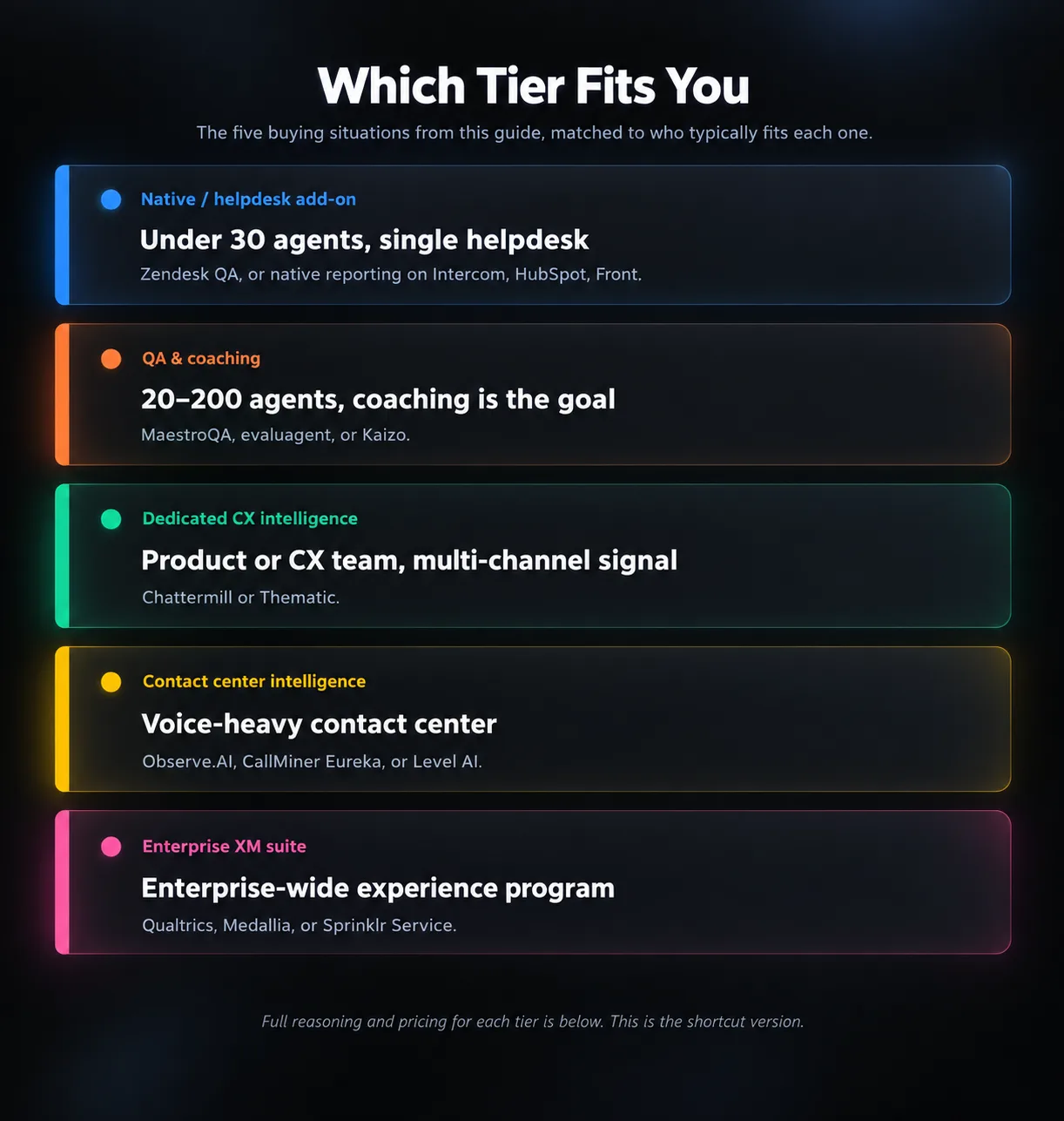
Under 30 agents, single helpdesk. Turn on what you already have. Zendesk QA at $35 a seat is cheaper than any standalone platform's minimum, and if you're on Intercom, HubSpot, or Front instead, check their native reporting before assuming you need to buy anything at all.
20 to 200 agents; coaching is the goal. If you want published pricing and a straightforward buying process, consider MaestroQA or an evaluator. Kaizo if gamified coaching fits your team's culture and you're already Zendesk-only. Our lean AI support stack covers how sentiment and QA tooling typically slot in alongside a smaller team's existing tools.
Product or CX team, multi-channel signals. Chattermill is the clearest fit if support tickets are one input among surveys, reviews, and social mentions, and you need theme-level findings that tie back to satisfaction and revenue rather than a per-ticket score. Thematic is worth demoing alongside it if a faster path to "what are people actually saying" matters more than Chattermill's deeper review base.
Voice-heavy contact center. observer ai or CallMiner for the two most established options, Level AI if ease of implementation matters more to you than either's larger installed base. All three are quote-only, so get the 100-seat minimum question answered before you invest time in a demo.
Enterprise-wide experience program. Qualtrics or Medallia lead this tier, with Sprinklr Service worth a look, especially if social sentiment and service sentiment need to live on one platform. Budget a six-figure annual spend and a multi-month implementation for any of the three. If sentiment and CSAT already feel like they're telling two different stories in your organization, that gap is usually the actual argument for going this route rather than staying at the QA-tool level. It's the same gap we've discussed since deflection stopped being the only metric that mattered.
Questions
Frequently asked questions
What is customer service sentiment analysis?
It's the use of AI and natural language processing to score customer messages, tickets, calls, and reviews as positive, negative, or neutral, and increasingly by specific emotion or aspect, so support and CX teams can spot patterns a single CSAT score would miss.
How is sentiment analysis different from CSAT or NPS?
CSAT and NPS are surveys that only the customers who respond to them show up in, usually somewhere between one in ten and one in seven of the total. Sentiment analysis reads every conversation, including the ones nobody rated, which is why it tends to catch problems earlier.
Do I need a dedicated tool, or does my helpdesk already do this?
If you're on Zendesk, Intercom, HubSpot, or Front, check your existing reporting first. All four now include native sentiment scoring, and for a single-channel support team that just wants a trend line, that's often enough before a separate contract makes sense.
Can sentiment analysis actually predict churn?
Declining sentiment across several tickets from the same account, especially combined with a renewal date coming up or a drop in product usage, is one of the stronger leading indicators available. No tool predicts churn on sentiment alone, but it's a genuinely useful early flag rather than a lagging one.
How much does this software cost?
It ranges from $20 to $35 per agent per month for QA-and-coaching tools bolted onto a helpdesk you already run, up to six figures a year for enterprise experience management suites like Qualtrics or Medallia. Most vendors in the middle of that range don't publish pricing at all, so budget time for a sales conversation.
How accurate is AI sentiment analysis?
Vendors commonly cite 85 to 95 percent accuracy on clear text or audio, and that number drops with sarcasm, heavy jargon, or background noise on calls. Accuracy generally improves once a model has a few weeks of your own tagged conversations to train against, so don't judge a tool on day-one results alone.
Final Verdict
Start with what you already have. If sentiment visibility is the actual question, not coaching or revenue routing, the fastest and cheapest path is checking whether your helpdesk already scores it, and only shopping beyond that once you can name the specific gap a dedicated tool would close.
Past that starting point, the split that matters more than rating or price is whether sentiment needs to change a workflow, a coaching session, an alert, a routed ticket, or just needs to be visible on a dashboard. Most tools in this guide are strong at one of those two jobs. Few are strong at both, and the ones that claim to charge enterprise prices usually to prove it.
The CSAT gap we opened this guide with doesn't close itself. A tool only closes it if someone owns the alert, reads the trend, and acts on what it flags, so the better question before any contract is who on your team will actually do that, not which vendor has the highest G2 score. Our full customer support category has the rest of the field if none of the twelve tools above end up being the right fit.
WebTechOS accepts no payment for coverage, placement or scores. Where a piece references pricing, it reflects published list rates at the date shown.
Keep reading
All insights →Modern Web Performance Optimization Techniques in 2026
INP, AVIF, edge rendering, and AI crawler load: the web performance techniques that actually move Core Web Vitals in 2026
The State of Autonomous Customer Support Agents in 2026
Autonomous customer support agents in 2026: the $3.6B Fin deal, real resolution rates, outcome pricing, and a 16-point vendor checklist.
Comparing Vector Databases for Enterprise: Pinecone vs Qdrant
Pinecone bills per query, Qdrant bills per box. We compare 2026 pricing, compliance, and filtered-search speed for enterprise RAG buyers.
6 Best AI Alternatives to Zendesk in 2026 (Tested and Scored)
Zendesk now bills AI per resolution, not per seat. Compare 6 Zendesk AI alternatives on real pricing, G2 ratings, and resolution rates.