Clay Pricing 2026: Plans, Credits and Hidden Costs
Clay’s 2026 pricing explained: Free, Launch, Growth and Enterprise plans, how Data Credits and Actions work, and the hidden costs that drive up your bill.
14 Nov 2026·8 min read·Insights
Clay's pricing in 2026 goes beyond the monthly subscription fee. With separate charges for Actions and Data Credits, the actual cost depends on how many contacts you enrich, which providers you use, and how often you run automated workflows.
Clay introduced a new pricing structure in March 2026, replacing its older plans with Free, Launch, Growth, and Enterprise. While the starting prices are clear, Data Credit consumption, AI usage, and additional costs can make budgeting difficult.
This article breaks down Clay's 2026 pricing plans, explains how Actions and Data Credits work, and covers the costs you should consider before choosing a plan.
Clay Pricing 2026 at a Glance
Clay rebuilt its entire pricing model on March 11, 2026, and it's a genuinely different structure from what older reviews describe. If you're reading a Clay pricing guide dated before spring 2026, treat it as outdated.
As of the most recent checks against Clay's own pricing page (mid-to-late 2026), the lineup looks like this:
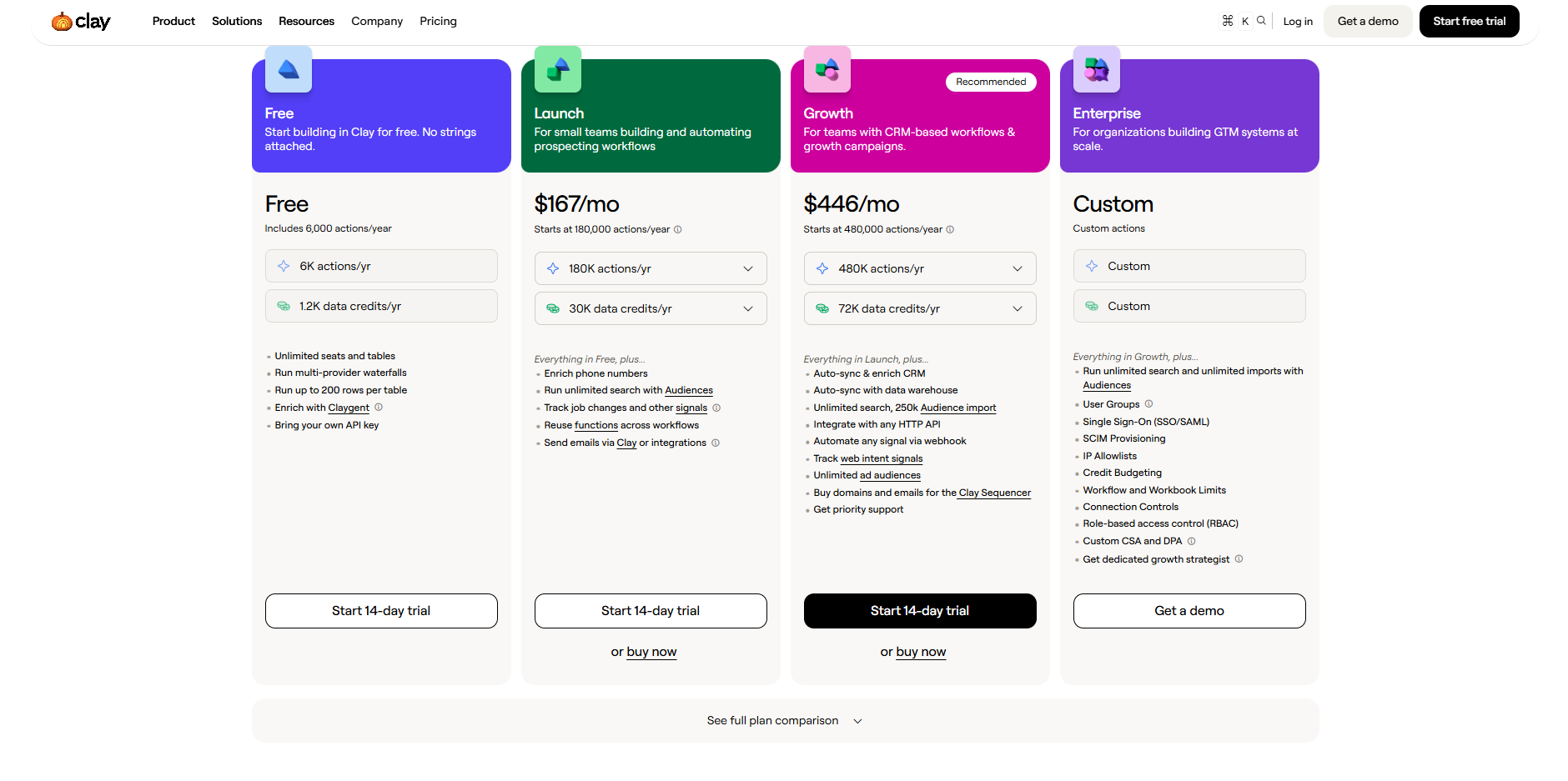
Plan | Monthly billing | Annual billing | Data Credits / month | Actions / month |
|---|---|---|---|---|
Free | $0 | $0 | 100 | 500 |
Launch | $185 | $167 | 2,500 | 15,000 |
Growth | $495 | $446 | 6,000 | 40,000 |
Enterprise | Custom | Custom | Negotiated | Negotiated |
Every plan, including Free, comes with unlimited seats. Clay doesn't charge per user. It charges for what your workspace actually does, which sounds friendlier than seat-based pricing until you realize it means your bill can grow even if your headcount never does.
Annual billing knocks off roughly 10% on both paid plans. That's a real discount, not a rounding error, so it's worth asking about if you're fairly sure you'll stick with a plan for the year.
If you signed up before the March overhaul, you may still be sitting on a legacy plan: Starter at $149 a month, Explorer at $349, or Pro at $800. Clay has let existing customers keep those plans indefinitely, but the window to switch between legacy tiers closed on April 10, 2026. Once you move off a legacy plan, there's no getting back on it.
Clay Free Plan
Clay's Free plan lets users test data enrichment, Claygent, and basic prospecting workflows without paying. However, its limited usage makes it more suitable for testing than regular lead generation.
Key Features
500 Actions and 100 Data Credits per month.
Unlimited seats and tables.
Multi-provider enrichment waterfalls.
Claygent AI enrichment.
Support for personal API keys.
Limitations
Maximum 200 rows per table.
No phone-number enrichment.
No Data Credit top-ups or rollovers.
Limited automation and advanced integrations.
Pricing
$0/month, with 500 Actions and 100 Data Credits included.
Best Fit
Individuals, freelancers, and small teams testing Clay's enrichment capabilities before upgrading to a paid plan.
Clay Launch Plan
Clay's Launch plan is designed for individuals and small teams who are automating their prospecting workflows. It offers higher usage limits than the Free plan, along with phone enrichment, buying signals, and email campaign capabilities.
Key Features
15,000 Actions and 2,500 Data Credits per month.
Up to 50,000 rows per table.
Phone-number enrichment and multi-provider waterfalls.
Job-change signals and company updates.
Email sequencing and recurring enrichment workflows.
Unlimited seats and tables.
Limitations
No automatic CRM syncing or HTTP API integrations.
No web intent tracking or webhook automation.
Data Credit top-ups cost 30% extra.
Unused Actions do not roll over.
Pricing
Monthly: Starts at $185/month.
Annually: Starts at approximately $167/month, billed yearly.
Included usage: 15,000 Actions and 2,500 Data Credits per month at the starting tier.
Best Fit
Freelancers, small sales teams, and agencies managing prospecting workflows with fewer than approximately 1,000 records per month.
Clay Growth Plan
Clay's Growth plan is designed for growing sales and RevOps teams managing CRM-connected workflows and larger prospecting campaigns. It adds advanced integrations, automation, and web intent tracking beyond the Launch plan.
Key Features
40,000 Actions and 6,000 Data Credits per month.
Automatic CRM syncing and enrichment.
HTTP API integrations and webhook automation.
Web intent tracking and advanced audience management.
Data warehouse integrations and priority support.
Up to 50,000 rows per table.
Limitations
Higher starting cost than the Launch plan.
Data Credit top-ups carry a 30% premium.
Unused Actions do not roll over.
SSO, role-based access control (RBAC), and dedicated support require Enterprise.
Pricing
Monthly: Starts at $495/month.
Annually: Starts at approximately $446/month, billed annually.
Included usage: 40,000 Actions and 6,000 Data Credits per month.
Clay Enterprise Plan
Clay's Enterprise plan is designed for large sales and RevOps teams managing high-volume data enrichment and complex workflows. It offers custom usage limits, enterprise-grade security, and dedicated support.
Key Features
Custom Action and Data Credit allocations.
Unlimited bulk enrichment and audience imports.
Single sign-on (SSO) and role-based access control (RBAC).
Data warehouse integrations and Clay API access.
Dedicated Growth Strategist and onboarding support.
Custom Data Credit pricing and usage controls.
Limitations
Requires an annual contract.
No publicly listed fixed pricing.
Costs depend on usage requirements and negotiated terms.
Pricing
Annual: Custom pricing with an annual commitment.
Included usage: Custom Actions and Data Credits based on business requirements.
Clay Hidden Costs and Cost Drivers
Clay's subscription price is only part of the total cost. The amount you spend also depends on how many Actions and Data Credits your workflows consume, the enrichment providers you use, and whether you need additional integrations. Understanding these costs helps prevent unexpected charges as usage increases.
1. Data Credit Top-Ups: Clay charges a 30% premium on one-time Data Credit top-ups. Teams that regularly exceed their included credits may spend more than expected. Upgrading the Data Credit allowance can be cheaper than repeatedly purchasing extra credits.
2. Actions Do Not Roll Over: Unused Actions expire at the end of each billing cycle. Unlike Data Credits, Actions cannot be purchased with one-time top-ups. Teams that exceed their Action allowance must increase their plan capacity.
3. Data Credits Do Not Equal Records: One Data Credit does not equal one enriched contact. Clay estimates that a fully enriched record typically consumes 6 to 20 Data Credits, depending on the requested data and the providers used. Phone numbers, additional enrichment steps, and AI research can increase consumption.
4. Variable AI Usage Costs: AI enrichment does not always have a fixed cost. Some models charge a predictable number of Data Credits per run, while others depend on token consumption. Complex AI research can therefore cost more than basic enrichment, especially across large datasets.
5. External API Costs: Using your own API keys can eliminate Clay's Data Credit charges for supported provider calls, but Actions are still consumed. The external provider bills separately, so lower Clay usage charges do not always mean lower total spending.
6. Feature-Based Plan Upgrades: Some features require a higher plan regardless of usage. CRM syncing, HTTP API integrations, webhooks, and web intent tracking are available on Growth rather than Launch. Teams may need to upgrade for these capabilities even when their Data Credit usage remains low.
7. Email Sequencing Costs: Clay Sequencer consumes one Action per lead enrolled in a campaign. Adding AI-generated email snippets can also consume variable Data Credits per lead. Large campaigns with personalized messages can therefore use both allowances quickly.
8. Annual Billing Commitment: Annual billing offers a lower monthly equivalent but requires a longer financial commitment. Teams with changing prospecting volumes should estimate their annual usage before committing, particularly because unused Actions do not roll over.
Clay's total cost depends on workflow complexity, enrichment volume, AI usage, and required features, not just the advertised subscription price.
Real Clay Cost Scenarios
Clay's actual cost depends on the number of contacts, enrichment steps, and automation requirements. Here are three scenarios showing how different workflows affect pricing.
1. Small Prospecting Workflow
Small teams enriching a few hundred contacts with email data and limited AI research may find the Launch plan sufficient. Data Credits are likely to be the main constraint if multiple enrichment providers are used.
Example: A team enriching 300 contacts per month with verified emails and basic company details, without CRM syncing.
2. Growing RevOps Team
Teams managing thousands of contacts often need CRM syncing, buying signals, and recurring enrichment. The Growth plan may be necessary for these features, even if their usage fits within a lower plan's limits.
Example: A RevOps team enriching 3,000 contacts monthly, updating CRM records, and monitoring job-change signals.
3. Research-Heavy Outbound Team
High-volume outbound teams using multiple data providers, phone enrichment, Claygent research, and email sequencing can consume both Actions and Data Credits quickly. Data Credit usage may become the biggest cost driver, requiring a larger allowance or additional purchases.
Example: An outbound agency researching 5,000 prospects monthly with phone numbers, AI-generated personalization, and automated email sequences.
Choosing the Right Clay Plan
The right Clay plan depends on your prospecting volume, automation needs, and required integrations. Here's how to choose based on your team's workflow.
Plan | Best Fit | When to Choose |
|---|---|---|
Free | Individuals and beginners | Testing data enrichment, Claygent, and basic workflows with limited usage. |
Launch | Freelancers and small sales teams | Running small prospecting campaigns with email and phone enrichment. |
Growth | Growing sales and RevOps teams | Managing CRM integrations, recurring enrichment, webhooks, and advanced automation. |
Enterprise | Large organizations | Handling high-volume enrichment, custom usage limits, security controls, and dedicated support. |
Before choosing a plan, estimate your monthly Actions and Data Credits, then check whether your workflows require features available only on higher tiers. A cheaper plan may not be the most cost-effective option if you regularly need extra credits or additional integrations.
Questions
Frequently asked questions
How much does Clay cost in 2026?
Free is $0/month, Launch starts at $185/month ($167/month billed annually), and Growth starts at $495/month ($446/month billed annually). Enterprise pricing is custom and not publicly listed.
What's the difference between Data Credits and Actions?
Data Credits pay for the actual data Clay pulls from its enrichment providers, like emails, phone numbers, and company details. Actions pay for the platform work itself, such as running a waterfall, syncing to a CRM, or sending through Clay Sequencer. Running out of one doesn't let you borrow from the other.
Does Clay charge per seat?
No. Every plan, including Free, comes with unlimited seats. Your bill scales with how much your workspace enriches and automates, not with how many people are using it.
Do unused Data Credits and Actions roll over?
Actions don't roll over on any plan. They expire at the end of each billing cycle and can't be topped up with a one-time purchase. Data Credit top-ups are possible on paid plans, but they carry a 30% premium over your included rate, which is why upgrading your plan is usually cheaper than repeatedly buying extra credits.
How many Data Credits does it take to fully enrich one contact?
There's no fixed number. Clay estimates a fully enriched record typically consumes 6 to 20 Data Credits, depending on what data you're requesting and which providers you're pulling from. Phone numbers and AI research steps push that number higher.
Does using my API key lower my Clay bill?
It removes the Data Credit charge for that specific provider call, since you're paying the provider directly instead of through Clay's marketplace. It does not remove the Action charge. Clay still counts the run itself as an Action, and the external provider bills you separately.
What happened to Clay's old Starter, Explorer, and Pro plans?
They were retired for new customers in Clay's March 11, 2026 pricing overhaul and replaced by the current Free, Launch, and Growth structure. Customers who were already on Starter ($149/month), Explorer ($349/month), or Pro ($800/month) can keep those plans indefinitely, but the window to switch between legacy plans closed on April 10, 2026.
Conclusion
Clay's pricing depends on more than its monthly subscription. Actions, Data Credits, enrichment providers, and AI usage all affect the total cost. Two teams on the same plan can have entirely unique usage requirements and expenses.
Before choosing a plan, estimate your monthly contact volume, enrichment steps, and automation needs. Start with a small workflow to understand credit consumption, then select a plan that fits your actual usage. Check Clay's official pricing page for the latest rates and limits before committing.
WebTechOS accepts no payment for coverage, placement or scores. Where a piece references pricing, it reflects published list rates at the date shown.
Keep reading
All insights →7 Best HeyGen Alternatives in 2026
Compare 7 HeyGen alternatives for 2026 by price, limits and fit. Synthesia, AI Studios, Colossyan, D-ID, Creatify, VEED and CoAnimator.
8 Best Remotion Alternatives for Programmatic Video in 2026
Remotion’s license or React-only workflow slowing your team? Compare 8 Remotion alternatives for programmatic video, from free engines to no-code APIs.
Best Free AI Tools in 2026 for Work, Video, Writing and Code
Compare the 10 best free AI tools in 2026 for work, video, writing, and code, each reviewed with real free-plan limits, features, and pricing.
Claude Opus vs Sonnet: Which Model Should You Pay For?
Opus 5.5 costs twice what Sonnet 5.5 does. Here's what the extra money buys, with current prices, published benchmarks and a simple way to choose.