Zapier Pricing 2026: What Each Plan Actually Costs
Zapier pricing 2026: see exactly what Free, Professional, Team, and Enterprise cost, how task billing works, and which plan actually fits you.
3 Nov 2026·10 min read·Insights
Zapier is a no-code automation platform that connects the web apps a team already uses, so work moves between them without anyone copying it by hand. You build an automation, which Zapier calls a Zap, from a trigger and one or more actions. A new form submission can add a row to a spreadsheet, post a message in Slack and create a contact in your CRM, all without anyone touching it. Small businesses use it for simple handoffs, and larger teams use it to wire together much of their day-to-day operations.
Zapier bills by usage. Each plan includes a monthly allowance of tasks, and a task is counted every time a Zap completes an action. A Zap with five action steps that runs 200 times in a month uses 1,000 tasks, and most people end up building several of them. That makes the monthly total hard to guess from the plan page alone, and it often comes out higher than expected.
This guide covers what Zapier’s Free, Professional, Team and Enterprise plans cost in 2026 and what each one includes. It explains how tasks are counted, so you can estimate your own volume from the automations you already have in mind. It also covers what happens when you reach your limit and which plan fits different levels of use.
All figures come from Zapier’s pricing page and its official pricing blog, both checked in late October 2026. Zapier changes its plans fairly often, so confirm the current numbers on the pricing page before you buy.
Zapier Pricing at a glance
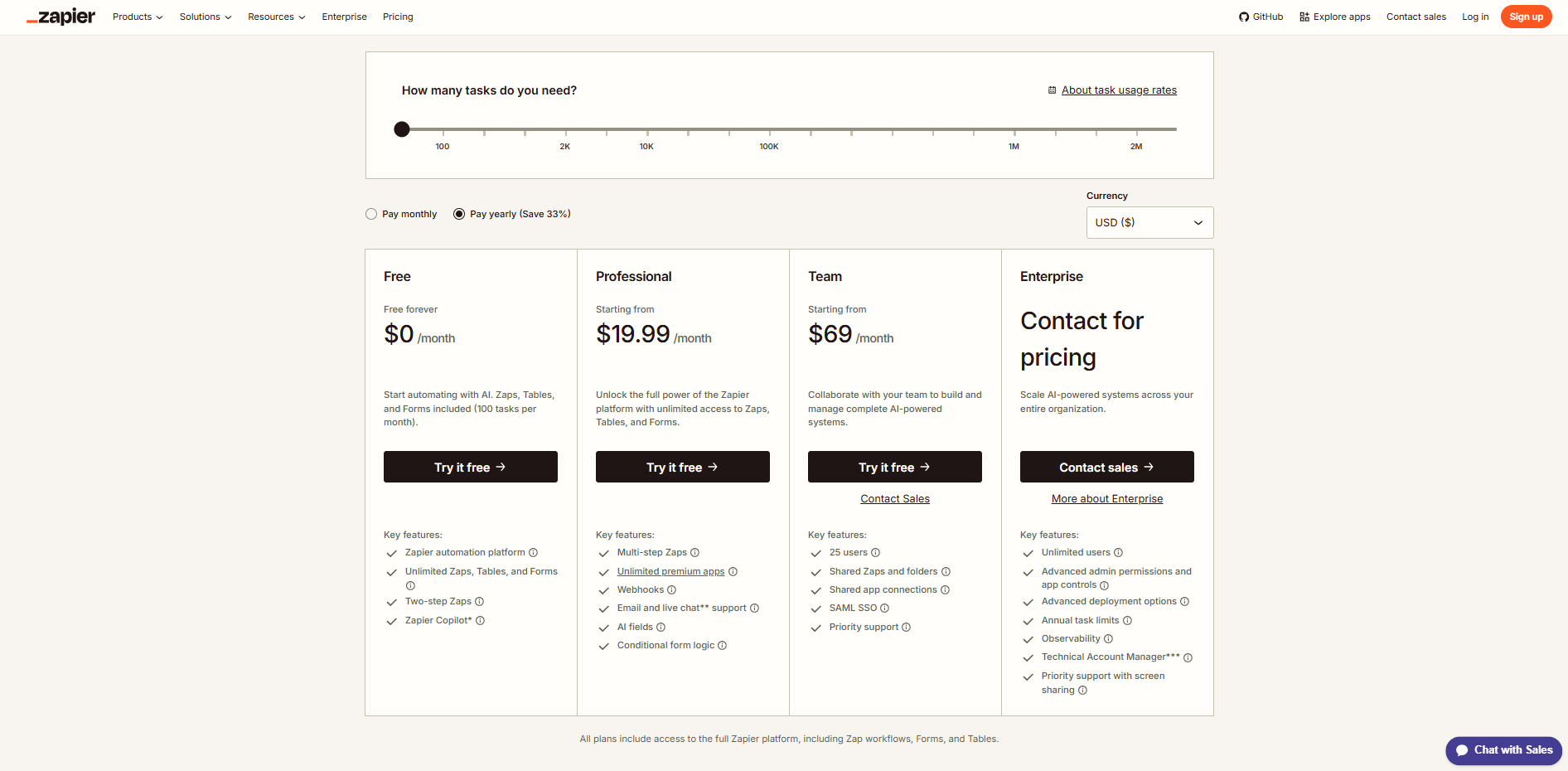
Zapier has four main plans. Three have a published price. The fourth doesn't.
Plan | Price | What it's for |
|---|---|---|
Free | $0/month | Testing automation, 100 tasks/month |
Professional | From $19.99/month (billed annually) | Multi-step workflows, one user |
Team | From $69/month (billed annually) | Collaboration, up to 25 users |
Enterprise | Custom, by quote | Governance and scale across an org |
Those are the entry prices at each plan's lowest task tier. Pricing climbs from there based on how many tasks you need, and that’s where most of the confusion lives.
Zapier’s Pricing Structure
Zapier uses a task-based pricing model, meaning your costs depend on how many actions your automations perform. Each plan includes a monthly task allowance, and the price increases when you need more tasks or advanced features.
Tasks as the Main Billing Unit: A task is counted when Zapier successfully completes a billable action, such as sending an email, updating a CRM record, or adding a row to Google Sheets. Triggers, Filters, and Paths generally do not consume tasks.
Workflow Steps and Task Usage: Multi-step workflows can use several tasks during a single run. For example, if a workflow adds a lead to a CRM, sends a Slack notification, and creates a spreadsheet entry, it consumes three tasks per successful run. Running it 500 times would use 1,500 tasks. Some AI, code, and connector actions have different task rates, so actual usage can vary.
Monthly and Annual Billing: Zapier offers monthly and annual billing, with a 33% discount on annual subscriptions. Annual billing reduces the effective monthly price but requires payment for the full year upfront. Monthly billing costs more but offers greater flexibility.
Pay-Per-Task Charges: When paid users exceed their included task allowance, Zapier's pay-per-task billing allows automations to continue running at an additional cost.
Extra tasks cost 1.25 times the standard task rate on annual plans and 2.5 times on monthly plans. Users can disable overage billing, but their workflows will be held once the task limit is reached.
Free Plan
Price: $0/month
Task Limit: 100 tasks/month
Zapier's Free plan allows users to automate basic tasks without a subscription. It supports simple, two-step workflows and is suitable for testing automations with low monthly usage.
Key Features
100 tasks per month.
Unlimited two-step Zaps with one trigger and one action.
Access to basic app integrations.
No credit card required to start.
Limitations
No multi-step Zaps.
Premium app integrations are not included.
Limited to 100 tasks per month.
No access to advanced features such as webhooks and conditional paths.
Best For: Individuals, freelancers, and small businesses testing simple automations with low task volumes.
Professional Plan
Price: $29.99/month or $19.99/month (billed annually)
Starting Task Limit: 750 tasks/month
Zapier Professional is designed for users who need more than basic two-step automations. It supports multi-step workflows, premium integrations, and advanced logic, with pricing that increases as task requirements grow.
Key Features
Starts with 750 tasks per month, with higher task tiers available.
Multi-step Zaps that perform several actions from a single trigger.
Access to premium app integrations.
Advanced workflow logic using Filters and Paths.
Webhooks for connecting apps and services.
Customizable workflows for more complex business processes.
Limitations
The starting 750-task allowance may be insufficient for frequent or complex workflows.
Higher task limits increase the subscription cost.
Additional charges may apply when usage exceeds the included tasks.
Lacks Team plan features such as shared workspaces and centralized team management.
Best For: Freelancers, solo professionals, and small businesses that need multi-step automations and premium integrations without advanced team collaboration features.
Team Plan
Price: $103.50/month or $69/month (billed annually)
Starting Task Limit: 2,000 tasks/month
Zapier Team is designed for businesses where multiple employees build and manage automations. It includes the features of the Professional plan while adding shared workflows, team access controls, and collaboration tools.
Key Features
Starts with 2,000 tasks per month, with higher task tiers available.
Supports up to 25 users.
Shared Zaps and folders for team collaboration.
Shared app connections to reduce individual account dependencies.
SAML single sign-on (SSO) for secure team access.
Priority customer support.
Team roles and permissions for managing workflow access.
Limitations
Higher starting price than the Professional plan.
Additional task usage can increase monthly costs.
Limited to 25 users, while Enterprise supports unlimited users.
Advanced administrative controls and organization-wide governance features require Enterprise.
Best For: Growing businesses and teams that need shared automation management, controlled access, and collaboration across multiple users.
Enterprise Plan
Price: Custom Pricing
Task Limit: Custom Annual Allowance
Zapier Enterprise is designed for large organizations that manage complex automations across multiple departments. It offers custom pricing based on business requirements, along with advanced security controls, centralized administration, and dedicated support.
Key Features
Custom annual task allowances based on organizational needs.
Advanced administrative controls for managing users, apps, and workflows.
Centralized security and access management.
User provisioning through SCIM.
Audit logs and monitoring tools for tracking automation activity.
Technical account management and enterprise-level support.
Limitations
No publicly listed pricing; businesses must contact Zapier's sales team for a quote.
Contract terms and task allowances depend on the negotiated agreement.
Additional costs may apply if automation usage exceeds contracted limits.
May be too expensive or complex for smaller teams with basic automation needs.
Best For: Large enterprises managing high-volume automations across departments that require centralized administration, advanced security, and dedicated technical support.
Costs Beyond the Advertised Plan Price
Zapier's starting prices don't always reflect the total cost of running automations. Depending on task usage and additional features, your monthly expenses may increase.
Higher Task Tiers: The advertised starting price covers a limited number of tasks. Plans with higher task allowances cost more.
Overage Charges: Paid plans may charge for additional tasks when usage exceeds the included allowance.
AI and Code Usage: Some AI and code steps consume tasks at different rates depending on the model, execution time, or processing requirements.
Zapier MCP Usage: Each successful MCP tool call consumes two tasks from your existing plan allowance.
Agents and Chatbots: Zapier Agents and Chatbots have separate pricing structures, which may add to your overall costs.
Before choosing a plan, estimate your monthly task usage and check whether your workflows require any separately priced products.
Side-by-Side Comparison
Category | Free | Professional | Team | Enterprise |
|---|---|---|---|---|
Pricing & Task Limits | $0/month, 100 tasks | $19.99 to $29.99/mo, 750 tasks | $69 to $103.50/mo, 2,000 tasks | Custom pricing and task allowance |
Workflow Automation Capabilities | Two-step Zaps, 15-min polling | Multi-step Zaps, 2-min polling | Multi-step Zaps, 1-min polling | Multi-step Zaps, 1-min polling |
App Integrations & Connectivity | Basic apps only | Unlimited premium apps, webhooks | Professional features, plus shared connections | Team features, plus managed connections |
Advanced Features & Workflow Logic | No Filters or Paths | Filters, Paths, Formatter, AI fields | Same as Professional | Advanced observability and analytics |
Team Collaboration & User Management | 1 user | 1 user | Up to 25 users, roles and permissions | Unlimited users, advanced permissions |
Security & Administrative Controls | None | Standard account security | SAML SSO, role-based access | SCIM provisioning, audit logs |
Support & Best Fit | Standard support; best for testing | Email and live chat; best for solo use | Priority support; best for growing teams | Priority support with a dedicated TAM; best for large enterprises |
Choosing the Right Zapier Plan
The right plan depends on how you actually use Zapier, not which one sounds the most appealing on paper. Match your situation to the options below:
Just testing the idea of automation, or running one low-volume workflow. Stay on Free until you actually hit the 100-task wall. There's no reason to pay before you've proven the workflow is worth keeping.
One person running several real workflows, no team involved. Professional is the obvious fit, and the free 14-day trial means you can confirm it before committing annually.
A few people need to build or manage automations together. Team earns its higher price through shared access and permissions, not through more tasks. If nobody on your team needs to share a workspace, you're paying for a feature you won't use.
Automation is becoming infrastructure your business depends on. That's when Enterprise's governance, audit tools, and dedicated support start to matter more than the price tag. Please reach out to sales for an accurate quote before assuming it's out of reach.
Zapier holds a 4.5 out of 5 rating on G2 from more than 2,000 reviews, and the most common complaint isn't the pricing model itself. It's that task-based costs can climb quickly once a workflow scales past what the free or entry plans assume. That's less a flaw than a fact worth planning around before you commit to a tier.
Questions
Frequently asked questions
What counts as a task in Zapier?
Any time a Zap successfully completes an action, like creating a record, sending a message, or updating a field. Triggers and checks for new data don't count. Neither do failed actions.
Is Zapier's Professional plan cheaper monthly or annually?
Annually. Paying monthly costs roughly 33% more per month for the same task tier, based on Zapier's own published discount and confirmed by independent pricing trackers through 2026.
Do Filters and Paths use up my tasks?
No. Built-in logic tools, including Filters, Paths, and formatters, don't count against your task limit on any plan.
Does AI automation cost extra on Zapier?
It depends on the model. The default AI step costs 1 task, like any other action, while Advanced AI steps cost 3 tasks and Premium AI steps cost 5 tasks per run.
Can I use Zapier for free indefinitely?
Yes. The Free plan doesn't expire, though it's capped at 100 tasks a month and two-step Zaps only.
Conclusion
Choosing a Zapier plan starts with one figure: the tasks your Zaps complete in a busy month. For each Zap, multiply its action steps by how often it runs, add the results, and use your busiest recent month rather than an average. Trigger steps and several built-in steps don't count as tasks, so your real total may come in below the raw step count. Compare it with each plan's allowance, then price your likely overage against the next tier up. Pay-per-task billing is charged at a higher rate than your base subscription tasks, which makes a rare spike cheap to absorb. Going over most months usually means the higher tier costs less.
Before you upgrade, look at where the tasks go. A Zap that fires on every new row when only some rows matter spends tasks on work you didn't need, and a filter at the start can bring the count down. Since the June 2026 changes, AI steps, code, MCP and SDK calls draw from the same shared task pool at variable per-action rates, so a Zap with an AI step can use more than one task per run. Count those steps separately from your plain actions.
AI agents need their own budget line. Agents are billed in activities, a separate pool that doesn't touch your task count, so a task estimate tells you nothing about them. The agent decides how many actions a run takes, which makes the usage harder to predict than a Zap's fixed steps. The practical way to price it is to run a handful of your real jobs on the free allowance, note how many activities each one uses, and multiply by the volume you expect. Leave a wide margin, because that average will move more than a Zap's will. If you plan to run agents constantly, compare the result with tools that bill closer to model usage before you commit.
Zapier has restructured its pricing more than once this year, and sources already disagree on some Agents figures, so recheck your numbers every few months. Automations also tend to multiply once the first few prove useful.
WebTechOS accepts no payment for coverage, placement or scores. Pricing in this article reflects published list rates and was checked against Zapier's official pricing page and pricing blog on October 30, 2026. Confirm current rates before you buy, as SaaS pricing can changes often.
WebTechOS accepts no payment for coverage, placement or scores. Where a piece references pricing, it reflects published list rates at the date shown.
Keep reading
All insights →Claude Opus vs Sonnet: Which Model Should You Pay For?
Is Claude Opus worth double the price of Sonnet? Compare 5.5 pricing, benchmarks and a break-even rule to pick the right model for your work.
10 Best n8n Alternatives for Workflow Automation
Compare 10 n8n alternatives, from Zapier and Make to AI agent platforms like YourGPT, on verified 2026 pricing and who each tool actually fits.
Claude Haiku vs Opus: When the Cheaper Model Is Enough
Haiku 5.5 costs 40x less than Opus 5.5 per token. See which tasks it handles equally well, where Opus pays off, and how to route between them.
9 Best AI Video Editors for Product Demos (2026)
Nine AI-native video tools for product demos and tutorials, compared on what an update costs when your interface changes, with prices, limits and picks.